

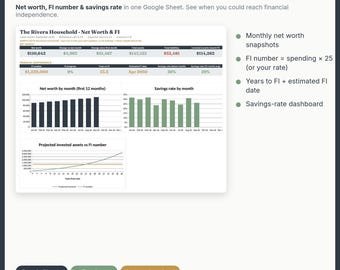
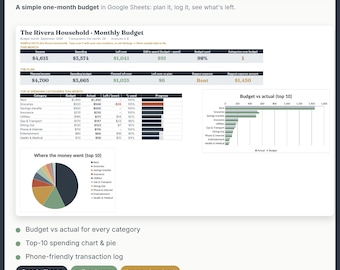
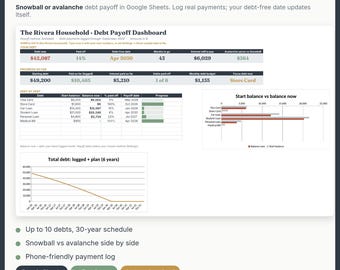
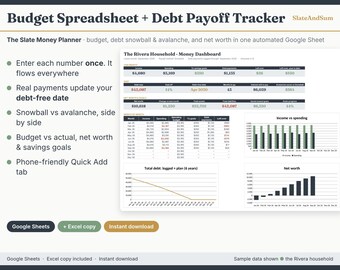

Automated Google Sheets for your money
Wszystkie produkty
Ogłoszenie
Data ostatniej aktualizacji 2 paź 2026
Informacje o sklepie SlateAndSumCo
Transakcje
0
Na Etsy od 2026
Regulamin sklepu
Data ostatniej aktualizacji 2 paź 2026
Produkty cyfrowe do pobrania
Pliki do natychmiastowego pobrania
Pliki będą dostępne do pobrania po potwierdzeniu płatności. Procedura.
Opcje płatności
Bezpieczne opcje
Akceptuje karty podarunkowe Etsy i bony Etsy
Etsy zapewnia bezpieczeństwo Twoich informacji o płatnościach. Sklepy Etsy nigdy nie otrzymują danych Twojej karty kredytowej.
Zwroty i wymiany produktów
Sprawdź szczegóły produktu, aby dowiedzieć się, czy kwalifikuje się on do zwrotu lub wymiany.
Anulowania
Anulowania: niezaakceptowane
Skontaktuj się ze sprzedawcą w razie problemów z zamówieniem.
Polityka prywatności
Więcej informacji
Data ostatniej aktualizacji
2 paź 2026
Często zadawane pytania
The link asks me to "Make a copy." Is that right?
After purchase, go to Etsy Purchases (or the email from Etsy) and select Download files. Open the PDF and select Make a copy (Google Sheets), then Make a copy: the sheet is saved in your own Google Drive. Your download also has two backup files (both .xlsx): import the GoogleSheets file at sheets.new (File → Import → Upload → Replace spreadsheet), or open the Excel file in Excel.
Do I need a Google account?
Yes. You need a free Google account (Gmail works) to make and save your copy in Google Sheets. You don't need to pay for anything else.
Does it work on my phone?
Yes. Every sheet is designed to read well in the free Google Sheets app, with summary views and charts that fit a phone screen. In The Slate Money Planner, use the Quick Add tab to log spending, payments, or balances on the go. For the one-time first step (making your copy), a computer or your phone's web browser works most reliably. After that, update your numbers from the app anywhere.
Does it work in Excel?
Yes, an Excel copy is included with every product. Your download includes the Excel .xlsx file (Excel 2019 or Microsoft 365). It's provided as-is: the sheets are built for Google Sheets, so some formulas, automation, charts, or formatting may not work in Excel. I can only offer support for the Google Sheets version. For the full automated experience, use Google Sheets (it's free).
The link asks me to "Make a copy." Is that right?
Yes. Select Make a copy. This creates your own private, editable version in your Google Drive. If you see "request access," sign in to Google (or try a private window) and select the link again. Backup: on a computer, go to sheets.new, choose File → Import → Upload, pick the GoogleSheets .xlsx file and choose Replace spreadsheet.
I lost my files. How do I get them again?
Go to Etsy You → Purchases, find the order, and select Download files. There's usually no limit on how many times you can download. Your copy of the sheet also stays in your Google Drive (search Drive for the sheet's name).
Can I customize it?
Yes. Your copy is yours to edit: rename budget categories, add accounts, debts, or income sources, and change the currency (Format → Number → Currency, or File → Settings → Locale). Tip: input cells are shaded light tan (brass) with a thin gold underline. Type only in those. Every white or grey cell is a formula and updates on its own, so the totals and charts stay right. To hide the sample household, set Settings → Show sample data to No in The Slate Money Planner.
Do you do custom versions?
Not at this time. The sheets are designed to be easy to customize yourself (see the question above).
Can I get a refund?
Digital downloads can't be returned or canceled. If something isn't working, or a sheet doesn't match the listing, message me and I'll fix it. If I can't, I'll refund you. For anything else, message me. I look at other refund requests case by case.
Can I share it with my partner?
Yes. Your license covers one household, so you can share your own copy with people you live with and track together (Share button in Google Sheets). Please don't share the purchase files outside your household. Friends can get their own copy in the shop. Bundles have the same terms.