























NowPrice:SGD 28.13
Original Price: SGD 36.06
22% off
Sale ends on 10 October
Real Estate CRM and Transaction Tracker Spreadsheet | Realtor Commission Calculator, Split and Cap, Closing Deadlines | Excel Google Sheets
Star Seller
Star Sellers have an outstanding track record for providing a great customer experience – they consistently earned 5-star reviews, dispatched orders on time, and replied quickly to any messages they received.
You can only make an offer when buying a single item.
Star Seller. This seller consistently earned 5-star reviews, dispatched on time, and replied quickly to any messages they received.
Highlights
The Real Estate Agent Transaction + Commission Tracker is a ten-tab Excel and Google Sheets workbook for a licensed real estate agent, for working out what a closing actually pays after the brokerage split, the cap and the fees, and for keeping every deal, contingency date and client in one file. One workbook (.xlsx) in four color editions, for Excel or Google Sheets. Instant download.
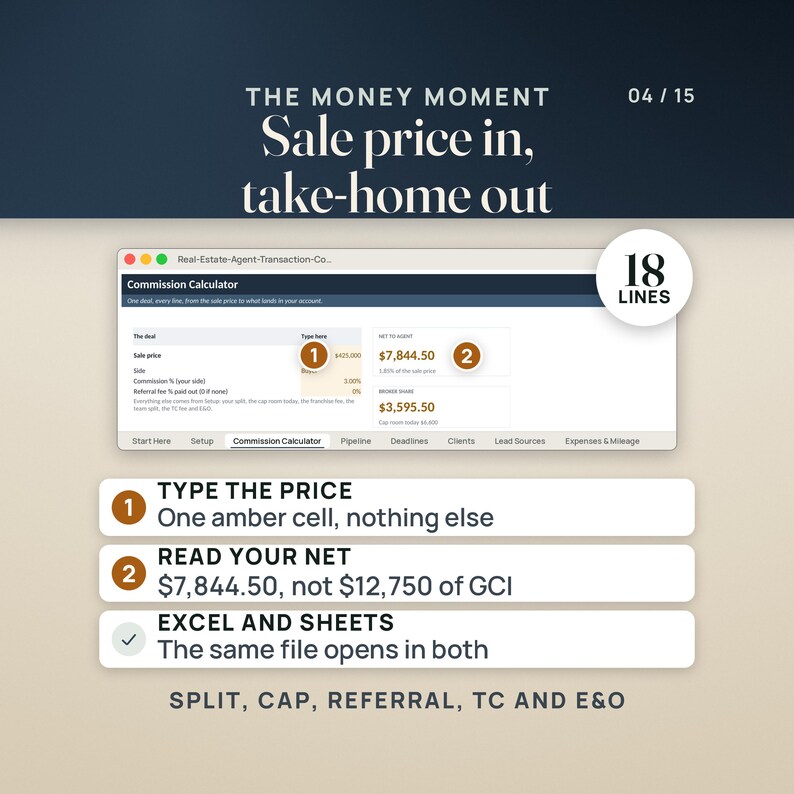
You know the sale price and you know your side of the commission. What you do not know, until the disbursement comes back, is what lands in your account. The sample this file opens with is an agent on a 70/30 split with an $18,000 annual cap: a $425,000 sale at 3% is $12,750 of gross commission, and after a $765 franchise fee, a $3,595.50 broker share, a $395 transaction coordinator fee and $150 of E&O, she keeps $7,844.50. That is 1.85% of the sale price, and every line between the two figures is on the same screen. Type $450,000 instead and the net reads $8,338.00, still 1.85%.
Type your deals into the amber cells in Excel on a laptop, upload the same file to Google Sheets and read the tiles on your phone between showings, or print the Deadlines tab and carry the week's dates with you.
————————————————————
📦 WHAT'S INCLUDED (6 FILES)
————————————————————
01. Real-Estate-Agent-Transaction-Commission-Tracker.xlsx (the Colorful edition)
The workbook: ten tabs, fifty deal rows, eighty CRM rows, two hundred expense rows, 2,088 formulas. Open this one first.
02. Real-Estate-Agent-Transaction-Commission-Tracker-Editorial.xlsx
The same workbook, cell for cell, in a quieter editorial palette.
03. Real-Estate-Agent-Transaction-Commission-Tracker-Light.xlsx
The same workbook again, light, inside Real-Estate-Agent-Transaction-Commission-Tracker-3color.zip.
04. Real-Estate-Agent-Transaction-Commission-Tracker-Dark.xlsx
The same workbook again, dark, also inside the 3color zip.
05. QUICK-START-Real-Estate-Agent-Transaction-Tracker.pdf
Two pages: the four things to do first, what every tab holds, and the honest warnings.
06. START-HERE.txt
The one-screen version, in plain text.
————————————————————
📑 THE TEN TABS
————————————————————
Start Here: what the file does, the four first steps, and where every number comes from.
Setup: your split, your annual cap and the date the cap year starts, what you have already paid toward it, the franchise or royalty percentage, the transaction coordinator fee, the E&O fee per closed deal, your team split, the mileage rate, the deadline window and a typed as-of date, beside a cap status block that names the closing date you cap on.
Commission Calculator: four amber cells (sale price, side, commission percentage, referral percentage paid out) and the eighteen-line walk from the sale price down to net to agent, the effective percentage of the sale price, the cap room left afterward and what the brokerage keeps in total, with NET TO AGENT and BROKER SHARE as tiles beside the price.
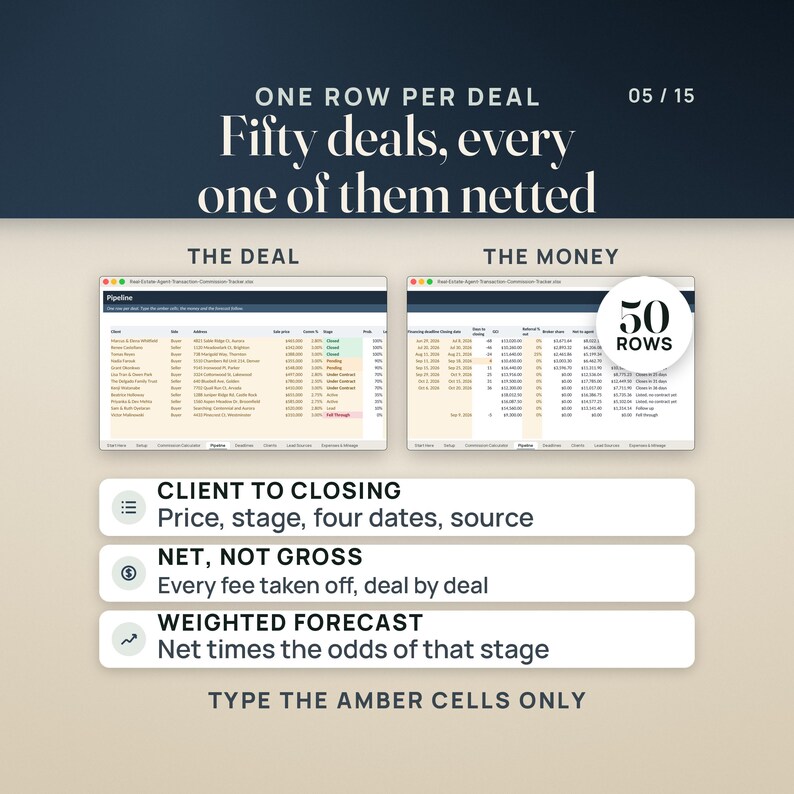
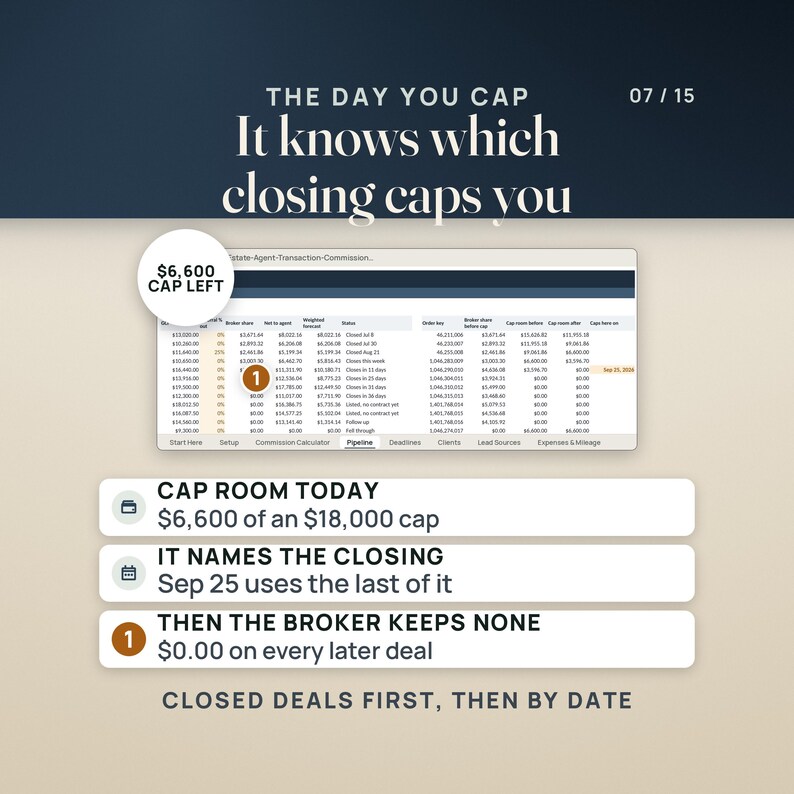
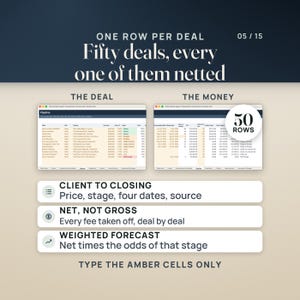
Pipeline: fifty deal rows with client, side, address, price, commission percentage, stage, probability, lead source, the contract, inspection, appraisal, financing and closing dates, days to closing, gross commission, referral out, broker share, net to agent, a probability-weighted forecast, a plain-English status, and a five-column cap engine that charges each deal in closing order.
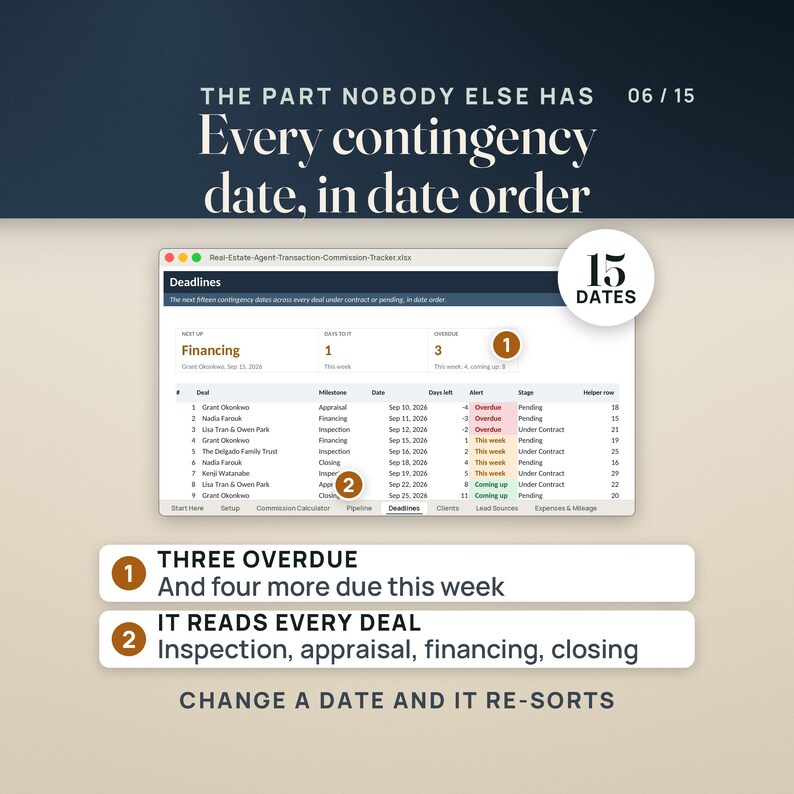
Deadlines: three tiles (overdue, this week, coming up) over the next fifteen contingency dates across the whole pipeline in date order, each with the days left and an alert, read from a two-hundred-line block of fifty deals by four milestones.
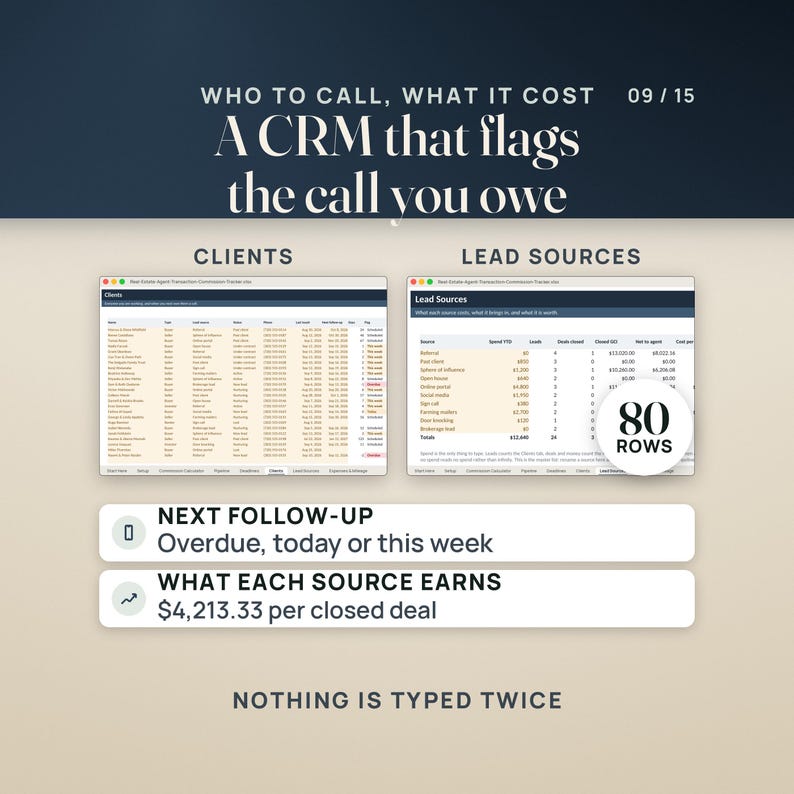
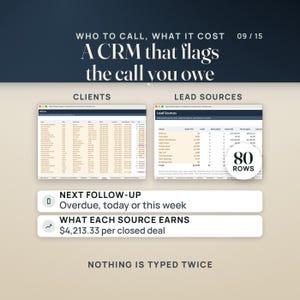
Clients: eighty CRM rows with client type, lead source, status, phone, the last touch, the next follow-up, the days until it is due and a flag when it is late.
Lead Sources: ten sources with spend, leads, deals closed, closed commission, net to agent, cost per lead, cost per closed deal, return on spend, and the open weighted pipeline each source is carrying.
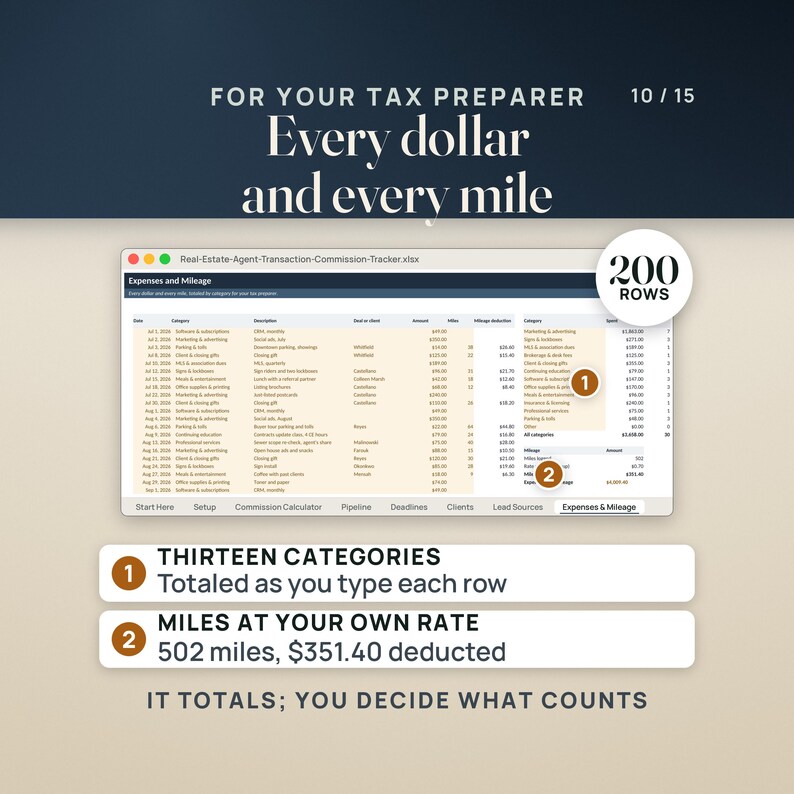
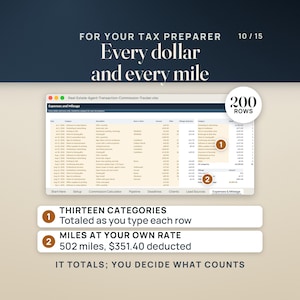
Expenses & Mileage: two hundred rows across thirteen categories, with miles and the mileage deduction, and a block that adds the expenses and the mileage together.
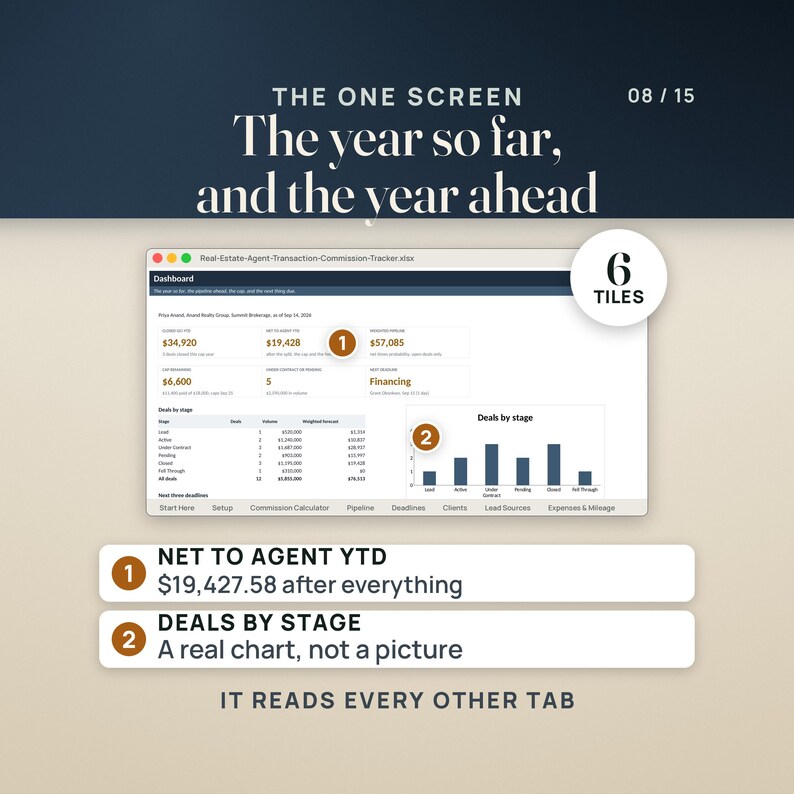
Dashboard: six tiles, deals by stage with a bar chart, the next three deadlines, and eight business measures.
Help: the money chain explained line by line, ten questions answered, and the named ranges the formulas use.
————————————————————
👤 WHO THIS IS FOR
————————————————————
A licensed agent on a split with a cap who wants to know what a closing actually pays after the brokerage, the franchise fee, the coordinator and E&O, and which closing takes the last of the cap room.
An agent running five or ten deals at once whose inspection, appraisal, financing and closing dates live in four different places, who wants one list that says what is overdue, what is due this week and what is coming up.
An agent who already keeps the business in a spreadsheet and wants the pipeline, the client list, lead source spend and the mileage log in the same file as the commission math, with no subscription and no account.
————————————————————
🚫 WHO THIS IS NOT FOR
————————————————————
Anyone who wants software that connects to the MLS or a brokerage transaction system and updates itself, or that emails clients for them. This is a spreadsheet: you type the deals, it does the arithmetic.
Anyone who needs tax, legal or brokerage advice, or a file that already knows their brokerage's fee schedule. Every split, cap and fee in here is a cell you type over the sample.
————————————————————
✅ KEY BENEFITS
————————————————————
The whole commission chain on one screen: eighteen lines from the sale price to what the brokerage keeps, through gross commission, the referral fee paid out, the franchise or royalty fee, the broker split charged against your cap, the team split, the transaction coordinator fee and E&O, ending at net to agent and the effective percentage of the sale price.
A cap that actually binds. The sample's $18,000 cap holds $15,626.82 of room once what was already paid this year is counted, the three closed deals use $9,026.82 of that, $6,600 is left, and the file names the Sep 25 closing that takes the last of it. Every deal that closes after that one shows a broker share of $0.00.
A deadline calendar that reads every contingency date in the pipeline: fifty deals by four milestones (inspection, appraisal, financing, closing), sorted into overdue, due this week and coming up. The sample has seventeen dates inside the window and lists the next fifteen: 3 overdue, 4 this week, 8 coming up.
Pipeline, client list and lead source spend in the same file: fifty deal rows with a probability-weighted forecast by stage, eighty client rows with a next follow-up date and a flag when it is late, ten sources costed down to cost per closed deal and return on spend, and two hundred expense rows with the mileage deduction.
2,088 formulas in every edition, recalculated with zero errors, and the same file opens in Excel 2016 or later and in Google Sheets. No macros, no subscription, no account, nothing to install.
————————————————————
🔧 HOW IT WORKS
————————————————————
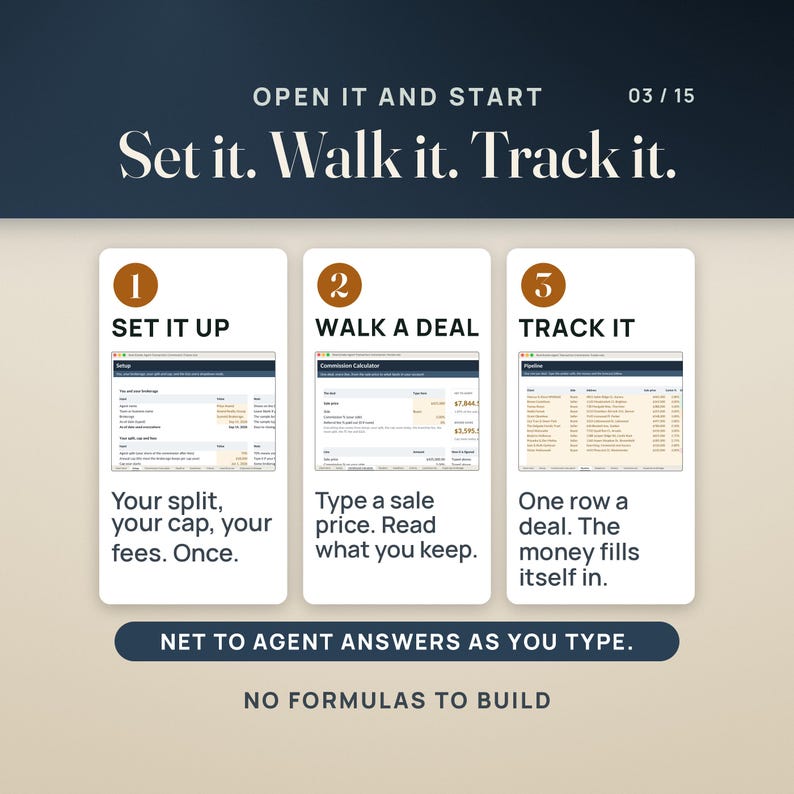
1. Open Setup and type your own terms over the sample: your split, your annual cap and the date your cap year starts, what you have already paid toward the cap, the franchise or royalty percentage, the transaction coordinator fee and the E&O fee per closed deal, your team split and the IRS mileage rate. Type 0 for anything you do not pay.
2. Walk one deal on the Commission Calculator. The sample agent (Priya Anand of Anand Realty Group at Summit Brokerage, both invented for the example) is on a 70/30 split with an $18,000 cap and twelve deals: a $425,000 sale at 3% on the buyer side is $12,750 of gross commission, less $765 of franchise fee, less a $3,595.50 broker share, less the $395 coordinator fee and $150 of E&O, which leaves $7,844.50 net to the agent, 1.85% of the sale price. Type $450,000 instead and it reads $13,500 gross, $810 of franchise fee, a $3,807.00 broker share and $8,338.00 net, still 1.85%.
3. Type your deals on Pipeline with their contract, inspection, appraisal, financing and closing dates. Deadlines lists the next fifteen dates across the whole pipeline in date order with the days left on each, the cap engine charges every deal in closing order so the broker share stops when you cap, and the Dashboard reads the closed commission, the net to agent, the weighted pipeline and the cap remaining.
————————————————————
❓ QUESTIONS BUYERS ASK
————————————————————
What format is this? One workbook (.xlsx) in four color editions, Colorful, Editorial, Light and Dark, plus a two-page quick-start PDF and a plain-text START-HERE file. You get a zip file to download the moment payment clears.
What do I need to open it? Excel 2016 or later, or Google Sheets (File, Import, Upload, then Replace spreadsheet), on a computer or through the Excel or Sheets app on a phone or tablet. It was tested in LibreOffice Calc as well; Apple Numbers opens it but drops some of the formatting, so Excel or Sheets is the better home. There are no macros and nothing to install. Every formula ships with its value saved, so the sample shows up in protected view, in the Sheets preview and on a phone instead of blanks.
What does it compute? Net to agent on one deal, line by line: gross commission, the referral fee out, the franchise or royalty fee, the broker split limited by the cap room you have left, the team split, the coordinator fee, E&O, and the effective percentage of the sale price. Across the pipeline it computes the broker share deal by deal in closing order, the cap room before and after each one and the closing date you cap on, the days to closing and a status for every deal, a probability-weighted forecast by stage, every contingency date sorted into overdue, this week and coming up, the days until each client follow-up, cost per lead and cost per closed deal and return on spend for each source, and the expense total by category with the mileage deduction.
Is this tax or legal advice, and will it match my brokerage exactly? No, and not on its own. It is a tracker doing arithmetic on the numbers you type. Every brokerage writes its own split, cap and fee schedule, and yours comes from your independent contractor agreement, not from this file. The cap here is a per-deal simplification, so check one closed deal against your own commission disbursement authorization before you quote a number to anyone.
————————————————————
⚠️ PLEASE READ
————————————————————
This is a tracker, not tax, legal or brokerage advice. Nothing in it tells you what to charge, what to deduct or what your brokerage owes you.
Every brokerage writes its own split, cap and fee schedule. Yours is set by your independent contractor agreement, and every one of those terms is a cell you type over the sample.
The cap logic is a per-deal simplification: one annual cap, charged deal by deal in closing order, closed deals first. Real brokerages add things this file has no cell for, such as a post-cap transaction fee, a monthly desk fee that also counts toward the cap, a company dollar minimum, or a split that steps up partway through the year. Check one closed deal against your own commission disbursement authorization before you trust the file, and fold anything left over into the paid-toward-the-cap figure on Setup or into Expenses & Mileage.
The Commission Calculator and the Pipeline are meant to disagree on the same deal. The calculator assumes the deal you are typing closes next, so it uses the cap room you have today; the Pipeline puts that deal in closing order behind everything that closes first. Both answers are right to different questions, and the Help tab says so.
Deadlines lists only deals at Under Contract or Pending, and only four milestones: inspection, appraisal, financing and closing. A date that has just passed stays on the list marked Overdue until it falls outside the window you set on Setup.
Two deals closing the same day are charged against the cap top to bottom as they sit on the Pipeline, and a deal with no closing date is assumed to close last. If the true order matters, type the rows in closing order.
The Pipeline totals row is a raw column sum, so its commission total includes leads and any deal that fell through. The Dashboard's closed commission and net to agent are the figures to quote.
Expenses & Mileage totals what you spent; it does not decide what is deductible. Meals are usually only partly deductible and some categories are not deductible at all. Re-check the IRS standard mileage rate each January and retype it on Setup.
One cap year and one agent per file. Start a fresh copy when your cap year rolls over.
Fifty deals, eighty clients, two hundred expense rows and fifteen listed deadlines are the limits. The four color editions are separate files, so a deal typed into the Light copy does not appear in the Dark one.
Priya Anand, Anand Realty Group, Summit Brokerage, and every client name, address and figure in the sample were invented for the example. None of them are real.
————————————————————
📥 INSTANT DOWNLOAD
————————————————————
Your files are available the moment your payment clears. Nothing is shipped.
Start with the quick-start guide: the four things to do first and what every tab holds.
🎬 WATCH THE FULL WALKTHROUGH before you buy — seven minutes, every tab of the real workbook:
https://youtu.be/WyagqWhSAV0
Questions? Send a message. I read and answer them myself.
Instant Download
Your files will be available to download once payment is confirmed. Here's how.
Instant download items don’t accept returns, exchanges or cancellations. Please contact the seller about any problems with your order.
Etsy Purchase Protection
Shop confidently on Etsy knowing if something goes wrong with an order, we've got your back for all eligible purchases —
see programme terms

Be the first to review this item

Speedy replies Has a history of replying to messages quickly.
Rave reviews Average review rating is 4.8 or higher.
More from this shop
Visit shop-

Digital download
Real Estate Deal Analyzer Dashboard App Investment Property Calculator for Any Browser Rental BRRRR & Fix and Flip ROI Tool
Sale Price SGD 52.94
Original Price SGD 67.86
-

Digital download
Real Estate Investment Deal Analyzer Spreadsheet Rental Property BRRRR & Fix and Flip Calculator Excel and Google Sheets
Sale Price SGD 28.12
Original Price SGD 36.06
-

Digital download
Paycheck Budget Spreadsheet Budget by Paycheck Planner for Excel and Google Sheets Biweekly Bills Sinking Funds and Savings
Sale Price SGD 14.61
Original Price SGD 18.73
-

Digital download
Trucking Owner Operator Bookkeeping Spreadsheet Excel and Google Sheets Cost Per Mile IFTA Load Profit Tracker Schedule C Tax Template
Sale Price SGD 16.86
Original Price SGD 21.62