




Cozy Winter Ice Skating Chat Overlay & Snowman Sub Goal Widget for Twitch, Kick, YouTube | StreamElements | Streamlabs (Digital Download)
Puntos destacables del artículo
Descripción del vendedor
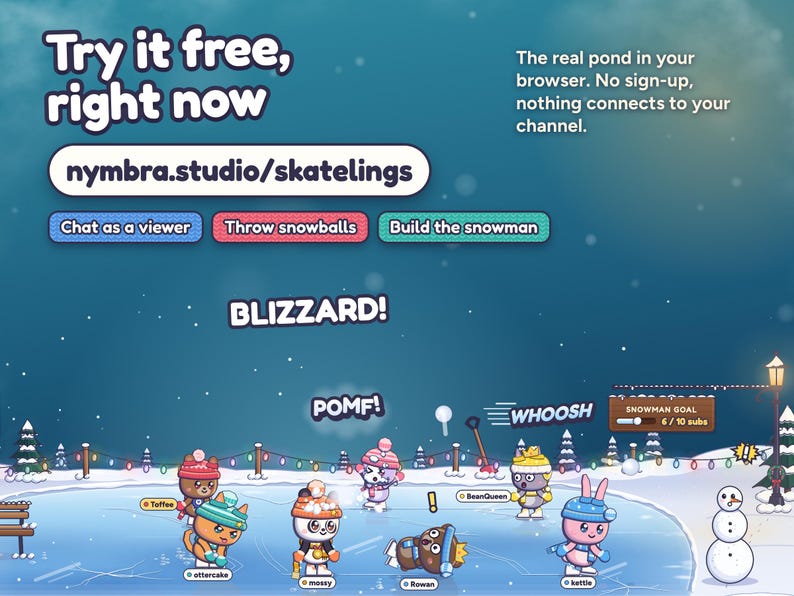
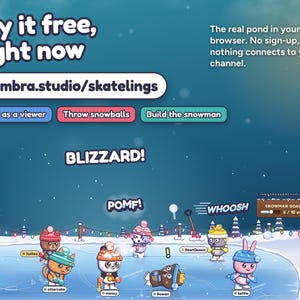
TRY IT FIRST: play with the live demo at nymbra.studio/skatelings. Chat as a viewer, throw snowballs, fire alerts and build the snowman, right in your browser. No sign-up, nothing connects to your channel.
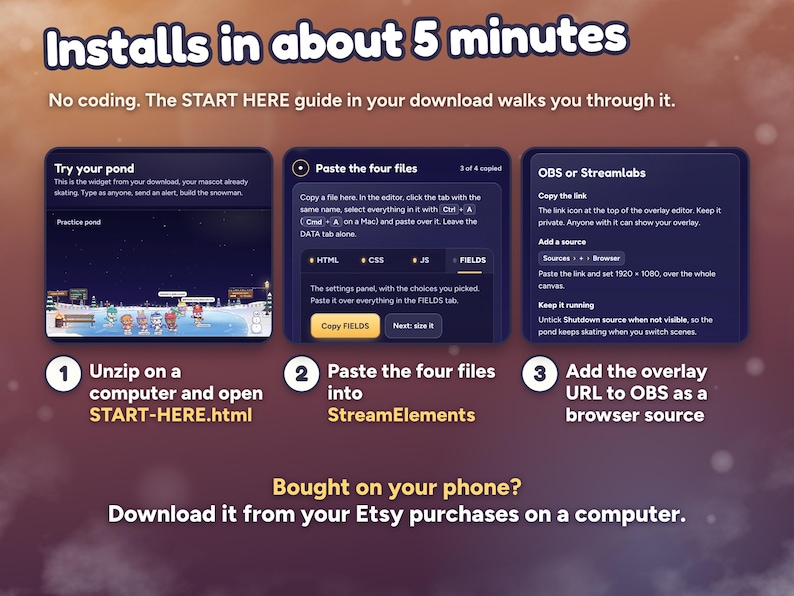
Installs in about 5 minutes with the START HERE guide, no coding. Bought on your phone? Download from your Etsy purchases on a computer; installing needs one.
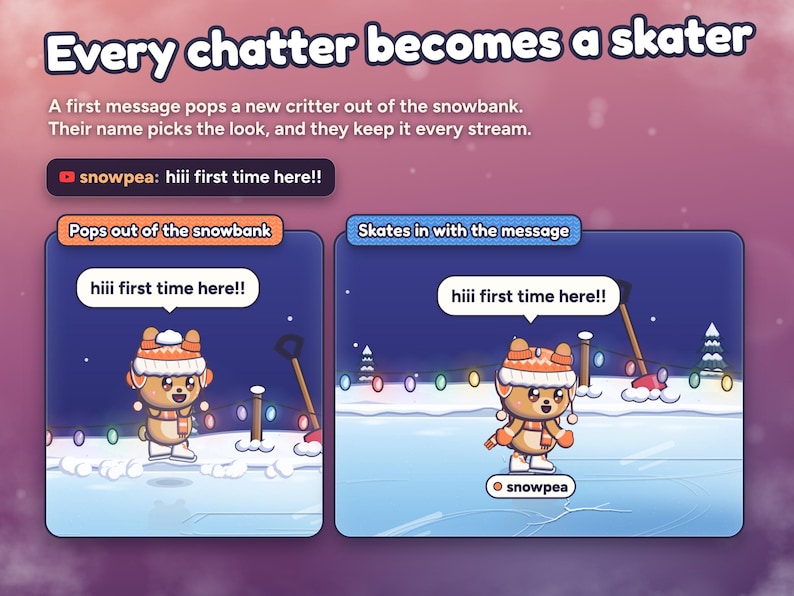
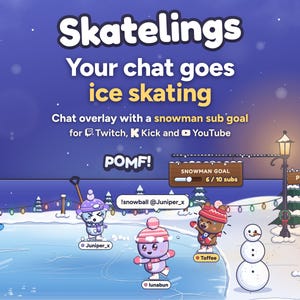
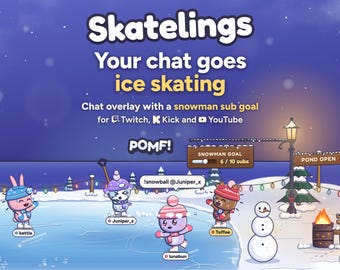
Your chat goes ice skating. Everyone who chats pops out of the snowbank as a cute little critter in a knit hat and skates on a cozy frozen pond along the bottom of your stream. Friends hold hands, !snowball starts a snowball fight, and regulars skate back in their own look every stream.
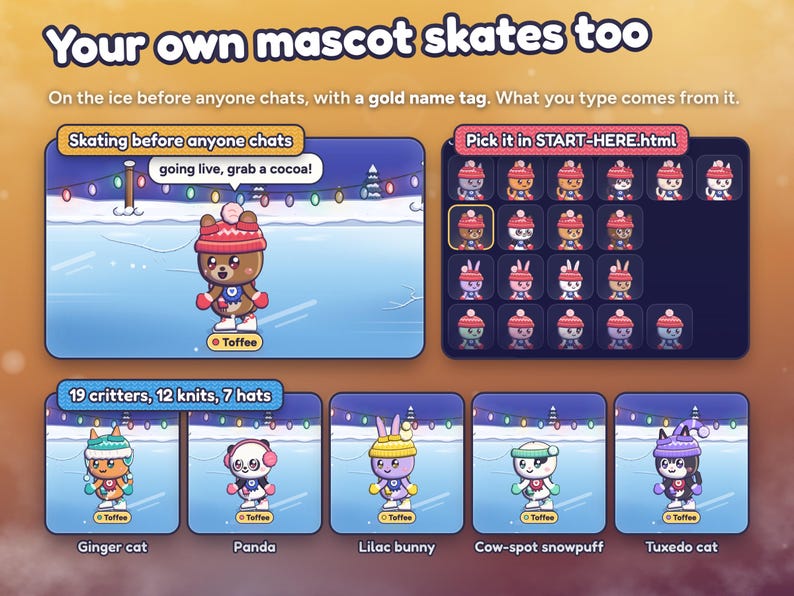
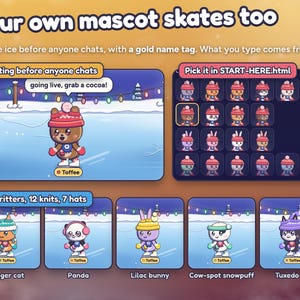
Your own mascot hosts the pond. It skates from the very first frame, so the ice is never empty, even before anyone chats. Your chat messages come from it, viewers can @ you to hold its hand, and it waves at newcomers, cheers your alerts and holds up the 10 when someone subs. Before you paste, pick its critter (19 of them: cats, bears, a panda, bunnies and round snowpuffs), its knit colour, its hat and its name. Change it any time in the settings.
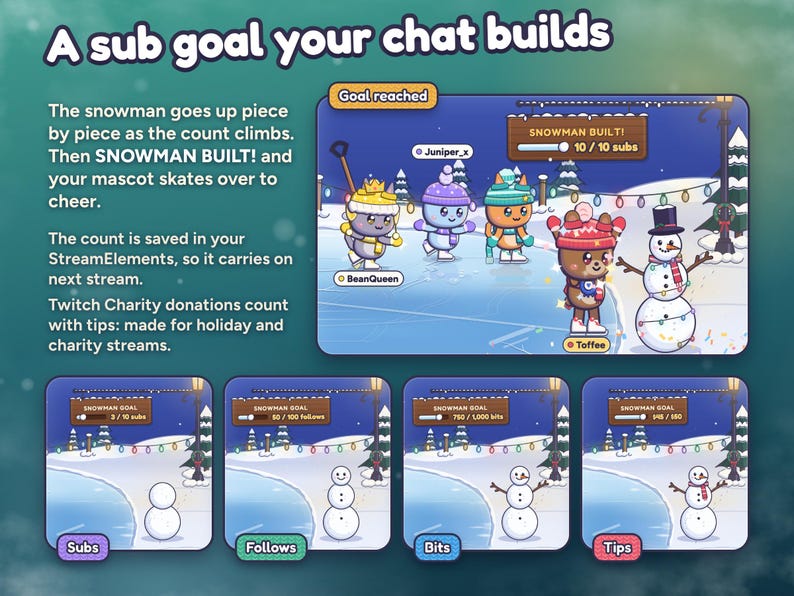
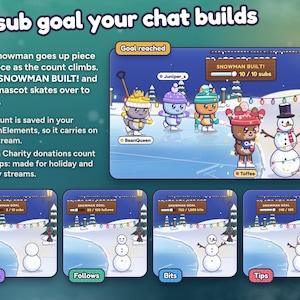
And your sub goal is a snowman your whole chat builds together. It goes up piece by piece as the subs come in, from the first snowball to the top hat, and at your target it's SNOWMAN BUILT! with your mascot cheering beside it. Rather count follows, bits or tips? Pick one in the settings. The count carries on from stream to stream, and Twitch Charity donations count with tips, so it fits holiday and charity streams.
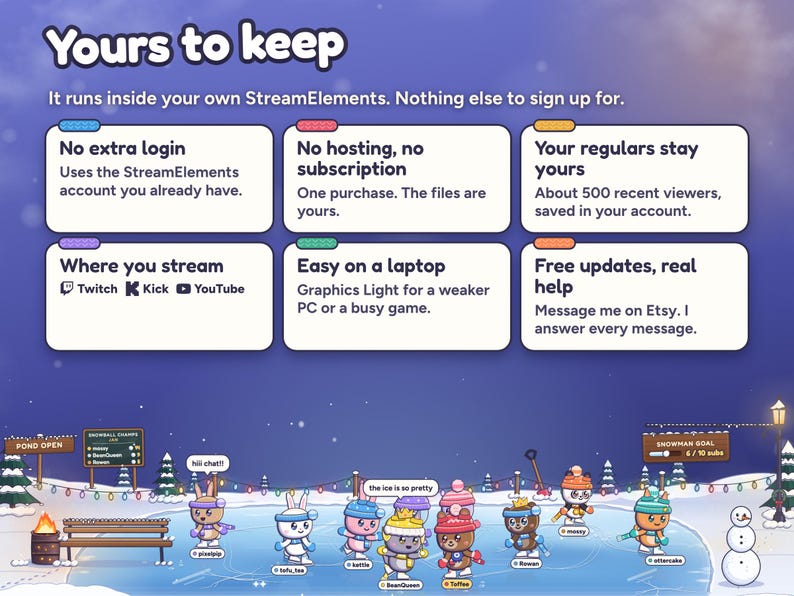
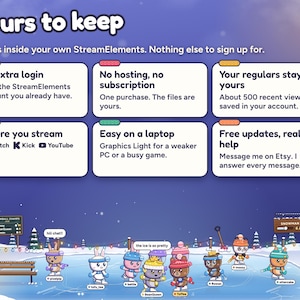
No extra login, no hosting, no subscription. It runs in your own StreamElements account and remembers your regulars there.
YOUR MASCOT
• Always on the ice: from the first frame, in the StreamElements editor and on your BRB screen, with a rosette and a gold name tag so viewers know it's yours.
• Make it yours in START-HERE.html before you paste, or later in the settings: 19 critters (six cats, four bears including a panda, four bunnies and five snowpuffs), 12 knit colours for its hat, scarf and mittens, 7 hats, and a name (leave it blank for your channel name). Or pick No mascot.
• Your chat is its chat: your own messages and commands come from your mascot, never from a second skater.
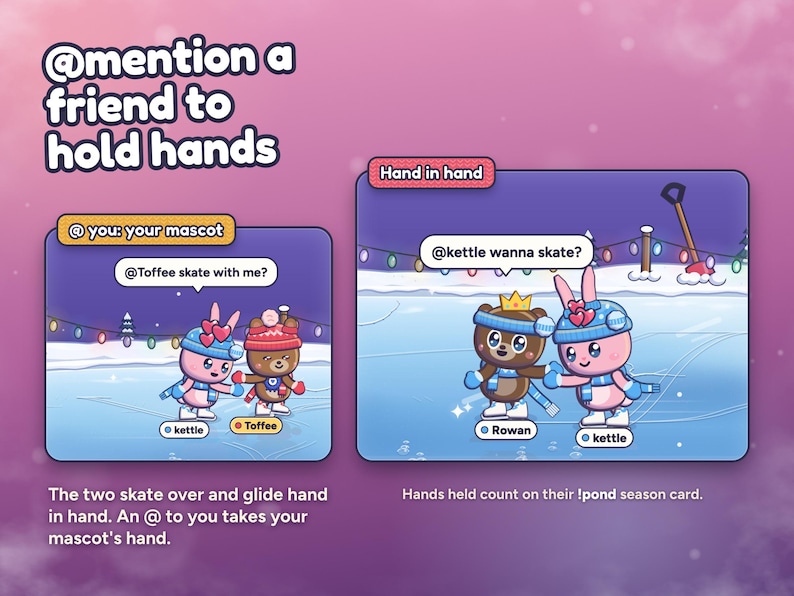
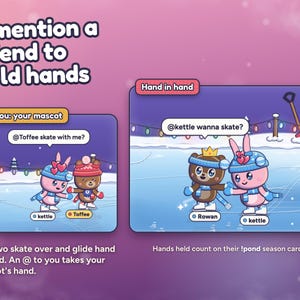
• Viewers who @ your channel name, @streamer or your mascot's name skate over and hold its hand.
• On its own: a little spin or a long glide every minute or so, a wave for newcomers, a cheer for alerts, the 10 as head judge at a sub's axel, a welcome for raiders and a cheer beside the finished snowman. At !goodnight it's tucked in last, closest to the fire.
• It never counts toward Most skaters on the ice and never skates off to make room.
THE SNOWMAN GOAL
• Pick what builds it: subs and memberships, follows, bits or tips, with any target from 1 to 1,000,000 (10 subs to start). Or pick Nothing and the snowman just stands by the pond.
• A wooden plaque shows the count (6 / 10 subs) while the snowman goes up in eight steps: three snowballs, a face, a carrot nose, stick arms, a scarf and, last, the top hat.
• At your target: SNOWMAN BUILT!, confetti, string lights around the snowman, everyone on the ice turns to cheer, and your mascot skates over to cheer beside it.
• The count is saved in your StreamElements, so it carries on next stream. Start a new snowman sets it back to zero.
• A gift of five subs adds five. Kick subs and YouTube memberships count as subs, a YouTube subscribe counts as a follow, and Super Chats and Twitch Charity donations count with tips. Test alerts in the StreamElements editor are never saved to the count.
WHAT HAPPENS ON YOUR POND
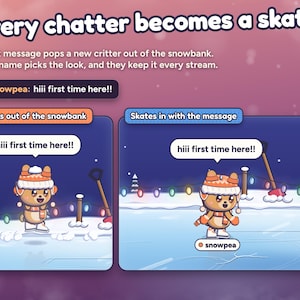
• Chat: a first message pops a skater out of the snowbank. Their name picks the critter (cats, bunnies, bears, pandas and more), the coat and the knit, so they look the same every stream. Messages show in chat bubbles.
• @mentions: mention someone on the ice and the two skate over and hold hands for about half a minute. An @ to you takes your mascot's hand.
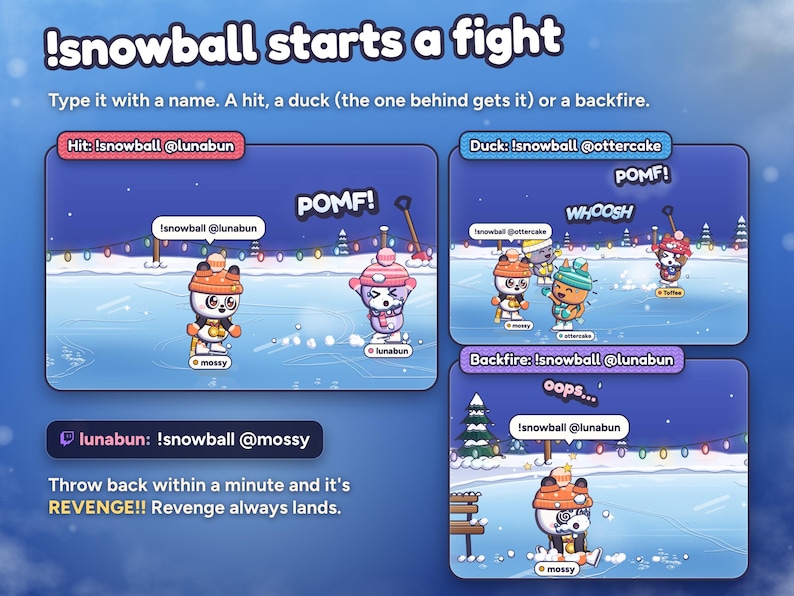
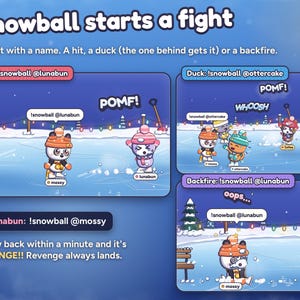
• Snowball fights: !snowball @name winds up and throws. It's a hit (POMF!), a duck that hits whoever is behind (WHOOSH), or a backfire (oops). Revenge within a minute always lands. Plain !snowball picks someone on the ice. Give your mascot a name of its own and chat can throw at it too.
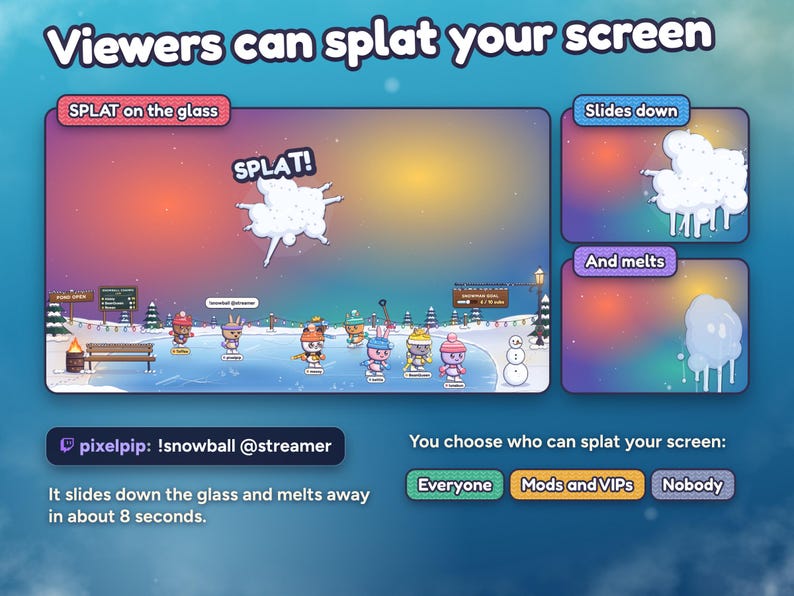
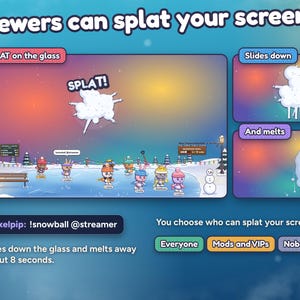
• Your screen: !snowball @streamer (or your channel name) is thrown at the stream glass, since you sit behind it: SPLAT!, and the snow slides down and melts. You choose who can: everyone, mods and VIPs, or nobody. With your mascot on, a throw that can't splat goes across the ice at your mascot instead.
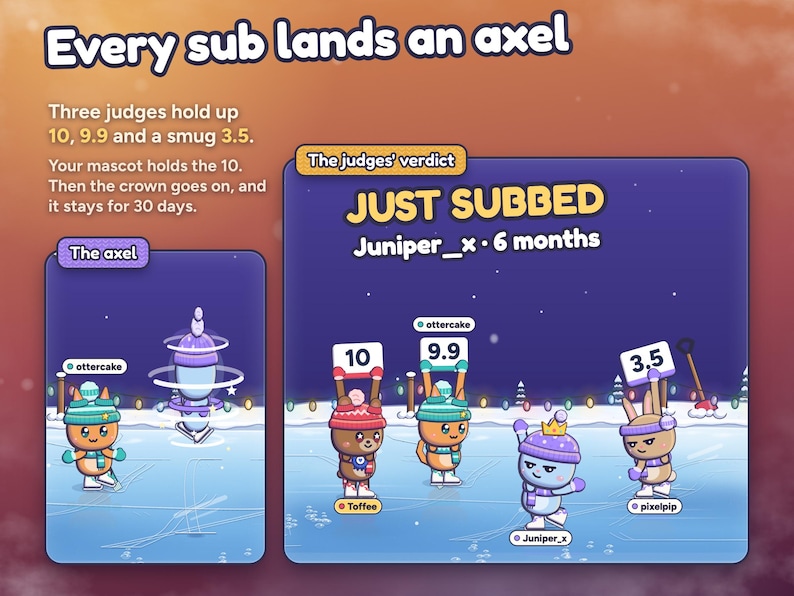
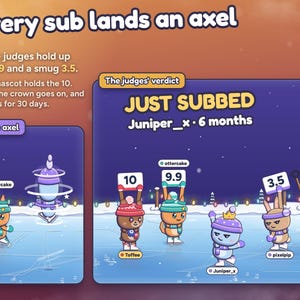
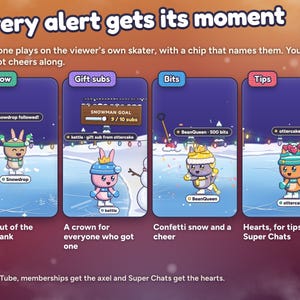
• Subs, resubs and memberships: an axel for three judges (10, 9.9 and a smug 3.5, with your mascot holding the 10) and a crown for 30 days.
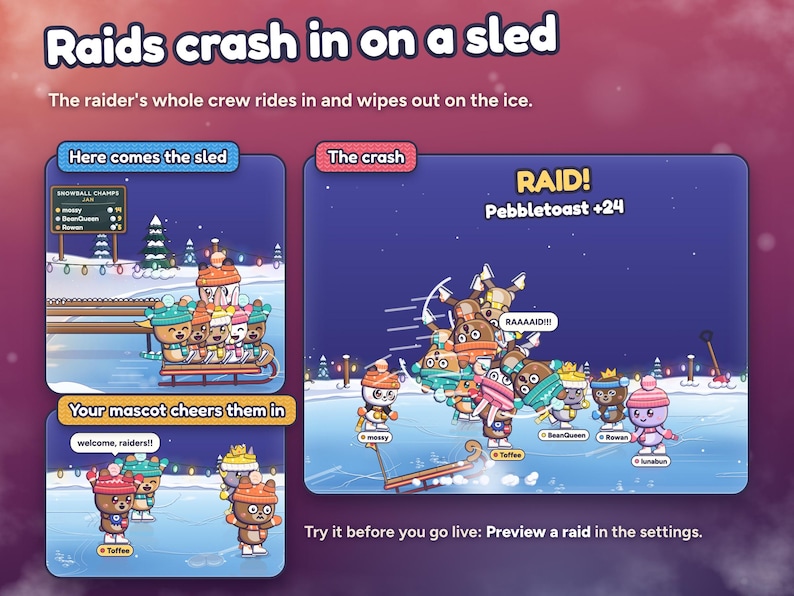
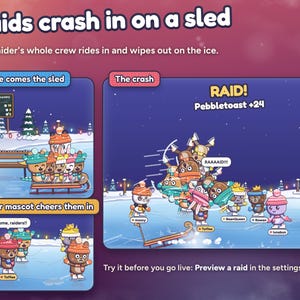
• Raids: a sled full of raiders crashes onto the ice, and your mascot welcomes them in.
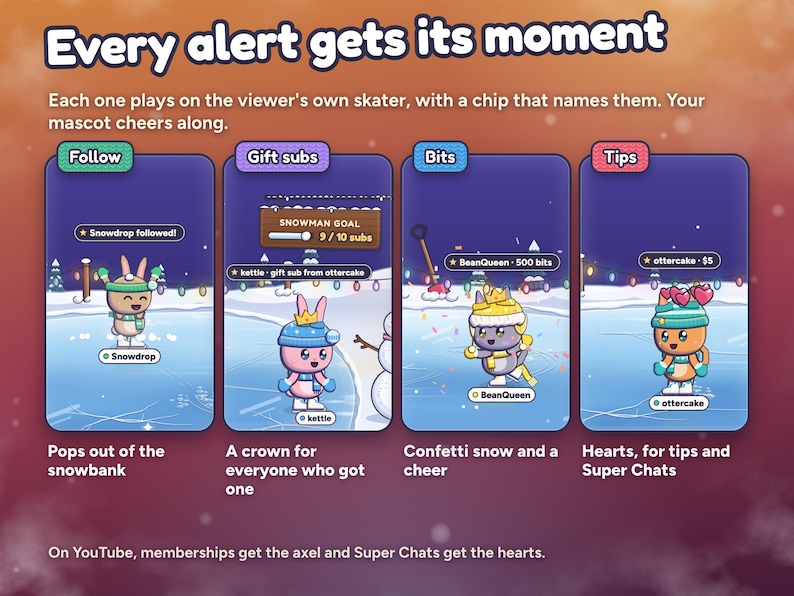
• Follows: a new skater pops out of the snowbank with sparkles.
• Gift subs: the gifter's axel, then crowns for the skaters who got one.
• Bits: confetti snow and a cheer. Tips, Super Chats and Twitch Charity: hearts and a cheer, with the amount over their head.
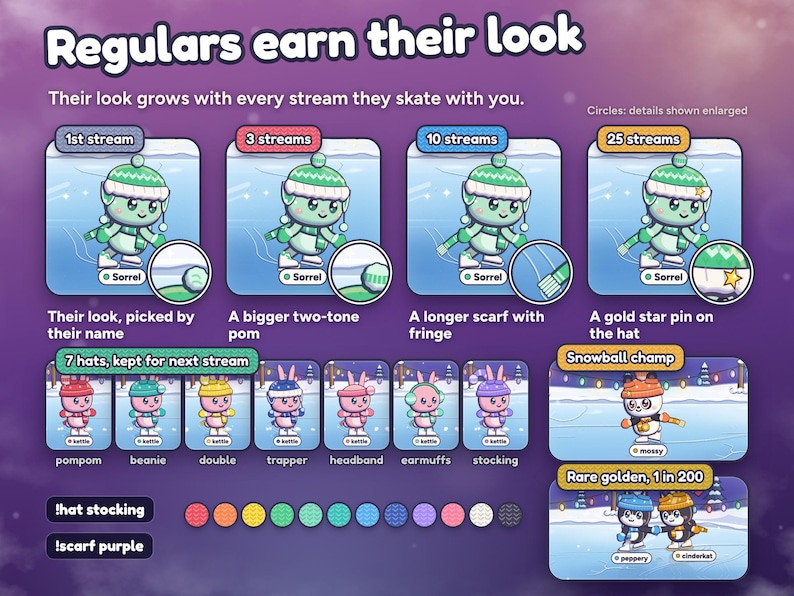
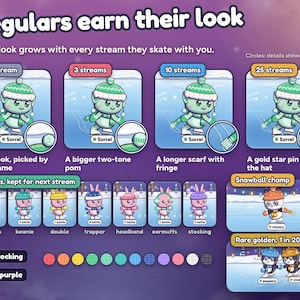
• Regulars: a bigger pom after 3 streams, a longer scarf after 10 and a gold star pin after 25. This month's snowball champ wears a gold scarf, the champs board shows the top three, and about 1 in 200 new skaters is golden.
• Outfits: !scarf in 12 colours and !hat in 7 styles, kept for next stream.
• Season card: !pond shows a viewer's streams on the ice, snowballs landed and hands held.
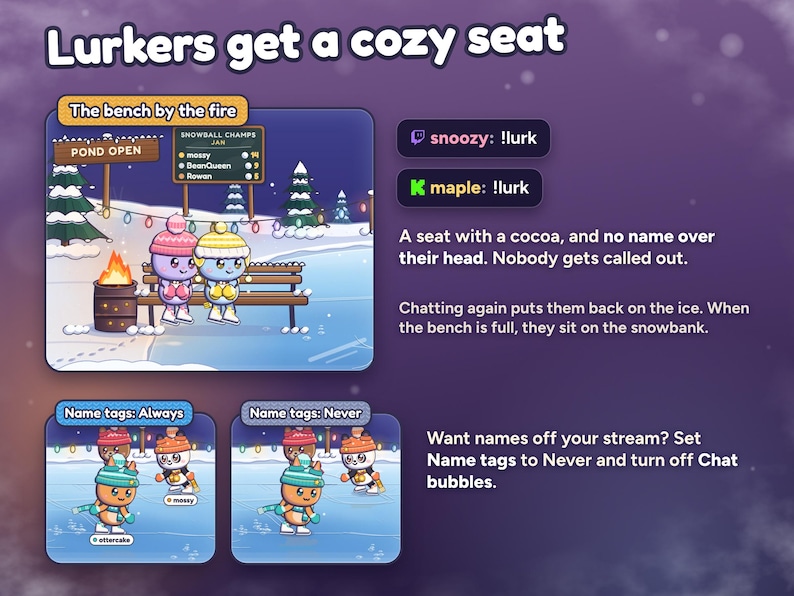
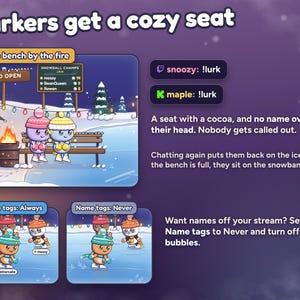
• Lurkers: !lurk takes a seat on the bench with a cocoa, or on the snowbank when the bench is full. Nothing names them, and chatting again puts them back on the ice.
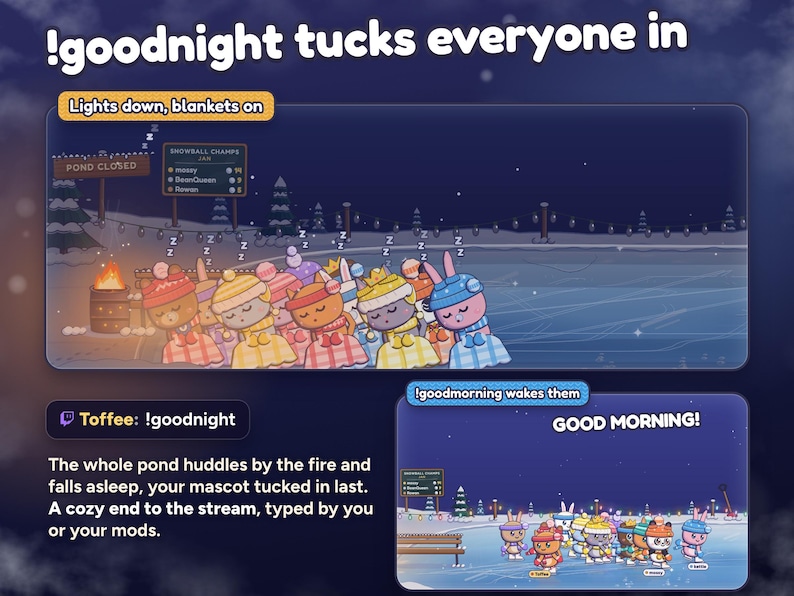
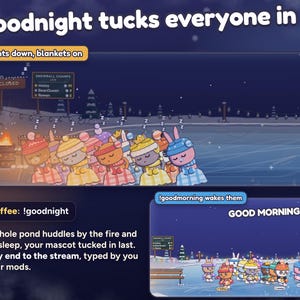
• Goodnight: the lights go down and everyone huddles by the fire under blankets, your mascot tucked in last.
COMMANDS, BY WHO TYPES THEM
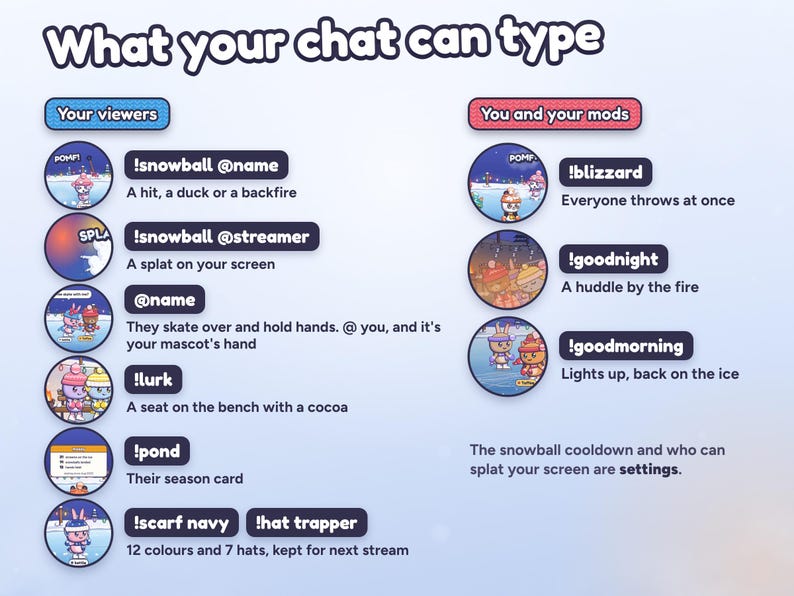
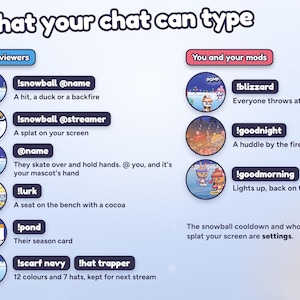
Your viewers: !snowball @name, !snowball @streamer, !lurk, !pond, !scarf red, !hat trapper, any @mention of someone on the ice, and @streamer to hold your mascot's hand.
You and your mods: !blizzard (everyone on the ice joins a snowball fight), !goodnight and !goodmorning. When you type, your mascot says it.
MAKE IT YOURS
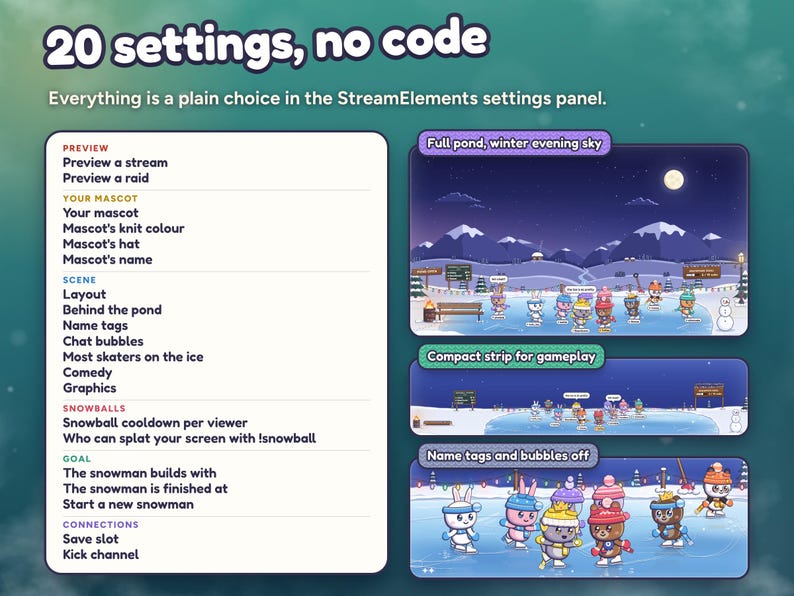
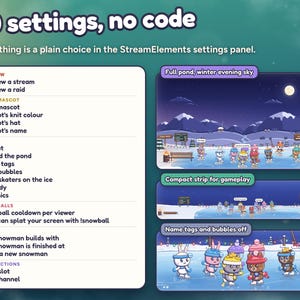
20 settings, in plain words, in the widget's settings panel:
• Preview a stream and Preview a raid buttons, to see it all before you go live
• Your mascot: its critter (or No mascot), knit colour, hat and name
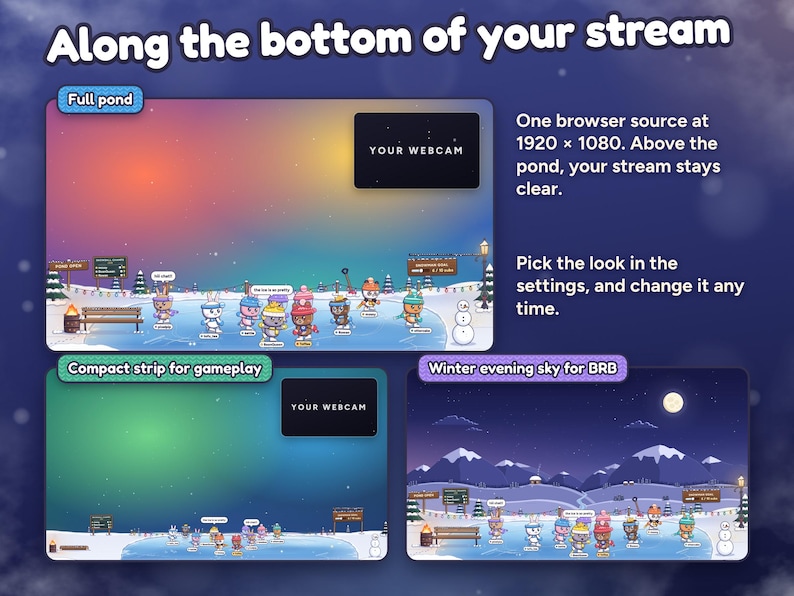
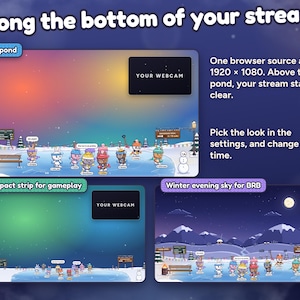
• Layout: the full pond, or a compact strip for gameplay
• Behind the pond: transparent, or a winter evening sky (a moon, snowy mountains and a log cabin) for starting and BRB screens
• Name tags: always, only while chatting, or never. Chat bubbles on or off
• Most skaters on the ice, and comedy (random slips and bonks): lively, calm or off
• Graphics: Full, or Light for a weaker PC
• Snowball cooldown per viewer, and who can splat your screen
• What builds the snowman, its target, and a button to start a new one
• Save slot and Kick channel
Viewers choose their own scarf and hat with !scarf and !hat; their name picks the rest of the look.
SETUP AND DOWNLOAD
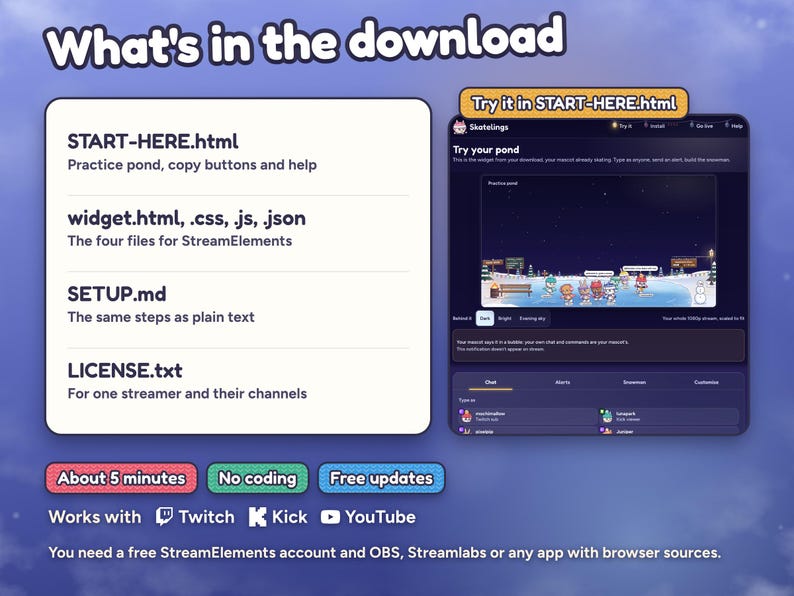
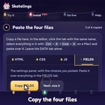
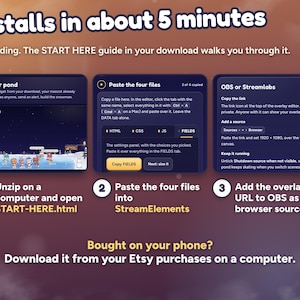
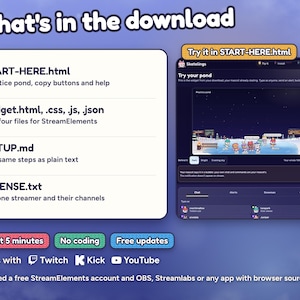
Unzip the download on your computer and open START-HERE.html first. Its practice pond shows your whole 1080p stream with your mascot already skating, so you see where the pond sits before you install, and you can pick your mascot there. Then use its copy buttons to paste HTML, CSS, JS and FIELDS into a StreamElements custom widget, size it to the whole 1920 × 1080 screen and add the overlay link to OBS or Streamlabs as a browser source. About 5 minutes in all, and no coding needed.
Your ZIP includes START-HERE.html, widget.html, widget.css, widget.js, widget.json, SETUP.md and LICENSE.txt. The guide holds the working practice pond, the copy buttons and help. One-time purchase, no subscription, free updates.
WHAT YOU NEED
A free StreamElements account and OBS Studio, Streamlabs Desktop or any streaming software with browser sources. A 1920 × 1080 overlay: the pond sits along the bottom and the rest stays see-through.
• Twitch: works as soon as the files are pasted.
• Kick: type your channel name in the Kick channel setting, or leave it blank if you signed in to StreamElements with Kick. Twitch and Kick chat skate on one pond.
• YouTube: use StreamElements signed in with your YouTube channel. Memberships count as subs; a YouTube subscribe counts as a follow.
FAQ
Does it remember regulars?
Yes. Your save slot keeps about 500 recent viewers in your own StreamElements account: their look and outfit, streams on the ice, snowballs and hands held. A viewer back after six quiet hours counts a new stream. The pond fills as people chat, and regulars skate back in their own look.
How many skaters fit on the ice?
3 to 30 on the full pond (24 by default), and up to 20 on the compact strip, plus your mascot, which never counts. When it's full, the quietest skater skates off to make room. With Graphics on Light the pond holds up to 15 (12 on the strip).
Can I change my mascot later?
Yes. Your mascot sits right under the preview buttons in the widget's settings. A new critter, knit, hat or name shows at once on the same skater. Pick No mascot and only your viewers skate.
What about lurkers?
!lurk is a seat on the bench with a cocoa. Nothing on the pond names a lurker, and they're back on the ice when they chat.
Does it have sound?
No. Skatelings is silent, so it never talks over your game or music.
Will it slow down my PC?
Graphics Full is the default. Light drops reflections, weather, glows and sparkles, runs at about 30 fps and keeps fewer skaters. Lowering Most skaters on the ice helps too.
Can I keep viewer names off the stream?
Yes. Set Name tags to Never and turn Chat bubbles off. Lurkers on the bench are never named.
Does it import my past audience?
No. A new pond starts with just your mascot and fills from chat and alerts while the overlay runs. The editor and the Preview buttons never save skaters.
The listing shows the real widget with example names. Abstract listing backgrounds are not part of the overlay. This is a digital download licensed to one streamer and their channels; please do not share or resell the files.
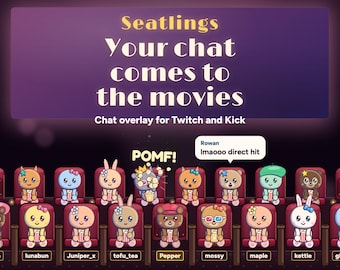
Also from Nymbra Studio: Starlings, where everyone who chats becomes a little star in your sky and the moon is your goal.
Need help? Message me through Etsy with your StreamElements username and a screenshot of the widget settings. I'll help you get it running and usually answer within a day.
Reseña de la tienda
Todas las reseñas son de compradores verificados. Esta reseña se muestra automáticamente en función de la fecha de publicación, si incluye comentarios, el idioma elegido y si la valoración refleja la experiencia típica con la tienda.
“¡Es tan lindo! ¡Estoy deseando usarlo en la transmisión! Gracias. Ojalá pudiera hacer los mensajes del chat en pantalla un poco más pequeños, pero eso es un detalle sin importancia.”

Celestial
Hace 6 días
Se ha visto 8 veces en las últimas 24 horas
AhoraPrecio:MX$358.31
Precio original: MX$448.00
-20 %
La oferta termina el 16 noviembre
Solo puedes hacer una oferta por compras de un único artículo
Entrega
Descarga inmediata
Los archivos estarán disponibles para descargar una vez que se confirme el pago. Sigue estas instrucciones.
No se admiten cambios, devoluciones ni cancelaciones de los artículos de descarga inmediata. Ponte en contacto con el vendedor si tienes algún problema con tu pedido.
Descripción del vendedor
Especificaciones
TRY IT FIRST: play with the live demo at nymbra.studio/skatelings. Chat as a viewer, throw snowballs, fire alerts and build the snowman, right in your browser. No sign-up, nothing connects to your channel.
Installs in about 5 minutes with the START HERE guide, no coding. Bought on your phone? Download from your Etsy purchases on a computer; installing needs one.
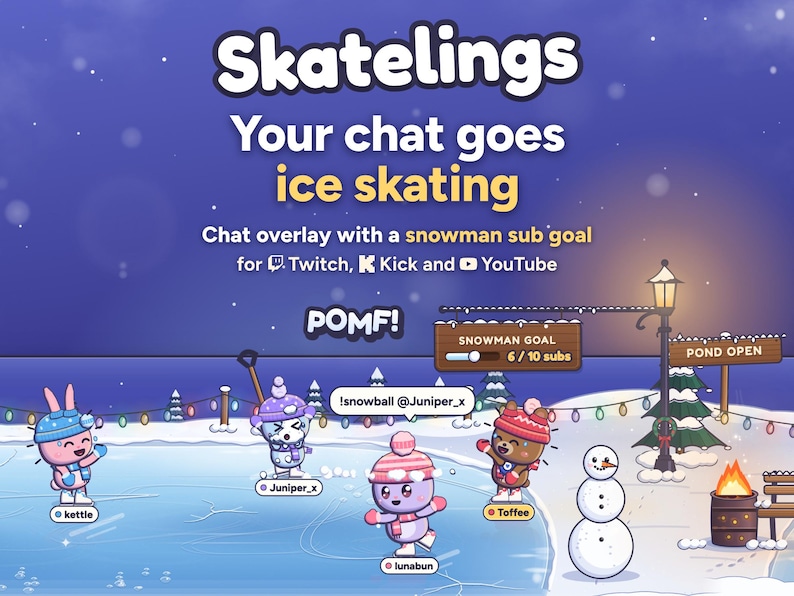
Your chat goes ice skating. Everyone who chats pops out of the snowbank as a cute little critter in a knit hat and skates on a cozy frozen pond along the bottom of your stream. Friends hold hands, !snowball starts a snowball fight, and regulars skate back in their own look every stream.
Your own mascot hosts the pond. It skates from the very first frame, so the ice is never empty, even before anyone chats. Your chat messages come from it, viewers can @ you to hold its hand, and it waves at newcomers, cheers your alerts and holds up the 10 when someone subs. Before you paste, pick its critter (19 of them: cats, bears, a panda, bunnies and round snowpuffs), its knit colour, its hat and its name. Change it any time in the settings.
And your sub goal is a snowman your whole chat builds together. It goes up piece by piece as the subs come in, from the first snowball to the top hat, and at your target it's SNOWMAN BUILT! with your mascot cheering beside it. Rather count follows, bits or tips? Pick one in the settings. The count carries on from stream to stream, and Twitch Charity donations count with tips, so it fits holiday and charity streams.
No extra login, no hosting, no subscription. It runs in your own StreamElements account and remembers your regulars there.
YOUR MASCOT
• Always on the ice: from the first frame, in the StreamElements editor and on your BRB screen, with a rosette and a gold name tag so viewers know it's yours.
• Make it yours in START-HERE.html before you paste, or later in the settings: 19 critters (six cats, four bears including a panda, four bunnies and five snowpuffs), 12 knit colours for its hat, scarf and mittens, 7 hats, and a name (leave it blank for your channel name). Or pick No mascot.
• Your chat is its chat: your own messages and commands come from your mascot, never from a second skater.
• Viewers who @ your channel name, @streamer or your mascot's name skate over and hold its hand.
• On its own: a little spin or a long glide every minute or so, a wave for newcomers, a cheer for alerts, the 10 as head judge at a sub's axel, a welcome for raiders and a cheer beside the finished snowman. At !goodnight it's tucked in last, closest to the fire.
• It never counts toward Most skaters on the ice and never skates off to make room.
THE SNOWMAN GOAL
• Pick what builds it: subs and memberships, follows, bits or tips, with any target from 1 to 1,000,000 (10 subs to start). Or pick Nothing and the snowman just stands by the pond.
• A wooden plaque shows the count (6 / 10 subs) while the snowman goes up in eight steps: three snowballs, a face, a carrot nose, stick arms, a scarf and, last, the top hat.
• At your target: SNOWMAN BUILT!, confetti, string lights around the snowman, everyone on the ice turns to cheer, and your mascot skates over to cheer beside it.
• The count is saved in your StreamElements, so it carries on next stream. Start a new snowman sets it back to zero.
• A gift of five subs adds five. Kick subs and YouTube memberships count as subs, a YouTube subscribe counts as a follow, and Super Chats and Twitch Charity donations count with tips. Test alerts in the StreamElements editor are never saved to the count.
WHAT HAPPENS ON YOUR POND
• Chat: a first message pops a skater out of the snowbank. Their name picks the critter (cats, bunnies, bears, pandas and more), the coat and the knit, so they look the same every stream. Messages show in chat bubbles.
• @mentions: mention someone on the ice and the two skate over and hold hands for about half a minute. An @ to you takes your mascot's hand.
• Snowball fights: !snowball @name winds up and throws. It's a hit (POMF!), a duck that hits whoever is behind (WHOOSH), or a backfire (oops). Revenge within a minute always lands. Plain !snowball picks someone on the ice. Give your mascot a name of its own and chat can throw at it too.
• Your screen: !snowball @streamer (or your channel name) is thrown at the stream glass, since you sit behind it: SPLAT!, and the snow slides down and melts. You choose who can: everyone, mods and VIPs, or nobody. With your mascot on, a throw that can't splat goes across the ice at your mascot instead.
• Subs, resubs and memberships: an axel for three judges (10, 9.9 and a smug 3.5, with your mascot holding the 10) and a crown for 30 days.
• Raids: a sled full of raiders crashes onto the ice, and your mascot welcomes them in.
• Follows: a new skater pops out of the snowbank with sparkles.
• Gift subs: the gifter's axel, then crowns for the skaters who got one.
• Bits: confetti snow and a cheer. Tips, Super Chats and Twitch Charity: hearts and a cheer, with the amount over their head.
• Regulars: a bigger pom after 3 streams, a longer scarf after 10 and a gold star pin after 25. This month's snowball champ wears a gold scarf, the champs board shows the top three, and about 1 in 200 new skaters is golden.
• Outfits: !scarf in 12 colours and !hat in 7 styles, kept for next stream.
• Season card: !pond shows a viewer's streams on the ice, snowballs landed and hands held.
• Lurkers: !lurk takes a seat on the bench with a cocoa, or on the snowbank when the bench is full. Nothing names them, and chatting again puts them back on the ice.
• Goodnight: the lights go down and everyone huddles by the fire under blankets, your mascot tucked in last.
COMMANDS, BY WHO TYPES THEM
Your viewers: !snowball @name, !snowball @streamer, !lurk, !pond, !scarf red, !hat trapper, any @mention of someone on the ice, and @streamer to hold your mascot's hand.
You and your mods: !blizzard (everyone on the ice joins a snowball fight), !goodnight and !goodmorning. When you type, your mascot says it.
MAKE IT YOURS
20 settings, in plain words, in the widget's settings panel:
• Preview a stream and Preview a raid buttons, to see it all before you go live
• Your mascot: its critter (or No mascot), knit colour, hat and name
• Layout: the full pond, or a compact strip for gameplay
• Behind the pond: transparent, or a winter evening sky (a moon, snowy mountains and a log cabin) for starting and BRB screens
• Name tags: always, only while chatting, or never. Chat bubbles on or off
• Most skaters on the ice, and comedy (random slips and bonks): lively, calm or off
• Graphics: Full, or Light for a weaker PC
• Snowball cooldown per viewer, and who can splat your screen
• What builds the snowman, its target, and a button to start a new one
• Save slot and Kick channel
Viewers choose their own scarf and hat with !scarf and !hat; their name picks the rest of the look.
SETUP AND DOWNLOAD
Unzip the download on your computer and open START-HERE.html first. Its practice pond shows your whole 1080p stream with your mascot already skating, so you see where the pond sits before you install, and you can pick your mascot there. Then use its copy buttons to paste HTML, CSS, JS and FIELDS into a StreamElements custom widget, size it to the whole 1920 × 1080 screen and add the overlay link to OBS or Streamlabs as a browser source. About 5 minutes in all, and no coding needed.
Your ZIP includes START-HERE.html, widget.html, widget.css, widget.js, widget.json, SETUP.md and LICENSE.txt. The guide holds the working practice pond, the copy buttons and help. One-time purchase, no subscription, free updates.
WHAT YOU NEED
A free StreamElements account and OBS Studio, Streamlabs Desktop or any streaming software with browser sources. A 1920 × 1080 overlay: the pond sits along the bottom and the rest stays see-through.
• Twitch: works as soon as the files are pasted.
• Kick: type your channel name in the Kick channel setting, or leave it blank if you signed in to StreamElements with Kick. Twitch and Kick chat skate on one pond.
• YouTube: use StreamElements signed in with your YouTube channel. Memberships count as subs; a YouTube subscribe counts as a follow.
FAQ
Does it remember regulars?
Yes. Your save slot keeps about 500 recent viewers in your own StreamElements account: their look and outfit, streams on the ice, snowballs and hands held. A viewer back after six quiet hours counts a new stream. The pond fills as people chat, and regulars skate back in their own look.
How many skaters fit on the ice?
3 to 30 on the full pond (24 by default), and up to 20 on the compact strip, plus your mascot, which never counts. When it's full, the quietest skater skates off to make room. With Graphics on Light the pond holds up to 15 (12 on the strip).
Can I change my mascot later?
Yes. Your mascot sits right under the preview buttons in the widget's settings. A new critter, knit, hat or name shows at once on the same skater. Pick No mascot and only your viewers skate.
What about lurkers?
!lurk is a seat on the bench with a cocoa. Nothing on the pond names a lurker, and they're back on the ice when they chat.
Does it have sound?
No. Skatelings is silent, so it never talks over your game or music.
Will it slow down my PC?
Graphics Full is the default. Light drops reflections, weather, glows and sparkles, runs at about 30 fps and keeps fewer skaters. Lowering Most skaters on the ice helps too.
Can I keep viewer names off the stream?
Yes. Set Name tags to Never and turn Chat bubbles off. Lurkers on the bench are never named.
Does it import my past audience?
No. A new pond starts with just your mascot and fills from chat and alerts while the overlay runs. The editor and the Preview buttons never save skaters.
The listing shows the real widget with example names. Abstract listing backgrounds are not part of the overlay. This is a digital download licensed to one streamer and their channels; please do not share or resell the files.
Also from Nymbra Studio: Starlings, where everyone who chats becomes a little star in your sky and the moon is your goal.
Need help? Message me through Etsy with your StreamElements username and a screenshot of the widget settings. I'll help you get it running and usually answer within a day.
-
Diseñado por
-
Tipo de artículoDescarga digital
-
Tipos de archivos digitales1 ZIP
Si surge un problema con un pedido que reúne los requisitos, te cubrimos las espaldas. Ver las condiciones del programa
Conoce al vendedor

Normalmente tarda unas horas en responder
Más artículos de esta tienda
-
Descarga digital
Interactive Star Chat Overlay and Moon Goal Widget for Twitch, Kick and YouTube | StreamElements | Starlings (Digital Download)
Precio en oferta MX$345.48
Precio original MX$431.99
-
Descarga digital
Superposición interactiva de chat de acuario para Twitch y Kick / Widget de transmisión de acuario con objetivo de suscripción, alertas y escena BRB / OBS StreamElements
Precio en oferta MX$319.96
Precio original MX$399.98
-
Descarga digital
Interactive Firefly Twitch Overlay & Sub Goal Jar, StreamElements and Kick | Cozy Chat Fireflies, Paper Lanterns, Shapes | Firefly Meadow
Precio en oferta MX$345.48
Precio original MX$431.99
-
Descarga digital
Boss Fight Overlay for Twitch | Interactive Chat Game Stream Widget with Alerts, Subathon Timer and Health Bar | StreamElements OBS
Precio en oferta MX$383.98
Precio original MX$480.01
-
Descarga digital
Firework Sub Goal Widget for Twitch & StreamElements | New Year Countdown | Launchlings
Precio en oferta MX$319.96
Precio original MX$399.98
-
Descarga digital
Custom Loyalty Card Widget for Twitch and Kick | Your Emotes or 3 Ready-Made Styles | Holographic Trading Cards | StreamElements | Foilfolk
Precio en oferta MX$255.94
Precio original MX$319.96
 Este anuncio
Cozy Winter Ice Skating Chat Overlay & Snowman Sub Goal Widget for Twitch, Kick, YouTube | StreamElements | Streamlabs (Digital Download)
Precio en oferta MX$358.31
Precio original MX$448.00
Oferta "Cómpralos juntos" del -20 %
Descarga digital
-
Descarga digital
Widget de chat Snowy Snowman para StreamElements / Twitch (personalizable)
MX$225.89
-
Descarga digital
Widget de objetivos navideños: Superposición de transmisión de Twitch (Streamlabs, Streamelements)
Precio en oferta MX$239.90
Precio original MX$399.78
-

Descarga digital
Widget interactivo de Twitch para pelea de bolas de nieve / Superposición animada navideña de invierno
MX$275.27
-

Descarga digital
Widget interactivo de árbol de Navidad: avatares de espectadores, chat, suscripciones, consejos y fragmentos / StreamElements y OBS / StreamLabs / Widgets para streamers
MX$302.13
-

Descarga digital
Widget de objetivo de muñeco de nieve navideño: superposición de seguimiento de eventos para Twitch y StreamElements
Precio en oferta MX$286.39
Precio original MX$440.65
-

Descarga digital
Widget de chat navideño de Twitch / Chat en vivo / 4 avatares (Papá Noel, Muñeco de nieve, Reno, Fluffy) / Elementos de StreamElements / Colores personalizables
MX$344.08
-

Descarga digital
Widget de juego de muñeco de nieve para Twitch | Compatible con OBS y Streamlabs
MX$376.37
-

Descarga digital
Widget de bola de nieve para Twitch y YouTube | Compatible con OBS y Streamlabs
MX$144.78
-

Descarga digital
Widget de Twitch con objetivos navideños • Diseño festivo de muñeco de nieve, copo de nieve y árbol de Navidad • Superposición para OBS y YouTube • StreamElements
Precio en oferta MX$180.71
Precio original MX$361.42
-
Descarga digital
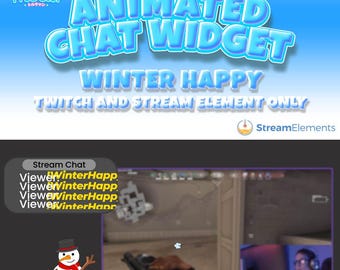
Widget de chat animado de Twitch "Feliz invierno" para StreamElements
MX$293.65
-

Descarga digital
Widget de trineo navideño: minijuego interactivo / StreamElements y OBS / StreamLabs / Widgets para streamers
MX$302.13
-
Descarga digital
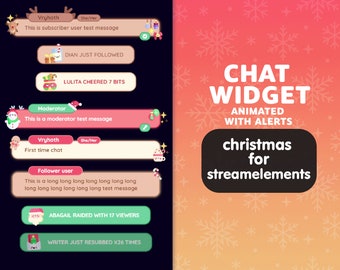
Widget de chat P2U Navidad Navidad Lindo pan de jengibre Santa Copo de nieve Galleta Transmisión Lindo Streamelements l Widgets para streamers l Twitch personalizado
MX$327.32
A los compradores con gustos similares les han gustado estos artículos
-
Vinilo adhesivo para pantalla LCD/OLED de Steam Deck con diseño de niebla de lavanda
MX$545.24
-
Revestimiento para plataforma de vapor Pruneau Purple: acabado mate, brillante o con purpurina
MX$538.62
-
Vinilo adhesivo para pantalla LCD/OLED de la plataforma de vapor con diseño de vidrieras
MX$545.24
-

Diseño inspirado en la naturaleza. Vinilo 3M color lila terroso para Steam Deck/OLED.
MX$583.99
-
Diseño floral para Steam Deck: Adhesivo de vinilo con diseño de Pivoine
MX$538.62
-
Skin para Steam Deck OLED con diseño floral rosa, calcomanía con estampado de chica rosa para SteamDeck, nueva funda premium para consola de juegos Valve, vinilo 3M
Precio en oferta MX$397.25
Precio original MX$467.35
-
Pegatina de vinilo premium para válvulas Steam Deck con diseño lavanda
MX$538.62
-

Pegatina de vinilo con diseño de dibujo azul marino para válvulas Steam Deck, diseño premium
MX$538.62
-
Pegatina de vinilo con diseño de acuarela para válvulas Steam Deck Premium
MX$538.62
-

Pegatina de vinilo con diseño de flores antiguas para válvulas de Steam Deck, diseño premium
MX$538.62
-
Vinilo para Steam Deck: Diseño de flor de cerezo
MX$538.62
-

Cuadros morados/menta/tema de 2 colores/cubierta/envoltura de vinilo 3M premium para Steam Deck/OLED
MX$583.99


