


Machine Embroidery Pricing Calculator, Price by Stitch Count, Embroidery Business Spreadsheet, Excel and Google Sheets
Punti salienti dell'articolo
In caso di problemi con un ordine proteggeremo tutti i tuoi acquisti idonei. Vedi termini programma
Prezzo:18,22 €
Puoi fare un'offerta solo acquistando un singolo articolo
Consegna
Download istantaneo
I tuoi file saranno disponibili per il download una volta confermato il pagamento. Ecco come.
Gli articoli con download istantaneo non accettano resi, cambi o annullamenti. In caso di qualsiasi problema relativo all'ordine, contatta il venditore.
Descrizione del venditore
Specifiche
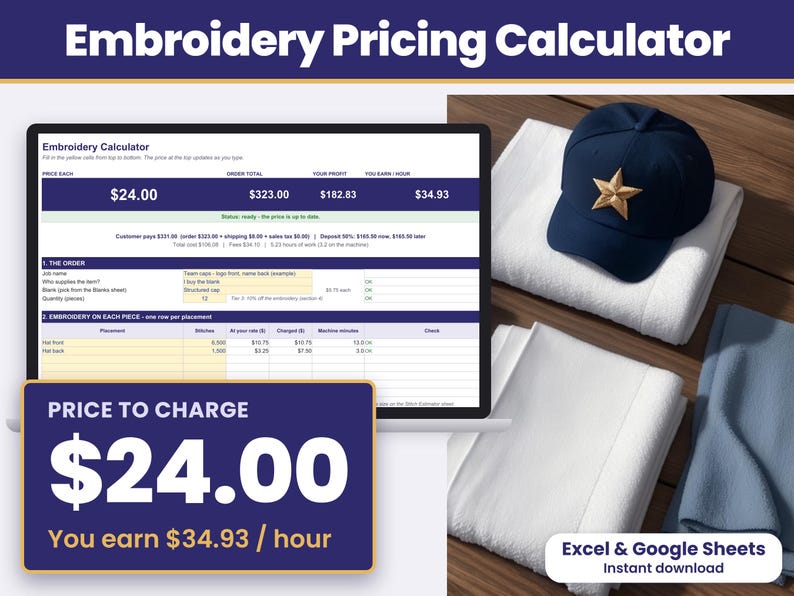
Machine Embroidery Pricing Calculator for Microsoft Excel and Google Sheets: an instant-download spreadsheet with an embroidery pricing calculator, a quote builder and an order & profit tracker in one file. It prices each order from your own stitch counts and shows the price each, the order total, your profit and what you earn per hour at the top of the sheet. It charges per 1,000 stitches with a minimum per placement, so a small name or monogram still pays for the hooping, then adds the blank and a digitizing fee, so you can see that a quote pays for your time before you send it. Then put several saved jobs on one quote and keep track of each order, what is paid and what you earned each month.
Made for home and small-shop embroiderers in the US who quote caps, shirts, hoodies, towels and totes for customers, teams and Etsy orders. Works in Microsoft Excel and Google Sheets on a computer.
WHAT YOU CAN DO
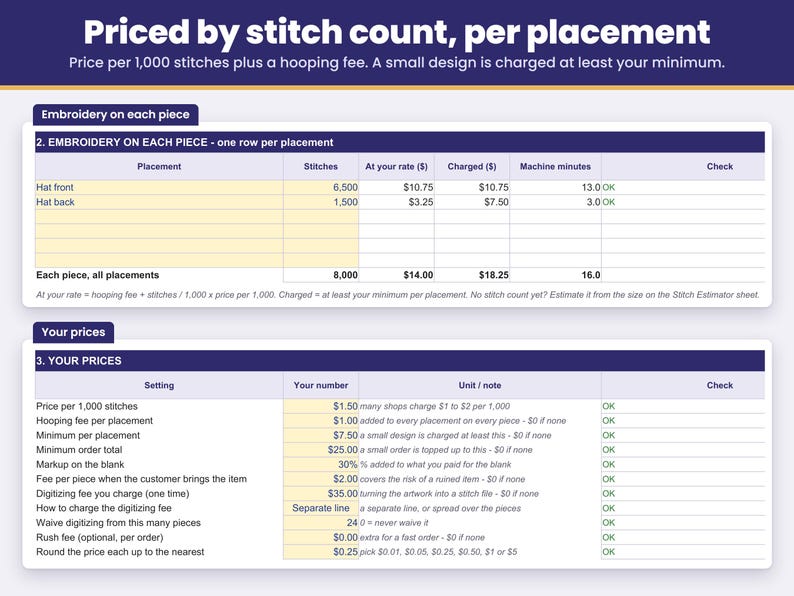
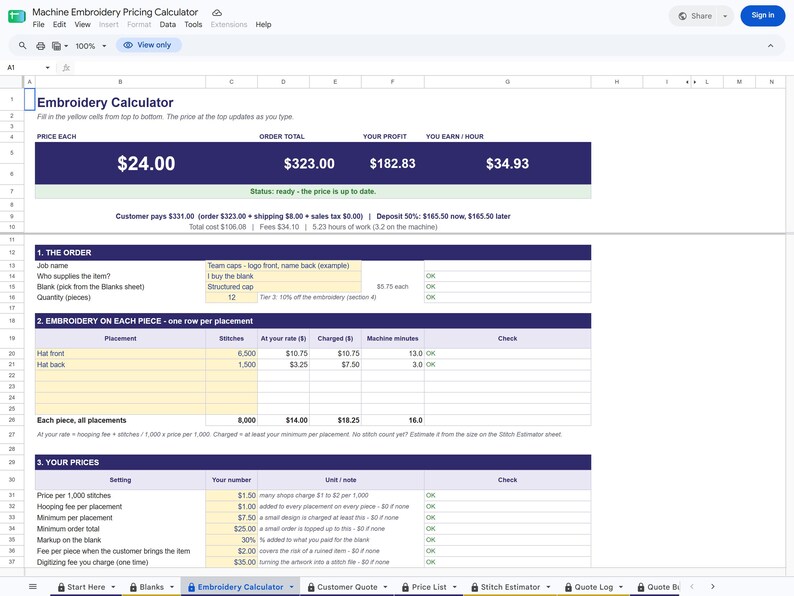
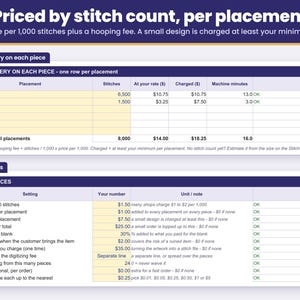
- Price by stitch count: each placement = hooping fee + stitches / 1,000 x your price per 1,000 stitches. A small design is charged at least your minimum per placement, so a 300-stitch monogram still pays for the hooping and the setup.
- Price several placements on one item: left chest, cap front, full back, a name on the sleeve - up to 6 placements, each with its own stitch count.
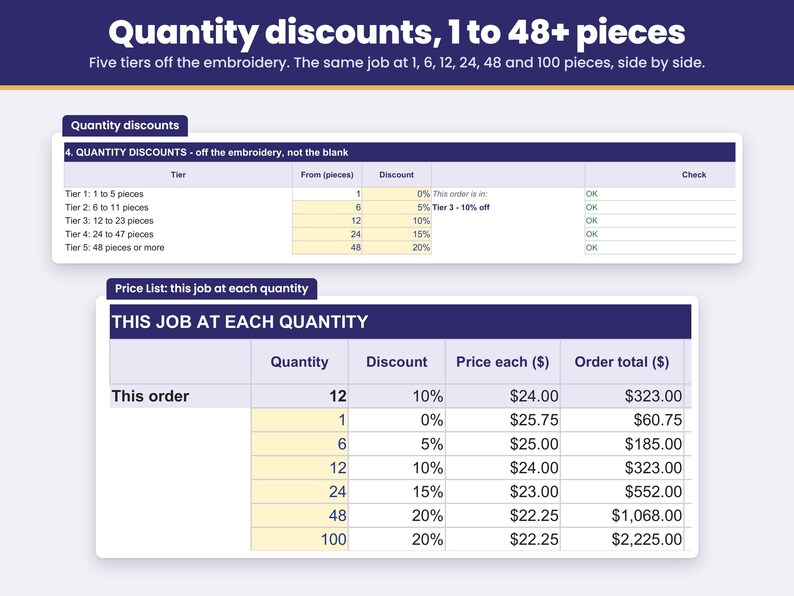
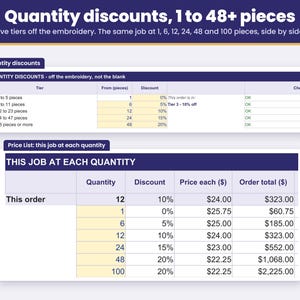
- Give quantity discounts: five tiers that start at 1, 6, 12, 24 and 48 pieces. Change the starts and the percents to your own. The discount comes off the embroidery, so you keep your markup on the blank.
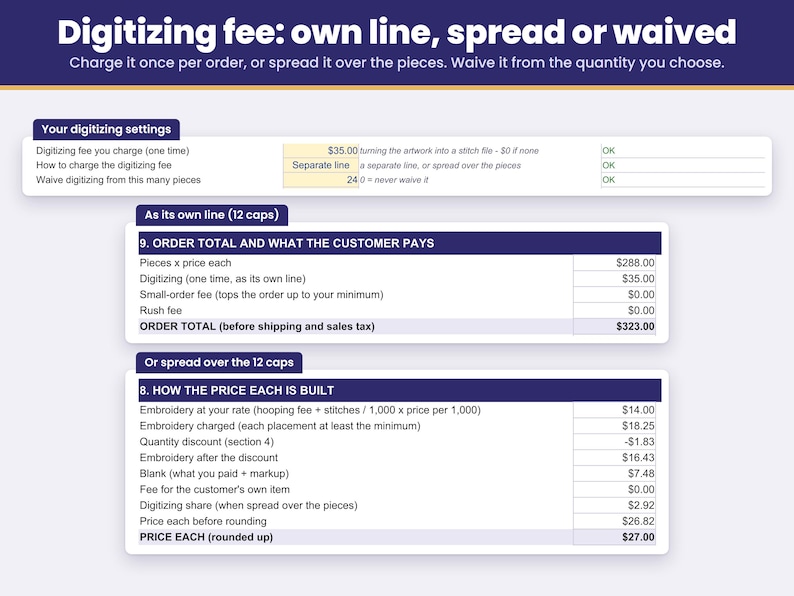
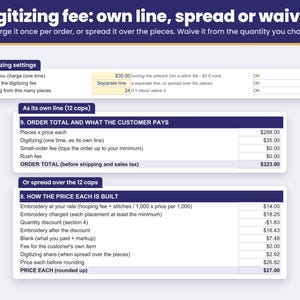
- Charge the digitizing fee your way: as its own line once per order, or spread over the pieces. Waive it from the quantity you choose (for example 24 pieces or more). What you pay a digitizer is counted as a cost.
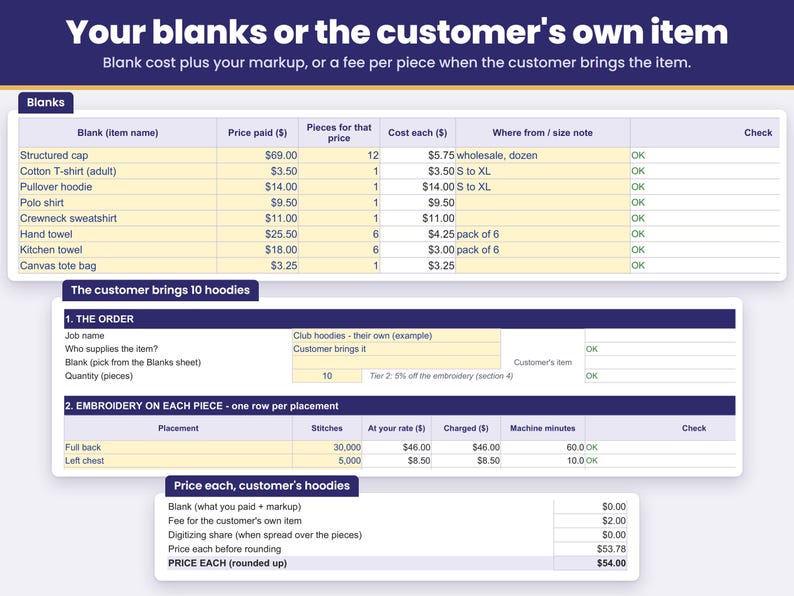
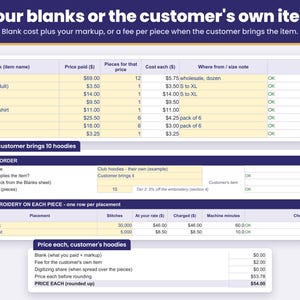
- Use your blanks or the customer's: pick a blank from your list and add your markup, or pick "Customer brings it" and a fee per piece is added instead of a blank.
- Set a minimum order total: a small order is topped up with its own line, so the price each stays the same.
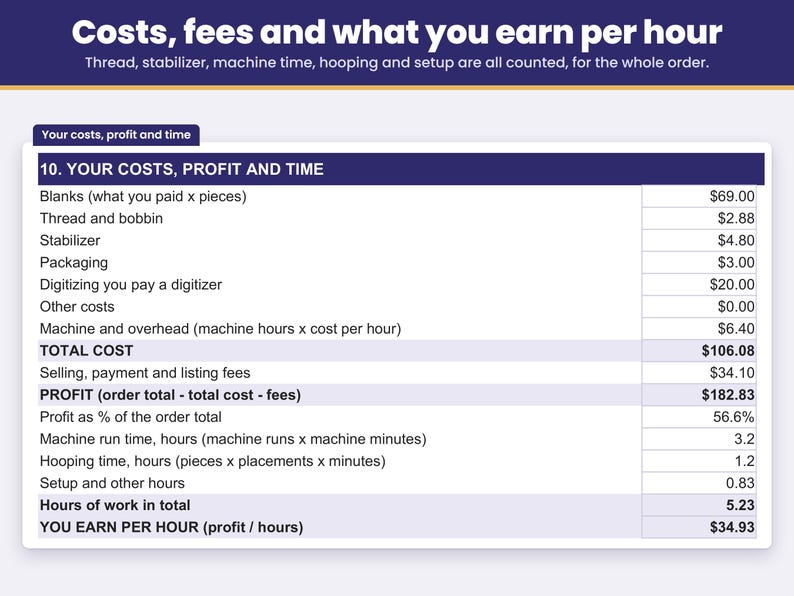
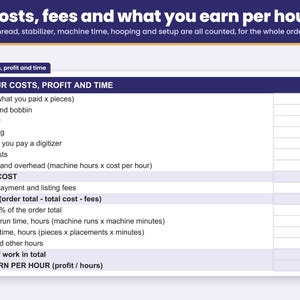
- See what your time earns: machine run time from your machine speed and number of heads, hooping time for every placement, setup and other hours. You earn per hour = profit / those hours.
- Count every cost: blanks, thread and bobbin per 1,000 stitches, stabilizer per placement, packaging, digitizing you pay for, other costs and machine overhead per machine hour.
- Set your selling fees: the example is Etsy US fees, and you can change them for any shop, or set 0% for a local cash order.
- Total up the order you priced: shipping, sales tax (with or without shipping), a rush fee, rounding of the price each, deposit now and balance later. Shipping and sales tax are kept apart from your profit.
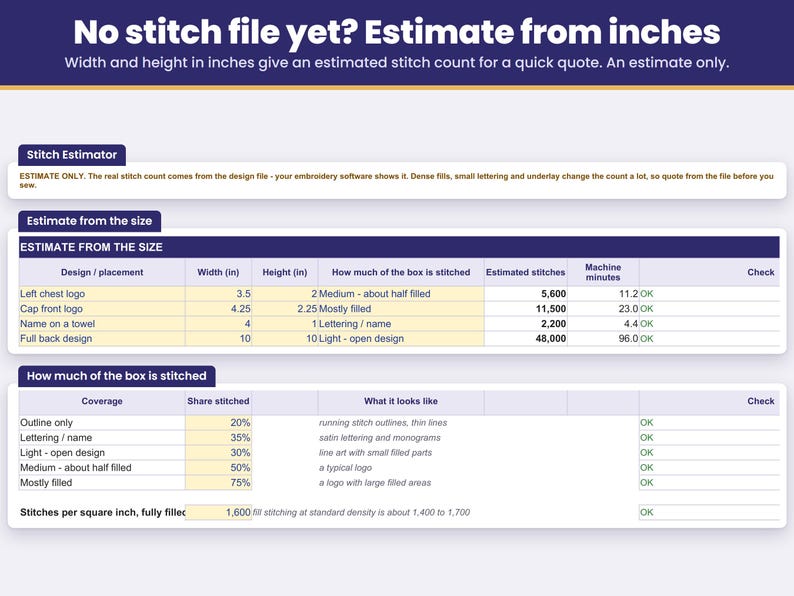
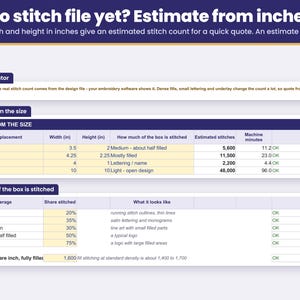
- Quote before you have the stitch file: the Stitch Estimator turns the design width and height in inches into an estimated stitch count for a first quote.
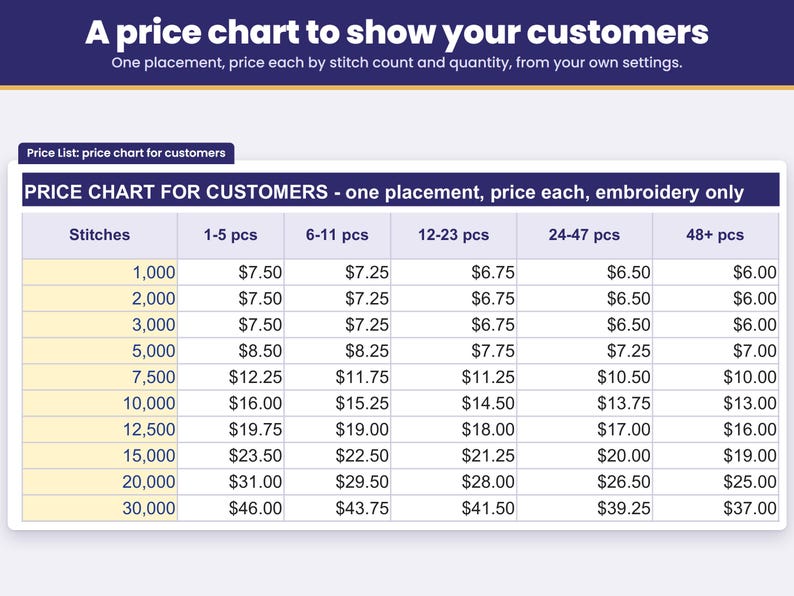
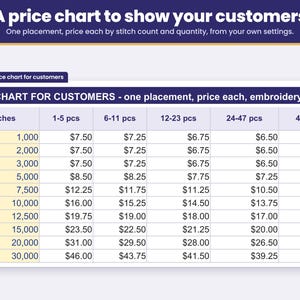
- Show customers a price list: the same job at 1, 6, 12, 24, 48 and 100 pieces, and a price chart of one placement by stitch count and quantity, from your own settings.
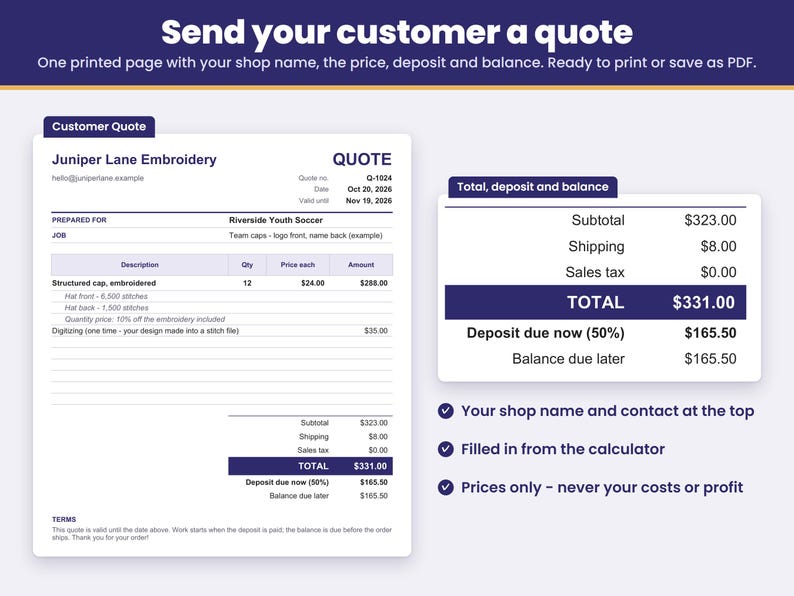
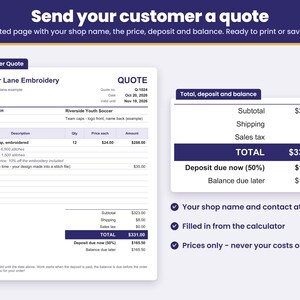
- Send a quote for the order you priced: the Customer Quote tab turns it into a one-page quote with your shop name, the price, deposit and balance, ready to print or save as PDF.
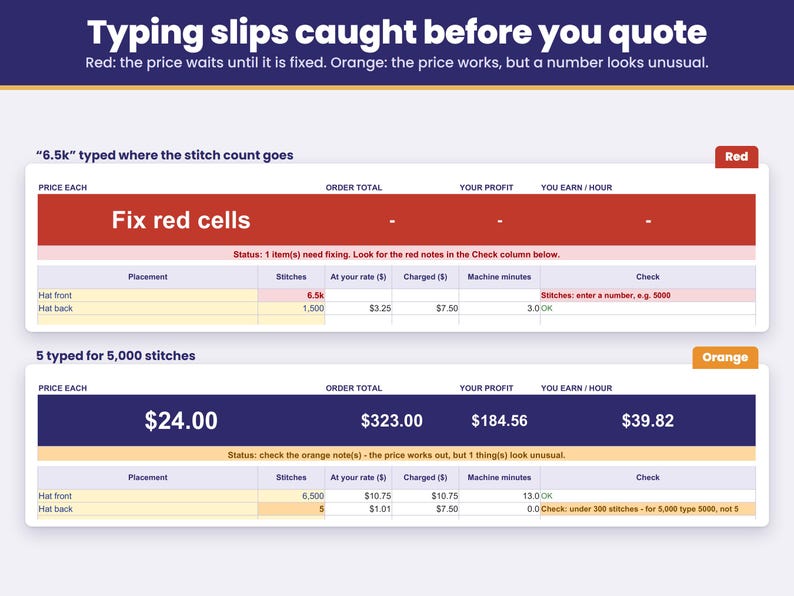
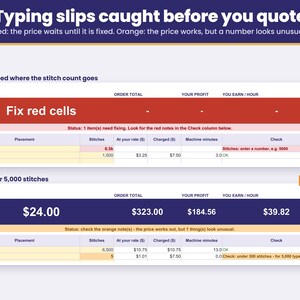
- Catch typing slips before you quote: a missing number, text in a number cell, a zero or an amount far too large turns red, and the price appears once it is fixed. Hours or minutes typed as a time (1:30, 12:00) or a fraction (1/2), and a machine cost or target under $1 an hour, turn red too. A number that looks unusual - 5 typed for 5,000 stitches, a very fast machine speed, an order that earns less per hour than your target - turns orange so you can double-check.
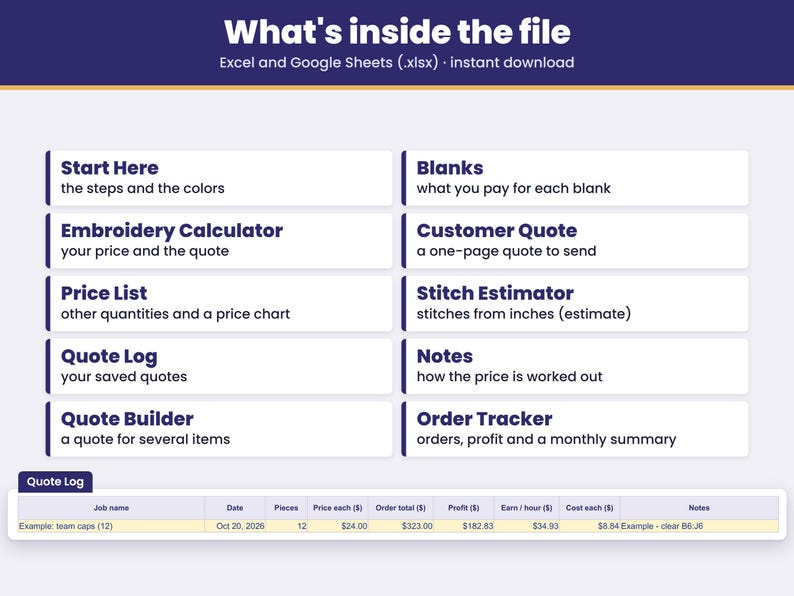
- Keep your quotes: copy each one into the Quote Log with the date, pieces, price each, cost each, order total, profit and pay per hour. Saved jobs can be picked on the Quote Builder and the Order Tracker.
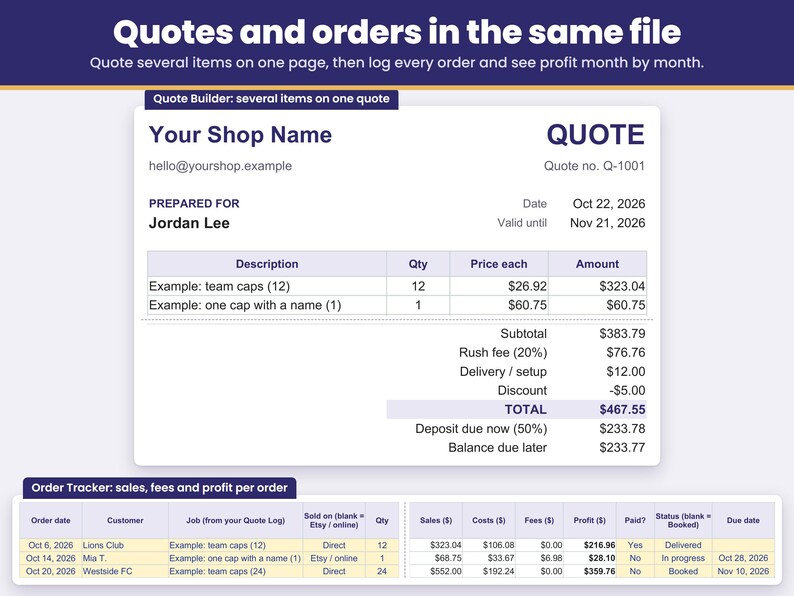
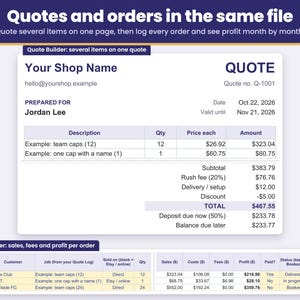
- Build a quote for several jobs: on the Quote Builder, pick jobs saved on your Quote Log - 12 shirts and 12 caps on one page - set the quantity, and add a rush fee, shipping or setup, a discount and a deposit. You get a one-page quote with the total, the deposit due now and the balance due later, ready to print or save as PDF.
- Track orders and profit: the Order Tracker keeps one row per order with the customer, the job, where it sold (Etsy / online or Direct), the price you charged, shipping, paid or not, status and due date. Cost, selling fees and profit fill in for you, and a summary shows orders, sales, costs, fees, profit and money still to collect for each month of the year you pick.
WHAT'S INCLUDED
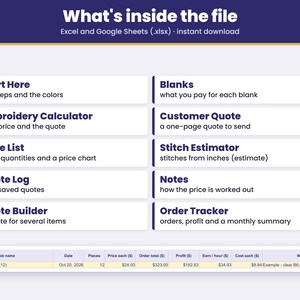
- One spreadsheet file (.xlsx) for Excel, plus a PDF with your link to make your own copy in Google Sheets. Tabs: Start Here, Blanks, Embroidery Calculator, Customer Quote, Price List, Stitch Estimator, Quote Log, Quote Builder, Order Tracker, Notes.
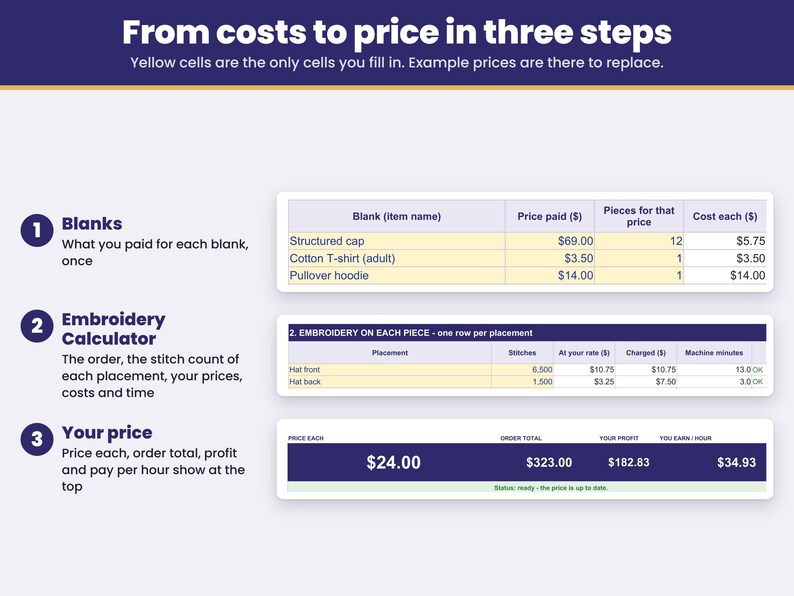
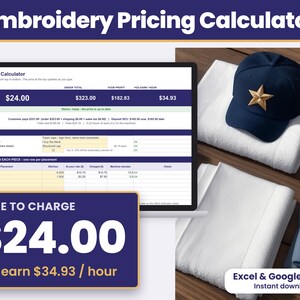
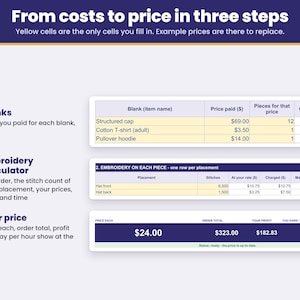
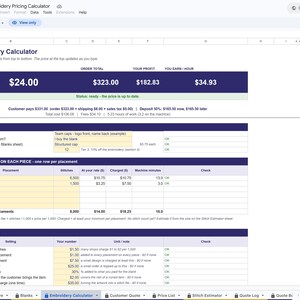
- A finished example already filled in (12 structured caps, a front logo and a name on the back: $24.00 each and $323.00 for the order), so you see a full quote before you type anything. Replace the example prices with your own.
- Yellow cells are the only cells you fill in. In Excel, formula cells are locked to keep them safe from accidental edits; in your Google Sheets copy, typing over a formula shows a warning first.
HOW TO USE IT
1. Blanks: type what you paid for the items you embroider - the price and how many pieces it bought (a dozen caps for $69.00 = 12).
2. Embroidery Calculator: from top to bottom - the order (blank and quantity), the stitch count of each placement, your prices, costs and time. Price each, order total, profit and what you earn per hour appear at the top.
3. Price List: the same job at other quantities and a price chart to show your customers.
4. Quote Log, Quote Builder and Order Tracker: save each job to the Quote Log, then pick it on a quote for several jobs or on an order row.
FAQ
How much should I charge per 1,000 stitches for machine embroidery?
Many shops charge $1 to $2 per 1,000 stitches, plus a minimum per placement, the blank and a digitizing fee. The example starts at $1.50 per 1,000 stitches, a $1.00 hooping fee and a $7.50 minimum per placement. Type your own numbers and the calculator shows the price each, the order total and what you earn per hour, so you can see whether the price pays for your time.
How do I price a small monogram or a name?
Use a minimum per placement. With the example settings, a 300-stitch monogram is only $0.45 of stitching at $1.50 per 1,000, so the $7.50 minimum per placement is charged instead - the hooping and setup take the same time as a bigger design. An order that comes to less than your minimum order total ($25.00 in the example) is topped up with its own line, so the price each stays the same.
Should I charge a digitizing fee on every order?
Digitizing is charged once per design, not per piece. Charge it as its own line, spread it over the pieces, or waive it from a quantity you choose. A repeat order with the same file can be priced with the fee at $0.
How do I give a discount for 12, 24 or 48 pieces?
Set the five tiers in section 4. The discount for the order's tier comes off the embroidery only, so you keep your markup on the blank. The Price List shows the same job at each quantity side by side.
What if the customer brings their own shirts or hoodies?
Pick "Customer brings it". No blank is charged, and your fee per piece for customer items is added to cover the risk of ruining an item you cannot replace.
How do I price a design when I don't have the stitch count yet?
Use the Stitch Estimator: type the width and height in inches and pick how much of the box is stitched. You get an estimated stitch count for a first quote. Price the final order from the stitch count your embroidery software shows.
Does it work with a multi-head machine?
Yes. Type the number of heads and your average machine speed, and the machine run time, your hours and what you earn per hour are worked out from your own setup.
Can I send my customer a quote?
Yes. The Customer Quote tab turns the order you priced into a one-page quote: type your shop name and the customer's name once, and it lists the items, quantity, price each, digitizing and rush fees, shipping, sales tax, the total, the deposit due now and the balance, with a valid-until date and your terms. It shows your customer's prices only, never your costs or profit. Print it or save it as PDF (in Google Sheets, select the quote first, then File > Print > Selected cells). The Customer Quote is for the one order on the Calculator; to quote several saved jobs on one page, use the Quote Builder.
Can I quote shirts and caps on one quote?
Yes. Price each job on the Calculator and save it to the Quote Log. On the Quote Builder tab, type your shop name, contact and the customer once, then pick each saved job and set the quantity. The price each is the saved order total divided by its pieces, so digitizing and minimums are included; it is rounded to the cent, so a line can come out a few cents off the saved total (for example $323.04 instead of $323.00). Or type your own. Add a rush fee percent, shipping or setup, a discount and a deposit percent, and the quote shows the total, the deposit due now and the balance due later, valid until the date you set. The printed quote shows only the lines you filled in and fits on one page. Quote Builder prices are before sales tax, and your customer sees prices only, never your cost or profit. A line priced below your cost, or with a quantity different from the pieces its saved price was worked out for, turns orange but still prints, and the quote stays blank until any red typing slip is fixed.
Can I track my orders and profit?
Yes. The Order Tracker has one row per order: order date, customer, job (from your Quote Log), where it sold (Etsy / online or Direct), quantity, price each, shipping charged, postage and other costs, paid Yes or No, status and due date. The price each starts at the saved price; type the price you charged if it was different. Cost comes from the Quote Log, selling fees are added for Etsy / online orders using your Calculator's fee settings, and profit fills in. At the top, pick a year to see orders, sales, costs, fees, profit and not paid yet for each month, plus the year total. Rows marked Quote sent or Cancelled, and rows with a red check, are not counted. An order that loses money, a due date before the order date, or a delivered order not paid yet turns orange.
Does it work in Google Sheets?
Yes. Your download includes a PDF with a link: click it and Google Sheets makes your own copy, no upload needed. In my checks, with the same numbers typed in, every price and check gave the same result in Google Sheets as in Excel, and the dropdown lists and the red and orange checks carry over. In Google Sheets, fill only the yellow cells and type hours as decimals, such as 1.5 for 1 hour 30 minutes.
Does it include my Etsy fees, shipping and sales tax?
Yes. Selling fees start at the Etsy US example rates, and you can change them to match your shop. Shipping, the sales tax rate, tax on shipping, the deposit percent and rounding are yours to set.
HOW TO DOWNLOAD
After you buy, open etsy.com in a web browser (computer recommended), go to Purchases and reviews, and click Download Files. Digital files cannot be downloaded in the Etsy app.
- Microsoft Excel: open the .xlsx file in Excel on a computer.
- Google Sheets: open the PDF in your download, click Make my copy in Google Sheets, then click Make a copy. The copy is saved in your Google Drive. A free Google account is enough. (You can also upload the .xlsx at drive.google.com: New > File upload, then right-click it > Open with > Google Sheets.)
LIMITATIONS
- Instant digital download. Nothing is shipped.
- Needs Microsoft Excel or Google Sheets on a computer.
- Made in Microsoft Excel and checked in Google Sheets.
- Not tested in Excel on the web, Excel for Mac, Numbers or the Google Sheets phone app.
- In Google Sheets, formula cells are not locked as they are in Excel. The copy from your link warns you before you type over a formula; an uploaded .xlsx does not, so fill only the yellow cells.
- In Google Sheets, today's date follows the spreadsheet's time zone.
- US dollars and inches.
- The Embroidery Calculator prices one kind of item at a time, with up to 6 placements per item. For 12 shirts and 12 caps, price and save each job, then put both on one Quote Builder quote.
- Room for 40 blanks and 50 saved quotes in the Quote Log.
- The Quote Builder holds up to 10 lines per quote, and the Order Tracker up to 200 orders per file.
- Quote Builder prices are before sales tax.
- It tracks orders and profit, but it is not a design file or bookkeeping, accounting or tax software.
- Stitch counts come from your design file. The Stitch Estimator gives an estimate only; dense fills, small lettering and underlay change the real count.
- Selling fees and tax rates in the file are examples (Etsy US fees as published in Oct 2026; Offsite Ads and currency conversion not included). Check your own shop and your local sales tax rate.
- Example prices, blank costs and machine speeds are examples. Replace them with your own.
- For use in your own business. Please do not resell or share the file.
- Because this is a digital download, returns and exchanges are not accepted. If anything does not work as described, send me a message on Etsy and I will help.
This spreadsheet was designed by CraftCostSheets and built with the help of AI tools, then checked in Microsoft Excel and Google Sheets.
-
Tipo di articoloDownload digitale
-
Tipologia/e di file digitale1 PDF, 1 altro file
-
LinguaIl testo in questo download potrebbe essere in un'altra lingua
In caso di problemi con un ordine proteggeremo tutti i tuoi acquisti idonei. Vedi termini programma
Ti presentiamo il venditore
Altro da questo negozio
-
Download digitale
Cake Pricing Calculator Spreadsheet, Home Bakery Recipe Cost Calculator, Excel and Google Sheets, Price Per Serving
14,80 €
-
Download digitale
Jewelry Pricing Calculator Spreadsheet, Jewelry Price Sheet, Wholesale Retail Price, Etsy Fees, Excel and Google Sheets
14,23 €
-
Download digitale
Crochet Pricing Calculator Spreadsheet, Yarn Cost Calculator, Craft Fair Pricing, Excel and Google Sheets
17,08 €
-
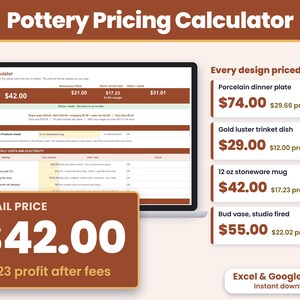
Download digitale
Pottery Pricing Calculator Spreadsheet, Kiln Firing and Glaze Cost, Ceramics Business, Excel and Google Sheets
18,22 €
-
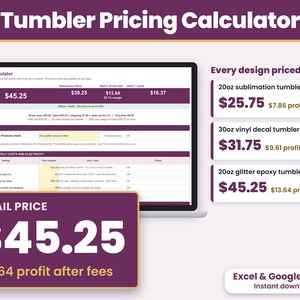
Download digitale
Tumbler Pricing Calculator Spreadsheet, Sublimation Epoxy Vinyl Tumbler Price Sheet, Excel and Google Sheets
15,94 €
-
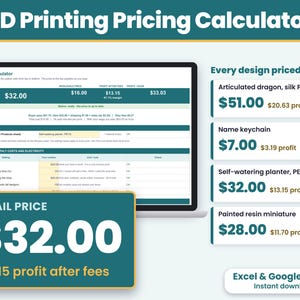
Download digitale
3D Print Pricing Calculator Spreadsheet, Filament Cost Calculator, 3D Printing Business, Excel and Google Sheets
13,67 €


