

Self Employed Tax Spreadsheet, Freelancer Tax Set Aside Tracker, Quarterly Estimated Taxes, 1099 Income, Expenses, Mileage Log, Excel
Punti salienti dell'articolo
Descrizione del venditore
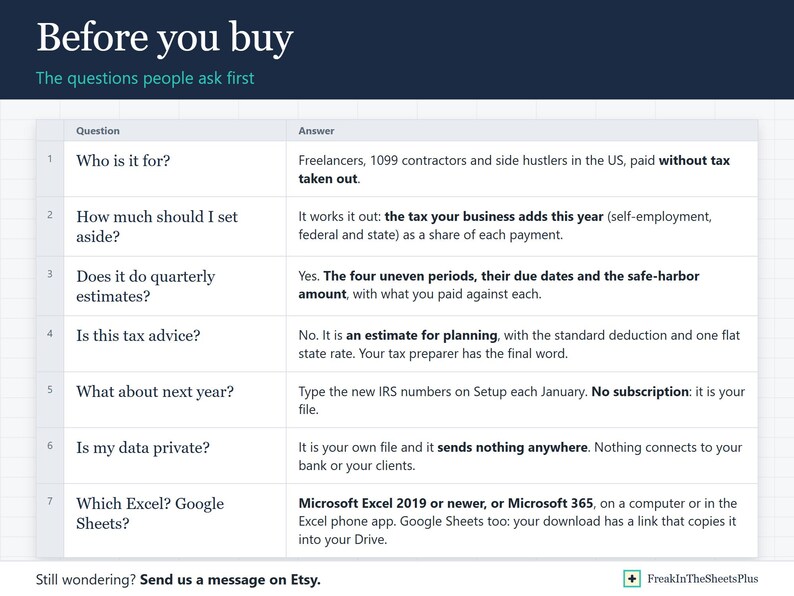
Freelancer Tax Set-Aside Tracker is a tax planner for people paid without tax taken out, in Excel. Type what clients pay you, what the work costs and the miles you drive, and it works out the share of every payment to set aside for tax and the four estimated payments that keep you clear of an underpayment penalty.
Made for freelancers, 1099 contractors and side hustlers in the US, including anyone with a day job on the side of it: type your job's wages and withholding once, and it counts only the tax your business adds.
WHAT IT DOES FOR YOU
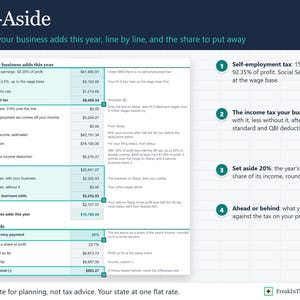
- Set aside from each payment: the tax your business adds this year (self-employment, federal and state) as a share of what clients pay you, rounded up. Each invoice shows the dollars to move, and a column records what you moved.
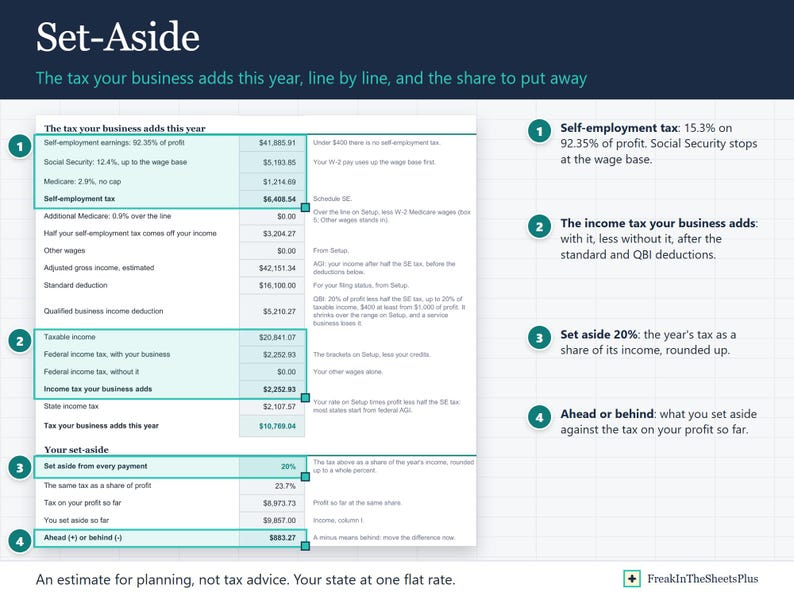
- Self-employment tax worked out the IRS way: 15.3% on 92.35% of profit, with Social Security stopping at the yearly wage base (less your own job wages; a spouse's pay is counted apart) and the extra Medicare tax over your filing status line.
- Federal income tax as the difference your business makes: your tax with it, less your tax without it, after the standard deduction, half of the self-employment tax and the qualified business income deduction (with the faster phase-out for a service business when you mark it one). Your state at one flat rate you type, on profit less half the self-employment tax, the way most states start from federal adjusted gross income.
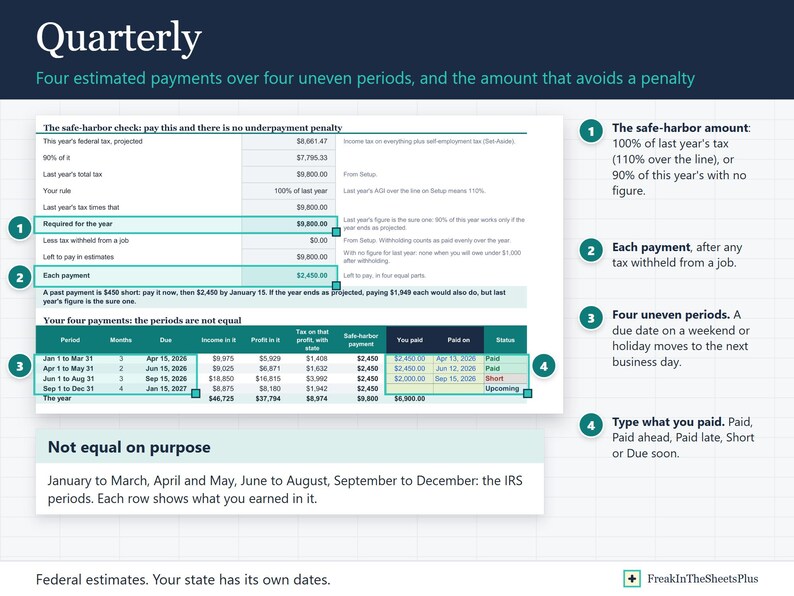
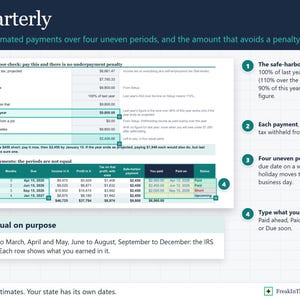
- Quarterly estimates: the four uneven IRS periods (January to March, April and May, June to August, September to December), each due date moved past weekends and holidays, and the safe-harbor amount: 100% of last year's tax (110% over the income line), or 90% of this year's when you leave last year blank, less tax withheld from a job. One line above the payments says what to do now: the next amount and date, a past payment that is short, or that no estimates are needed.
- Type what you paid and when, and each payment reads Paid, Paid late, Paid ahead, Short, Missed, Due soon or Upcoming. Pay more than one early and it counts toward the next ones, so the next amount due shrinks. A late payment fills the oldest open one first, the way the IRS counts it.
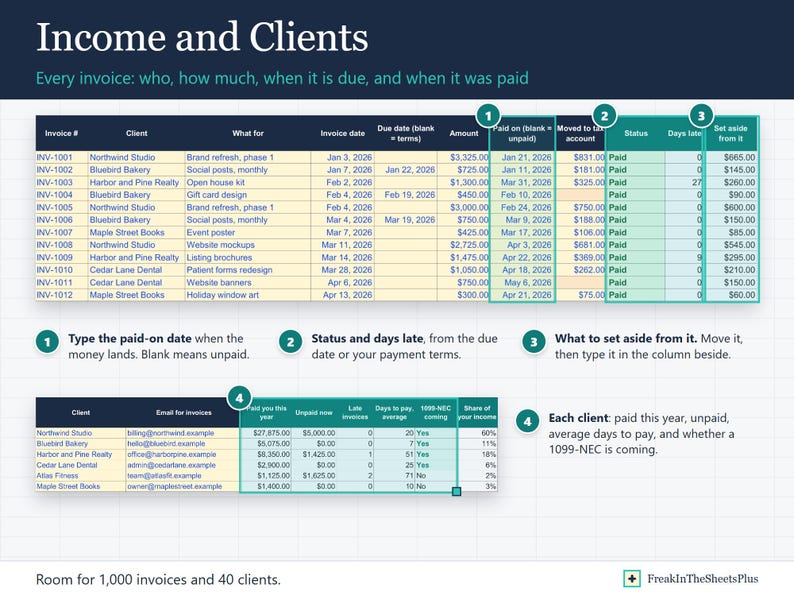
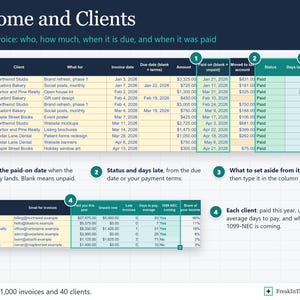
- Income by invoice: due date from your payment terms, Late with days late, Not due, or Paid on the day the money lands.
- Clients: what each paid this year, what is unpaid, average days to pay, and whether a 1099-NEC should be coming.
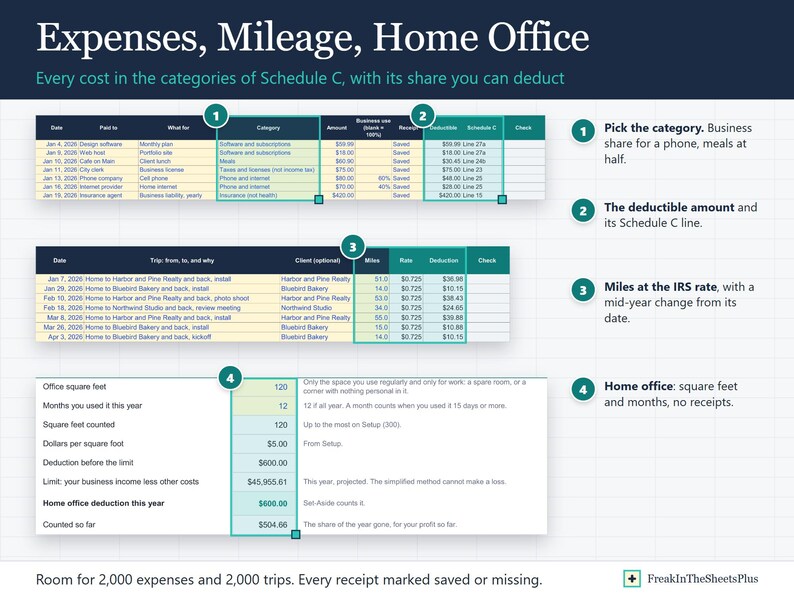
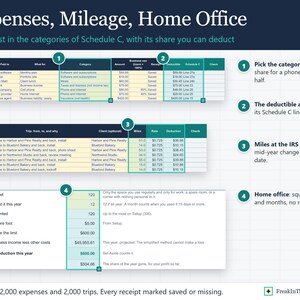
- Expenses in the categories of Schedule C, each with its line number, a business-use share (a phone you also use at home) and meals at half. Every receipt marked Saved or Missing. A one-off buy like a laptop counts once in the year's projection, not at your pace.
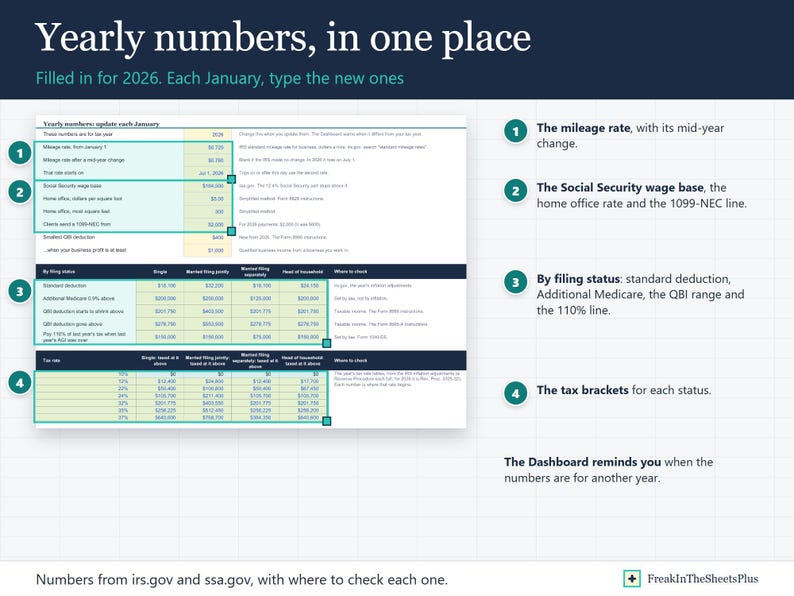
- Mileage at the IRS rate, with the mid-year rate change counted from its date.
- Home office by the simplified method: $5 a square foot, up to 300, with no receipts to keep.
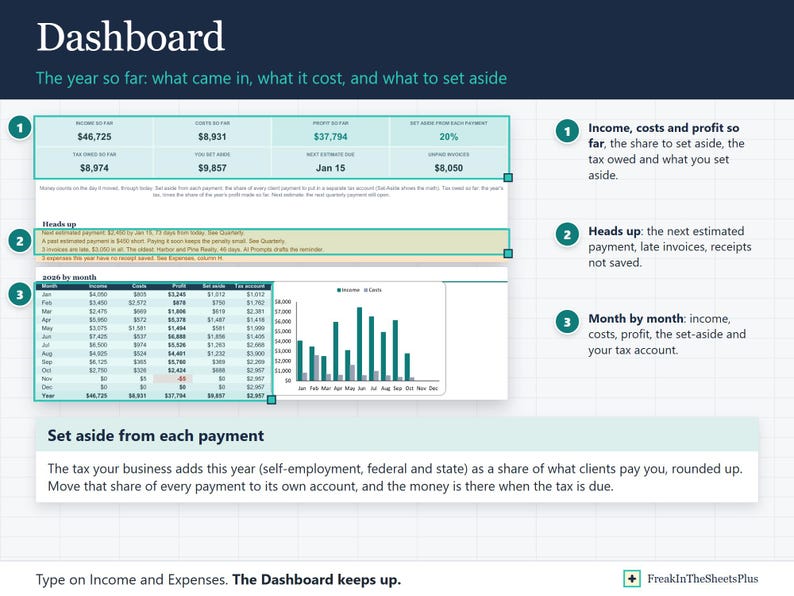
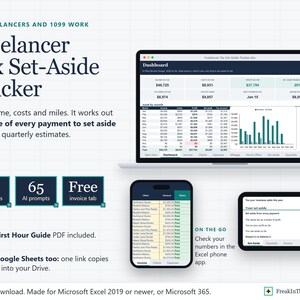
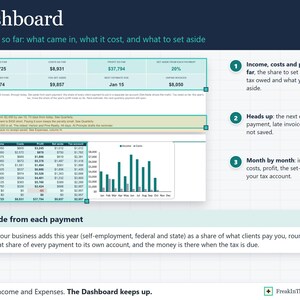
- Dashboard: income, costs and profit so far, the set-aside share, the tax owed and what you set aside, the next estimated payment, late invoices, receipts not saved, a month-by-month table with a chart, and your best clients.
- Ahead or behind: what you have set aside against the tax on your profit so far.
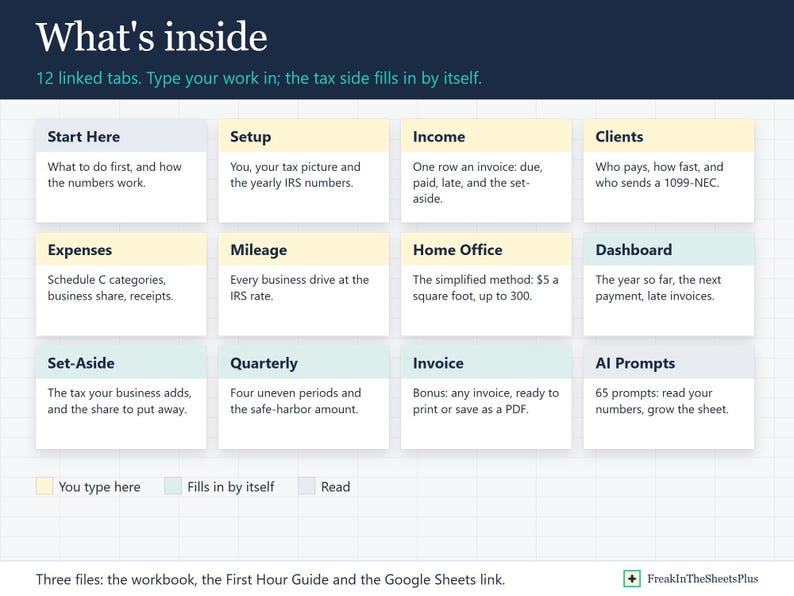
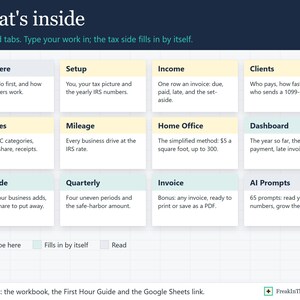
WHAT IS INSIDE (12 TABS)
Start Here, Dashboard, Income, Clients, Expenses, Mileage, Home Office, Set-Aside, Quarterly, Invoice, Setup, AI Prompts.
Room for 1,000 invoices, 40 clients, 2,000 expenses and 2,000 trips.
BONUS: INVOICE TAB
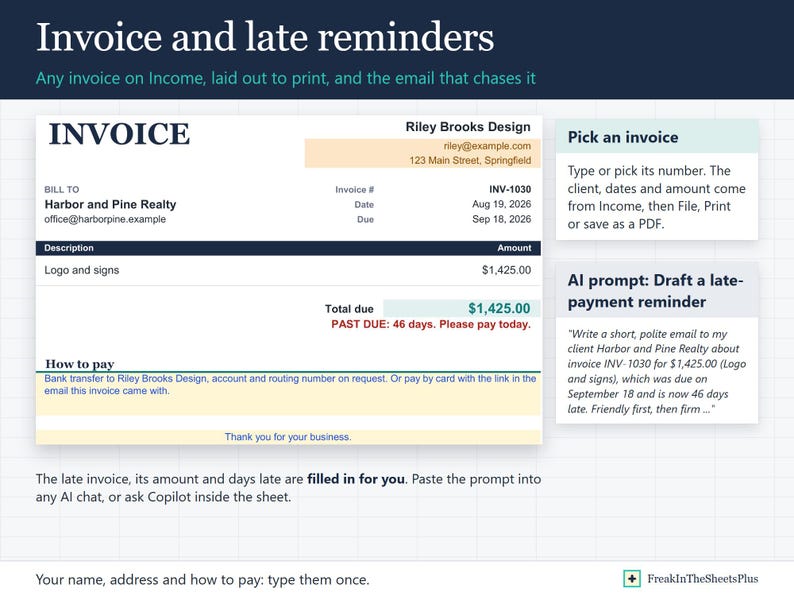
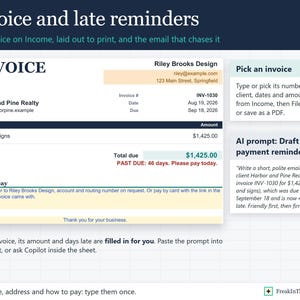
Pick any invoice from Income and it is laid out to print or save as a PDF: your name and how to pay, typed once, the client, the dates, the amount, and a past-due line with the days late when it is late.
65 COPY-PASTE AI PROMPTS, THREE WAYS
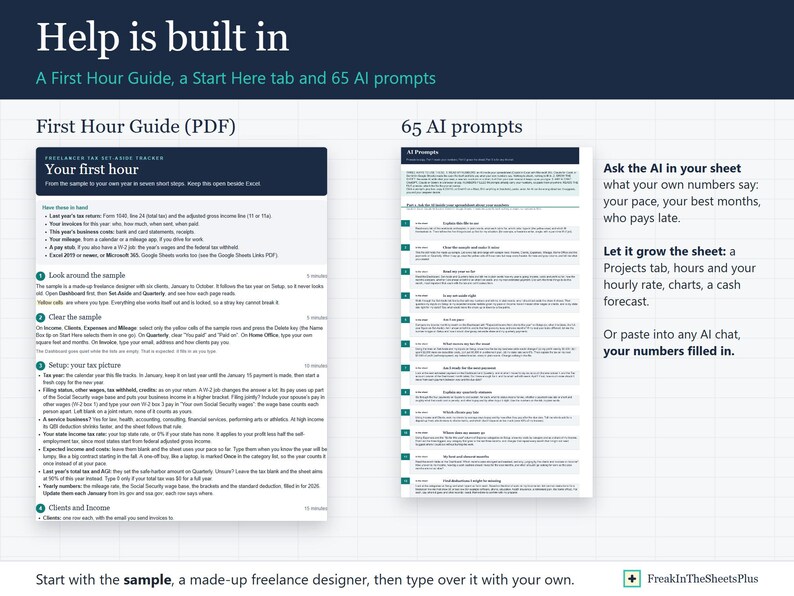
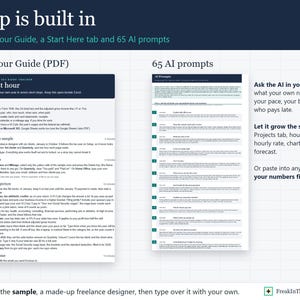
Ask the AI inside your spreadsheet (Copilot in Excel, Claude for Excel, Gemini in Google Sheets) what your own numbers say: 19 prompts read your year so far, your pace, your best and slowest months, what moves your tax the most, which clients pay late, whether your set-aside and your next payment are right, payments you forgot to move to your tax account, which client costs you the most in driving, and deductions you might be missing.
Let it grow the sheet: 14 prompts add what you need, built from your own rows so it keeps up as you type: hours and your hourly rate, a Projects tab, a Pay Yourself tab, subscriptions, a 90-day cash forecast, a proposals pipeline, a rate increase planner, a retirement estimate, a second business, charts and a monthly income goal.
Or any AI chat (ChatGPT, Claude or Gemini): 21 prompts already carry your numbers from the sheet (a late-payment reminder for your oldest late invoice, how much to set aside, your next quarterly payment, your year in plain words, how much you can pay yourself, what a rate raise would do, SEP-IRA or Solo 401(k), whether an S corp is worth it, a summary for your preparer, planning around one big contract, how long you could last if work stopped, an income summary for a lender or landlord, a W-2 job ending or starting, time off, what payment fees cost you, equal payments or the annualized method, a big purchase before year-end), and 11 read a file you attach (a bank or payment app export into rows, receipts, your 1099s, a full review of the year, pricing your next project, a plan for next year).
The AI tools are not included: each comes with its own plan, and Copilot in Excel needs Microsoft 365.
WHAT YOU GET
- Freelancer Tax Set-Aside Tracker.xlsx
- First Hour Guide (PDF): from the sample to your own year, step by step, and how the numbers work
- Google Sheets Links (PDF): one click copies the workbook into your Google Drive
This is an instant digital download. Nothing is shipped.
WORKS IN
Microsoft Excel 2019 or newer, or Microsoft 365, on a computer or in the Excel phone app.
Google Sheets too: the links PDF copies the workbook into your Google Drive.
GOOD TO KNOW
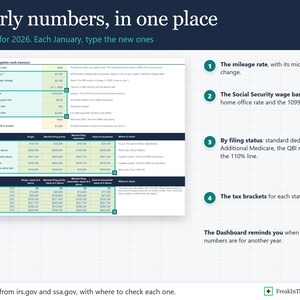
- Filled in for the 2026 tax year: the mileage rate, the Social Security wage base, standard deductions, tax brackets and the other yearly numbers are on Setup, with where to check each one. Each January, type the new ones. The Dashboard reminds you when they are for another year.
- Sample data (a made-up freelance designer and most of a year of invoices, costs and trips) shows how it works. Type over it, or clear it and start fresh.
- Nothing connects to your bank or your clients. You type or paste your payments, and an AI prompt can sort a list of expenses for you.
- The formulas are locked so they cannot break. The yellow cells are the ones you type in. Google Sheets does not lock them, so in Sheets type only in the yellow cells.
- For US federal tax, with your state at one flat rate. It uses the standard deduction, not itemized ones, and takes credits as one number you type. This file does arithmetic for planning; it is not tax or legal advice. Your tax preparer has the final word.
- For your own work. Please do not resell or share the files.
In caso di problemi con un ordine proteggeremo tutti i tuoi acquisti idonei. Vedi termini programma
OraPrezzo:17,08 €
Prezzo originale: 34,16 €
50% di sconto
L'offerta termina tra 11:49:28
Puoi fare un'offerta solo acquistando un singolo articolo
Consegna
Download istantaneo
I tuoi file saranno disponibili per il download una volta confermato il pagamento. Ecco come.
Gli articoli con download istantaneo non accettano resi, cambi o annullamenti. In caso di qualsiasi problema relativo all'ordine, contatta il venditore.
Descrizione del venditore
Specifiche
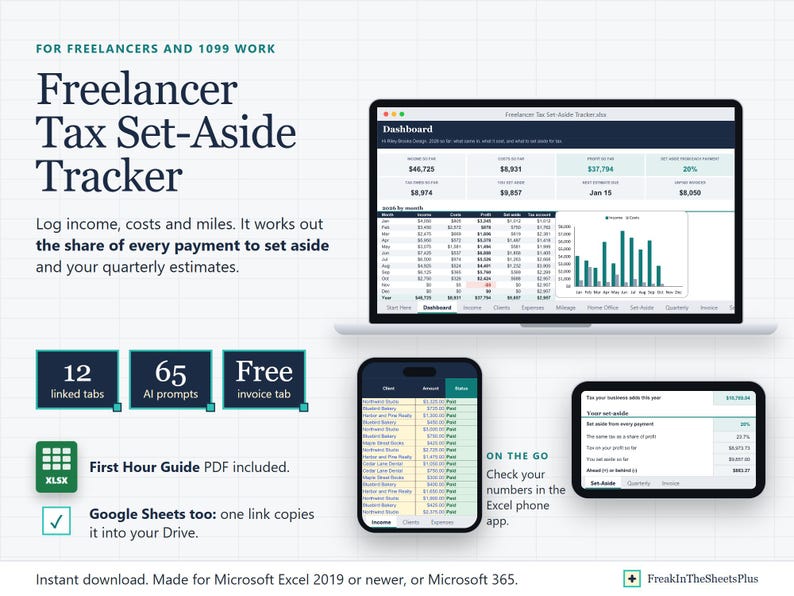
Freelancer Tax Set-Aside Tracker is a tax planner for people paid without tax taken out, in Excel. Type what clients pay you, what the work costs and the miles you drive, and it works out the share of every payment to set aside for tax and the four estimated payments that keep you clear of an underpayment penalty.
Made for freelancers, 1099 contractors and side hustlers in the US, including anyone with a day job on the side of it: type your job's wages and withholding once, and it counts only the tax your business adds.
WHAT IT DOES FOR YOU
- Set aside from each payment: the tax your business adds this year (self-employment, federal and state) as a share of what clients pay you, rounded up. Each invoice shows the dollars to move, and a column records what you moved.
- Self-employment tax worked out the IRS way: 15.3% on 92.35% of profit, with Social Security stopping at the yearly wage base (less your own job wages; a spouse's pay is counted apart) and the extra Medicare tax over your filing status line.
- Federal income tax as the difference your business makes: your tax with it, less your tax without it, after the standard deduction, half of the self-employment tax and the qualified business income deduction (with the faster phase-out for a service business when you mark it one). Your state at one flat rate you type, on profit less half the self-employment tax, the way most states start from federal adjusted gross income.
- Quarterly estimates: the four uneven IRS periods (January to March, April and May, June to August, September to December), each due date moved past weekends and holidays, and the safe-harbor amount: 100% of last year's tax (110% over the income line), or 90% of this year's when you leave last year blank, less tax withheld from a job. One line above the payments says what to do now: the next amount and date, a past payment that is short, or that no estimates are needed.
- Type what you paid and when, and each payment reads Paid, Paid late, Paid ahead, Short, Missed, Due soon or Upcoming. Pay more than one early and it counts toward the next ones, so the next amount due shrinks. A late payment fills the oldest open one first, the way the IRS counts it.
- Income by invoice: due date from your payment terms, Late with days late, Not due, or Paid on the day the money lands.
- Clients: what each paid this year, what is unpaid, average days to pay, and whether a 1099-NEC should be coming.
- Expenses in the categories of Schedule C, each with its line number, a business-use share (a phone you also use at home) and meals at half. Every receipt marked Saved or Missing. A one-off buy like a laptop counts once in the year's projection, not at your pace.
- Mileage at the IRS rate, with the mid-year rate change counted from its date.
- Home office by the simplified method: $5 a square foot, up to 300, with no receipts to keep.
- Dashboard: income, costs and profit so far, the set-aside share, the tax owed and what you set aside, the next estimated payment, late invoices, receipts not saved, a month-by-month table with a chart, and your best clients.
- Ahead or behind: what you have set aside against the tax on your profit so far.
WHAT IS INSIDE (12 TABS)
Start Here, Dashboard, Income, Clients, Expenses, Mileage, Home Office, Set-Aside, Quarterly, Invoice, Setup, AI Prompts.
Room for 1,000 invoices, 40 clients, 2,000 expenses and 2,000 trips.
BONUS: INVOICE TAB
Pick any invoice from Income and it is laid out to print or save as a PDF: your name and how to pay, typed once, the client, the dates, the amount, and a past-due line with the days late when it is late.
65 COPY-PASTE AI PROMPTS, THREE WAYS
Ask the AI inside your spreadsheet (Copilot in Excel, Claude for Excel, Gemini in Google Sheets) what your own numbers say: 19 prompts read your year so far, your pace, your best and slowest months, what moves your tax the most, which clients pay late, whether your set-aside and your next payment are right, payments you forgot to move to your tax account, which client costs you the most in driving, and deductions you might be missing.
Let it grow the sheet: 14 prompts add what you need, built from your own rows so it keeps up as you type: hours and your hourly rate, a Projects tab, a Pay Yourself tab, subscriptions, a 90-day cash forecast, a proposals pipeline, a rate increase planner, a retirement estimate, a second business, charts and a monthly income goal.
Or any AI chat (ChatGPT, Claude or Gemini): 21 prompts already carry your numbers from the sheet (a late-payment reminder for your oldest late invoice, how much to set aside, your next quarterly payment, your year in plain words, how much you can pay yourself, what a rate raise would do, SEP-IRA or Solo 401(k), whether an S corp is worth it, a summary for your preparer, planning around one big contract, how long you could last if work stopped, an income summary for a lender or landlord, a W-2 job ending or starting, time off, what payment fees cost you, equal payments or the annualized method, a big purchase before year-end), and 11 read a file you attach (a bank or payment app export into rows, receipts, your 1099s, a full review of the year, pricing your next project, a plan for next year).
The AI tools are not included: each comes with its own plan, and Copilot in Excel needs Microsoft 365.
WHAT YOU GET
- Freelancer Tax Set-Aside Tracker.xlsx
- First Hour Guide (PDF): from the sample to your own year, step by step, and how the numbers work
- Google Sheets Links (PDF): one click copies the workbook into your Google Drive
This is an instant digital download. Nothing is shipped.
WORKS IN
Microsoft Excel 2019 or newer, or Microsoft 365, on a computer or in the Excel phone app.
Google Sheets too: the links PDF copies the workbook into your Google Drive.
GOOD TO KNOW
- Filled in for the 2026 tax year: the mileage rate, the Social Security wage base, standard deductions, tax brackets and the other yearly numbers are on Setup, with where to check each one. Each January, type the new ones. The Dashboard reminds you when they are for another year.
- Sample data (a made-up freelance designer and most of a year of invoices, costs and trips) shows how it works. Type over it, or clear it and start fresh.
- Nothing connects to your bank or your clients. You type or paste your payments, and an AI prompt can sort a list of expenses for you.
- The formulas are locked so they cannot break. The yellow cells are the ones you type in. Google Sheets does not lock them, so in Sheets type only in the yellow cells.
- For US federal tax, with your state at one flat rate. It uses the standard deduction, not itemized ones, and takes credits as one number you type. This file does arithmetic for planning; it is not tax or legal advice. Your tax preparer has the final word.
- For your own work. Please do not resell or share the files.
-
Tipo di articoloDownload digitale
-
Tipologia/e di file digitale2 PDF, 1 altro file
-
LinguaIl testo in questo download potrebbe essere in un'altra lingua
In caso di problemi con un ordine proteggeremo tutti i tuoi acquisti idonei. Vedi termini programma
Ti presentiamo il venditore

Altro da questo negozio
-
Download digitale
Wedding Budget Planner Spreadsheet, Guest List and RSVP Tracker, Vendor Payment Tracker, Seating Chart, Checklist, Excel and Google Sheets
Prezzo scontato 17,08 €
Prezzo originale 34,16 €
-
Download digitale
Debt Payoff Planner Excel, Debt Snowball vs Avalanche Calculator, Credit Card and Loan Payoff Tracker, Debt Free Countdown, Google Sheets
Prezzo scontato 14,80 €
Prezzo originale 29,60 €
-
Download digitale
Home Bakery Pricing Calculator Spreadsheet, Cake and Cookie Pricing, Recipe Cost, Bakery Order Tracker, Cottage Bakery Business, Excel
Prezzo scontato 14,80 €
Prezzo originale 29,60 €
-
Download digitale
Short Term Rental Spreadsheet, Vacation Rental Profit Tracker, Occupancy, Bookings, Owner Statement, Works for Airbnb and Vrbo, Excel
Prezzo scontato 22,78 €
Prezzo originale 45,56 €
-
Download digitale
Foglio di calcolo Excel per la pianificazione finanziaria degli adolescenti, budget per la paghetta e il primo stipendio, strumento per monitorare gli obiettivi di risparmio, lezioni su debiti e carte di credito, Fogli Google
Prezzo scontato 14,80 €
Prezzo originale 29,60 €
-
Download digitale
Foglio di calcolo Excel per proprietari di immobili, monitoraggio degli immobili in affitto, registro degli affitti e dei pagamenti in ritardo, imposte (Allegato E), ammortamento, analizzatore di contratti di locazione.
Prezzo scontato 28,48 €
Prezzo originale 56,95 €


