







Printables to Save You Time
お知らせ
最終更新日: 2025年 08月 13日
レビュー
4.9
(211)
商品のレビュー平均
すべての評価について、最新レビュー重視の平均評価基準を採用して、この数字を計算しています。最新の体験を反映するため、評価の価値は毎年半減する仕組みとなっています。
読み込み中
-

-

-
-

-
-
-
-

-
-
Jill さんのレビュー(2026年 08月 22日)
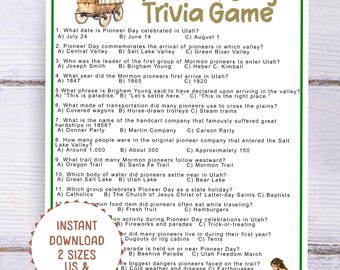
星 5 個のうち 5 個These are simple questions, but there are some harder ones too so no one got a perfect score. Used this twice this July with family members. I had a prize - a UTAH TRUFFLE - for the winner. Fun way to celebrate Pioneer Day. If your party is all adults who know a ton about the Mormon Pioneers, the quiz might be too easy, but for a younger crowd, this will be perfect.
読み込み中
BeeBusyPrintables について
セールス
3,508
Etsy ショップ創設年: 2024
ショップメンバー
-

Pam Wattenbarger
オーナー
I’m a former teacher and curriculum director who knows how valuable it is to find the perfect printable. My goal is to make your life easier and save you time, hassle, and money.
ショップポリシー
最終更新日:
利用可能な支払い方法
Etsy ギフトカードと Etsy ポイントがご利用可能です
返品&交換
返品&交換の可否は商品詳細をご確認ください。
その他の情報
最終更新日:
2025年 12月 17日
よくある質問
How to download a file
You'll find your files under Purchases and Reviews when logged in on a browser. If you checked out as a guest, check your email for a download link.
Instructions:
Log into your Etsy account (on a browser, not the Etsy app).
Click "Your Account" (top right), then select "Purchases and Reviews."
Find your order and click the “Download Files” button next to it.
You'll be taken to the Downloads page where you can download all included files.
Note: If you checked out as a guest, Etsy sends a link to your email address. Be sure to check your inbox and spam folder for an email from Etsy Downloads.
Why can't I download my file?
Possible Reasons & Fixes:
1. You checked out as a guest
Digital downloads are only stored in your Etsy account — so if you checked out without logging in, the files won’t appear under “Purchases.”
✅ Fix: Check your email (the one used at checkout) for a message from transaction@etsy.com titled “Download your files.” That link is how you’ll access your purchase.
2. You’re using the Etsy App
Unfortunately, Etsy does not support file downloads via the mobile app.
✅ Fix: Open Etsy.com in a browser (Safari, Chrome, etc.) on your phone, tablet, or computer, log in, then go to:
Your Account > Purchases and Reviews > Download Files
Why Can't I download my file? continued
3. Your payment is still processing
Sometimes Etsy needs a few minutes to process your payment. If it's still processing, the download link won’t appear yet.
✅ Fix: Wait a few minutes and refresh the page. If it takes longer than 30 minutes, reach out to Etsy Support for details about payment.
Checking out with Apple ID & Having Trouble Finding the File
Downloading from Etsy After Using Apple ID (Sign in with Apple):
You can download files — but only if:
You used "Sign in with Apple" while logged into an Etsy account.
You didn’t use Apple’s “Hide My Email” feature (or if you did, you still have access to the masked email inbox).
⚠️ Common Issue:
If you used Apple's “Hide My Email” feature and didn’t link it to a full Etsy account, you may have trouble finding your download.
✅ Fixes:
Search your inbox for emails from transaction@etsy.com.
If you can’t access the hidden email or didn’t create a full Etsy account, you’ll need to message me directly to retrieve your files.
Can I download files using the Etsy app?
Etsy’s mobile app doesn’t support downloads. Use a browser (like Safari or Chrome) on your phone, tablet, or computer instead.
Can I print this at home or do I need a professional printer?
The files are optimized for both. You can print at home or use a professional printer, like Staples or Kinkos, whichever you prefer. You can upload the file to their website or take it in on a USB drive.
What if I accidentally deleted or lost my files?
No worries! You can re-download them anytime from your Etsy account. They never expire.
Can I edit the files?
Can you edit the files?
That depends on the format. Most files are noneditable pdfs UNLESS they are tagged as the following:
CANVA FILES:
If the file says "edit in Canva" or "Canva template." it may be edited using a free Canva account.
EDITABLE PDF
Some files are marked as "editable pdf." These files allow the text to be edited in pdf software such as adobe acrobat reader.
With Adobe Acrobat Reader (Free or Pro):
Open the PDF in Adobe Acrobat Reader.
You can click into the form fields and type.
FOR USE IN APPS SUCH AS GOODNOTES , NOTABILITY, or APPLE BOOKS:
For forms, tap on fields to fill them in.
Use the markup tool to draw or type.
Can I use the files for commercial purposes? Can I use the files more than once?
Can I use the files for commercial purposes?
No, the files are for personal or classroom/daycare/preschool/Sunday School, etc. use only.
Can I use the files more than once?
Yes! You can print it as many times as you like for personal use.