



Smart spreadsheets for service businesses
All items
Announcement
Last updated on 29 Sept, 2026
About SmartServiceTools
Sales
3
On Etsy since 2018
-
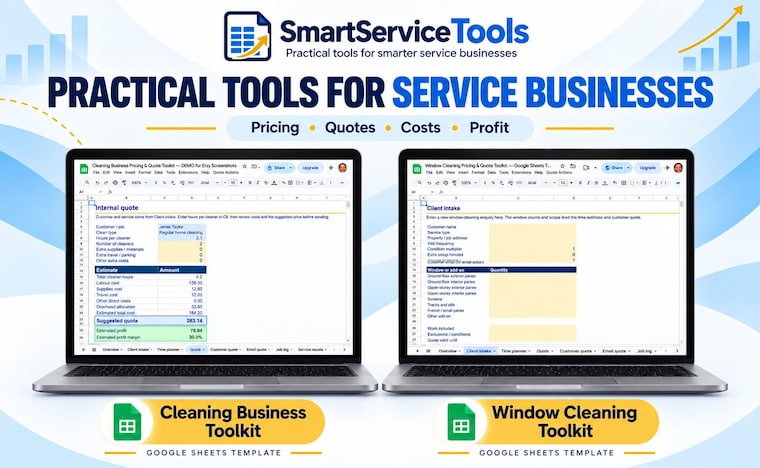 Practical Google Sheets tools for pricing, quoting and tracking profit.
Shop members
-

Angus
Owner
Role: Owner & Designer I create practical Google Sheets tools to help small service businesses price jobs, prepare quotes, track costs and protect profit. Each toolkit is designed for simple, flexible, real-world use.
Shop policies
Last updated on 11 Apr, 2018
Digital downloads
Instant downloads
Your files will be available to download once payment is confirmed. Here's how.
Made-to-order downloads
I’ll create your items after purchase and you’ll receive an email when the files are ready to download. The time I need to complete these items can vary. Contact me if you have questions.
Payment options
Secure options
Accepts Etsy Gift Cards and Etsy Credits
Etsy keeps your payment information secure. Etsy shops never receive your credit card information.
Returns & exchanges
See item details for return and exchange eligibility.
Cancellations
Cancellations: not accepted
Please contact the seller if you have any problems with your order.
More information
Last updated on
17 Dec, 2025
Frequently asked questions
What kind of paper do you reccomend for printing
Heavyweight, matte photo paper works great for all of my printables. Staples stores carry a great house brand that's inexpensive and high quality. If you prefer a semi-gloss or glossy look, glossy photo paper will work well with my photographic printables.
** Be sure to disable automatic color correction in your print settings. If you're using a professional print service, please instruct them not to apply color correction. This is particularly important with my animal prints on white backgrounds. **
Where can I download my purchased files?
Instant delivery! Your purchased files are available automatically once payment has cleared at http://www.etsy.com/your/purchases. If you need another size or are having issues downloading, please send me a convo and I'll help ASAP.
* Please note that the Etsy app on your mobile or tablet devices does not allow download functionality. You can still download your files to your device, though, by opening up your Etsy account in your device's internet BROWSER and navigating to You > Purchase and Reviews.
Where did you get your frames from in the listing photos?
These frames are from Amazon -
Check out these links to the frames
https://amzn.to/2H44tw8
https://amzn.to/2EL377x
https://amzn.to/2H2ppDL
How do I print at Staples stores (US and Canada customers)
I've had success with quality printing at Staples, where you can get very inexpensive same day prints if ordering before 2 PM (with a small rush fee). For 4x6, 5x7 or 8x10 prints, select their "copy and print services - color" option. Select the 110lb. white cover/card stock option for best results. The current price (in USD) as of March 31, 2017 is just 67 cents per print.
To print larger sizes, select the Same Day poster option. Their available sizes are rather limited - 12x18", 18x24" and 24x36". What's nice is that you have some paper options - I recommend going with their super heavyweight 140 lb. matte finish option, or the semi-gloss 140 lb. medium sheen option.
How do I print at FedEx Kinko's stores (U.S. and Canada customers)
To print 8x10 files at FedEx Kinko's, upload your file using the utility on their website. Once uploaded, you may receive a message stating "this file contains a non-standard print size," so you'll want to click the "review options" button. Select "Letter - 8.5x11" for your print size. This will enlarge the 8x10 image slightly since FedEx automatically scales to fill the page. Then, continue on to your print options. The only thing you have to do here is select your paper. Under "Paper Selection," choose "Card and Cover Stocks" and then "Ultra Bright White (Card)" for best results.
To print 11x14" files, select "Tabloid - 11x17" for the print size and 80lb. laser for the paper selection.
Poster sizes are 16x20, 18x24, 22x28 & 24x36.
How do I pront at Walgreens store's (U.S. customers)
Walgreens is my favorite location for same-day pickup of prints/posters in 11x14, 12x18, 16x20, 20x30 and 24x36 sizes. Their paper texture for posters is a nice satin - not quite matte, but not slippery smooth/gloss either. Walgreens often has coupons for photo printing, so check the site before purchasing online. My local Walgreens here in New Hampshire has my posters ready within 30 minutes of ordering! Their 8x10 prints also look great, though the only paper option is glossy paper for same-day pickup.
How do I print at Cosco?
The two main things to remember with Costco photo printing is 1.) Select "lustre" INSTEAD of "glossy" for paper texture, and 2.) Do NOT check the "autocorrect" box when presented. The autocorrect option must remain OFF for the best results.