




Hello! 😊 I've returned with more energy and creativity in 2025. Revamping my shop and myself! I’m persistently crafting designs that satisfy my admirers. Thanks for your love & support—I’m excited to reach five more people!
justArrived is taking a short break
Loading
Reviews
No reviews in the last year
Loading
-

Cele on Nov 12, 2017
5 out of 5 starsItem exactly as described. Owner is very friendly and most helpful. I will definitely be returning to this shop.
-

Häberle on Oct 29, 2017
5 out of 5 starsBeautiful mandalas..i also had a custom logo done for my buisness..brilliant work..very professional and will use him again.
-

-
-

-

-
About justArrived
Sales
79
On Etsy since 2017
Etsy automatically translates most text on the site to your preferred language.
See in original language
-
-
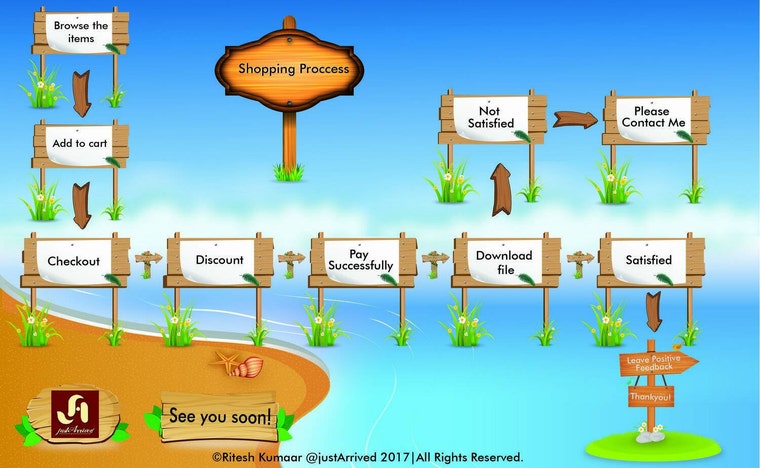 Ease of access.
 -
 Offer for my precious clients
Shop about video description
Shop members
-

Ritesh Kumaar.
Owner, Designer
I love to stay busy. I enjoy all sorts of crafts and designing process.
Shop policies
Last updated on Jul 16, 2019
Shipping
See item details for estimated arrival times.
Customs and import taxes
Buyers are responsible for any customs and import taxes that may apply. I'm not responsible for delays due to customs.
Digital downloads
Instant downloads
Your files will be available to download once payment is confirmed. Here's how.
Payment options
Secure options
Accepts Etsy Gift Cards and Etsy Credits
Etsy keeps your payment information secure. Etsy shops never receive your credit card information.
Returns & exchanges
See item details for return and exchange eligibility.
Cancellations
Cancellations: not accepted
Please contact the seller if you have any problems with your order.
Privacy policy
More information
Last updated on
Dec 17, 2025
Frequently asked questions
Sizing details
Since this is a Digital vector Graphics, Size doesn't matter if you are using any vector file extension like SVG, EPS, AI, DXF. But if you are using JPEG, PNG & PDF then sizes are generally in high resolution and enough for personal use. More than 300 DPI or PPI.
Do you customize Designs?
Yes, I do customization for personal use.
If I fall into trouble with items purchased, will you help me out?
Of course,
Yes!! I'd love to hear from your side. Your satisfaction is on my priority.
Please feel free to message me and I will help you out in the best way that I can.
Oops! I didn't check my software for SVG capability, What should I do??
Well, Don't worry. First of all I generally mention all the file type that you will get after purchasing my items. But I can understand you might have forgotten or didn't aware of all kind of softwares that are compatible with the type of file extension. Here is a list of file extensions with compatible software so you can find your all digital files useable.....
*JPEG
*SVG
*PNG
*PDF
*Ai
*EPS
*SVG
Corel Draw, Adobe softwares (Photoshop, illustrator, lightroom, InDesign etc.) Inkscap, Make the cut, AutoCAD.
These are the softwares that support all file types what I provide.
How to open a Zip/Compressed/ .Rar/.WinRar - Mac & PC
Ensure you have a decompression software like WinRAR or 7-Zip installed. If not, download them here:
🔗 WinRAR: Download (http://www.win-rar.com/download.html?&L=0)
🔗 7-Zip: Download (http://www.7-zip.org/download.html)
How to Unzip Files:
📌 Mac: Double-click the file to extract it.
📌 PC: Drag the .zip file to your desktop, then double-click or right-click to open.
Need a quick, software-free solution? Try Funzip (https://funzip.net) for instant online extraction!
🎥 Watch my tutorial: https://www.youtube.com/watch?v=AVzBtVpAhW0
How to edit a vector file after purchasing/Downloading?
To edit a vector file, you need a vector graphics editor like Adobe Illustrator or Inkscape to view and modify any purchased/downloaded file.
Editing in Adobe Illustrator
1️⃣ Open the AI/EPS file in Illustrator.
2️⃣ Ungroup elements using Object > Ungroup (Ctrl+Shift+G) or use the Direct Selection Tool (A).
3️⃣ To modify shapes or paths, select their anchor points with the Direct Selection Tool.
4️⃣ Use various vector editing tools to transform and customize your design.
This allows full flexibility to personalize your vector files!
If you still need help, feel free to connect with me—I’ll be more than happy to assist! 😊
Seller details
Captcha failed to load. Try using a different browser or disabling ad blockers.