


Catering Spreadsheet Template Excel Google Sheets | Private Chef Event Costing, Menu Pricing, Quote Builder and Booking Tracker
Price:$18.99
Star Seller
Star Sellers have an outstanding track record for providing a great customer experience—they consistently earned 5-star reviews, shipped orders on time, and replied quickly to any messages they received.
You can only make an offer when buying a single item
Star Seller. This seller consistently earned 5-star reviews, shipped on time, and replied quickly to any messages they received.
Highlights
YOU ARE NOT UNDERPRICING THE FOOD. YOU ARE UNDERPRICING THE LABOUR.
Ask a caterer why a big event lost money and they will tell you the beef went up. It almost never did.
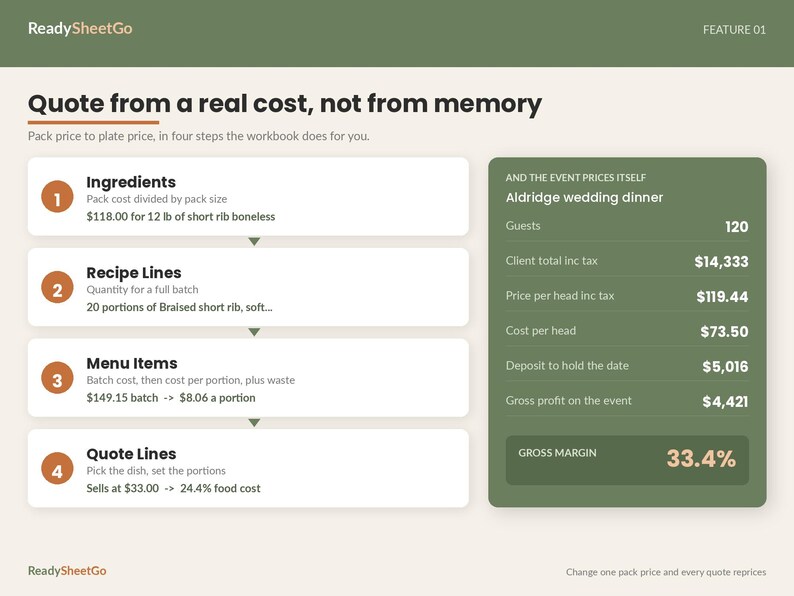
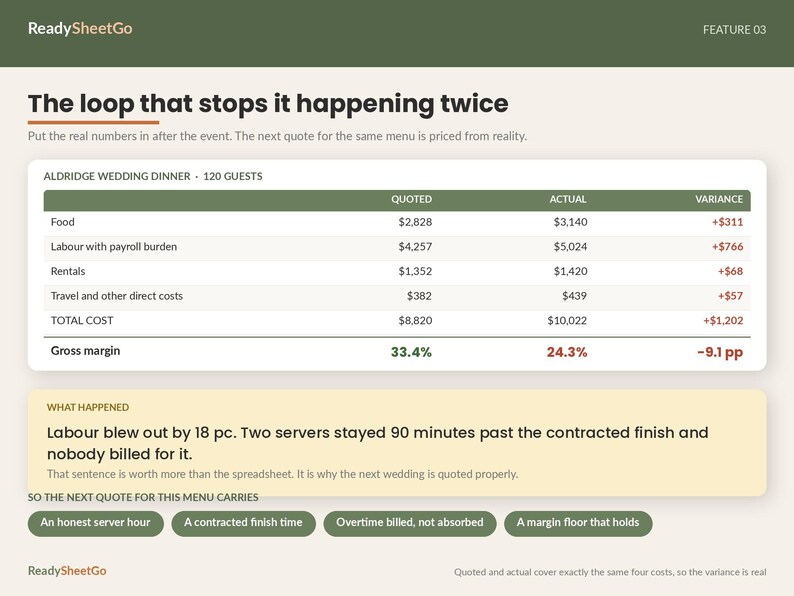
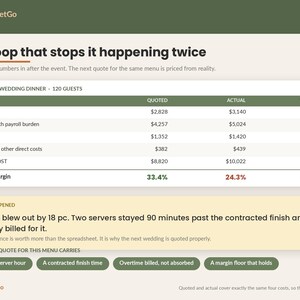
Here is a real event out of the sample file in this workbook. A wedding dinner, 120 guests, quoted at a 33.4 per cent gross margin. Food came in 11 per cent over, which anybody would have shrugged at. Labour came in 18 per cent over, because two servers stayed ninety minutes past the contracted finish and nobody billed for it. That is 766 dollars. The event actually delivered 24.3 per cent.
9.1 points of margin, on one job, and the quote never saw it coming.
This workbook is built to see it coming.
WHAT IT DOES
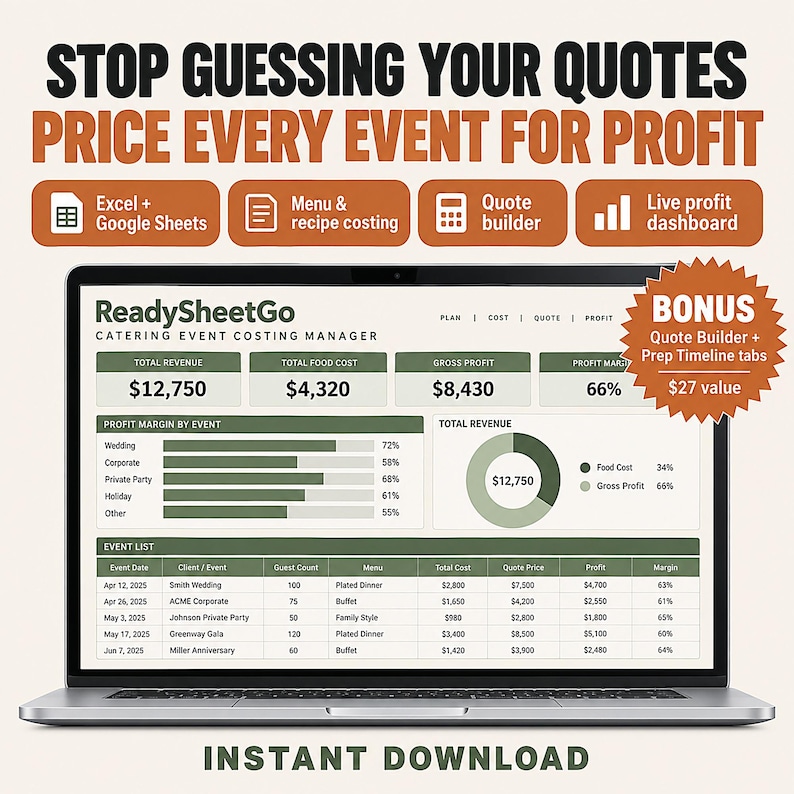
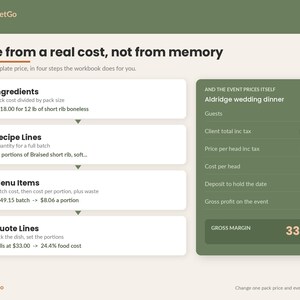
Prices your food from the bottom up. Enter what a pack costs and how much is in it, once. The workbook works out the unit cost, the batch cost, the cost per portion, the waste-adjusted true cost, the margin on every dish and the food cost percentage, and flags anything priced too thin. Change one pack price and every dish, every quote and every margin in the file moves with it.
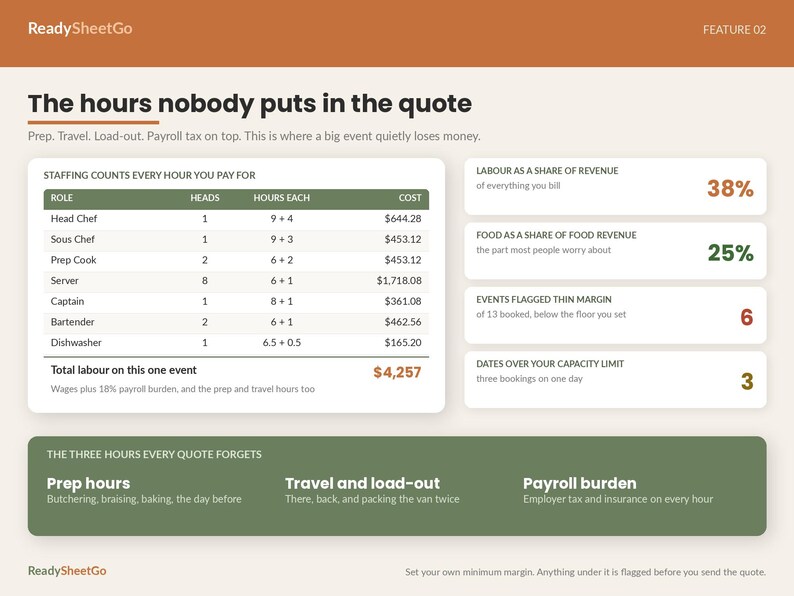
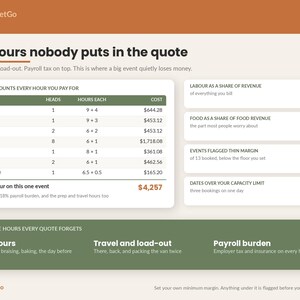
Counts every hour you will actually pay for. Not just service hours. Prep. Travel. Load-out. The extra body you always end up needing. Then it adds employer taxes and insurance on top, because the wage is not the cost.
Then it tells you the truth about the quote before you send it. Cost per head against price per head. Gross margin against the floor you set. A THIN MARGIN flag on anything that falls short, and an OVER CAPACITY warning when you have said yes to a third event on a Saturday you can only physically cover twice.
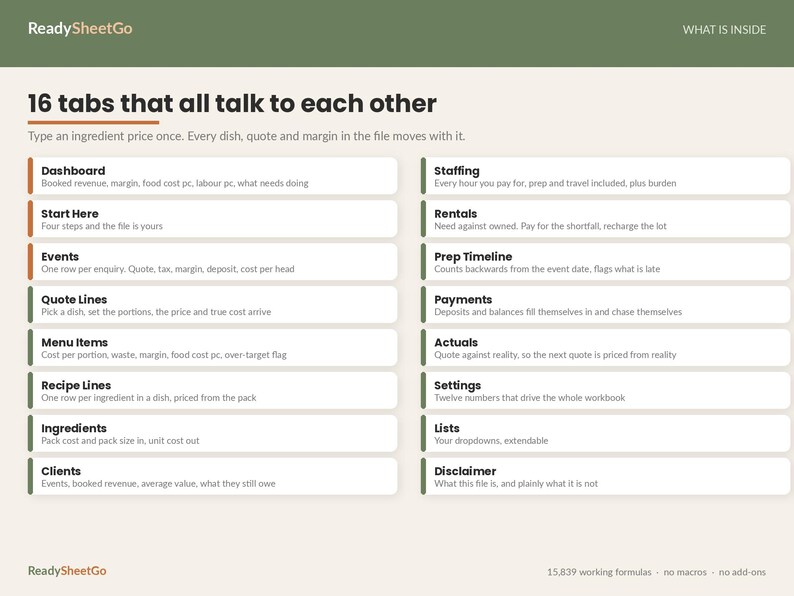
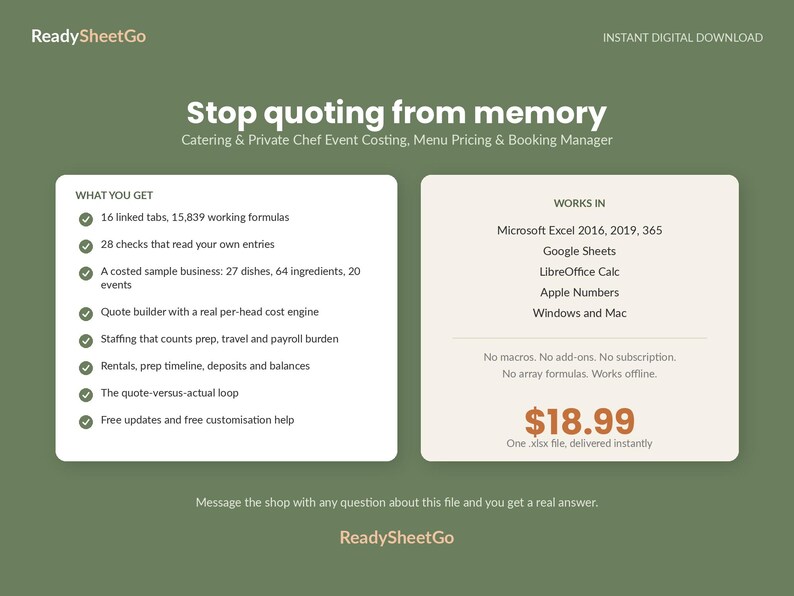
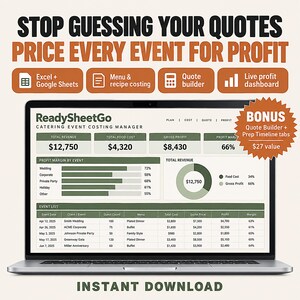
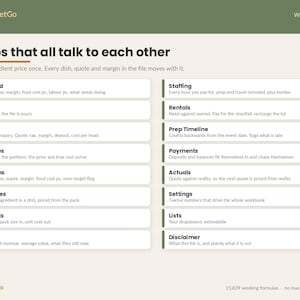
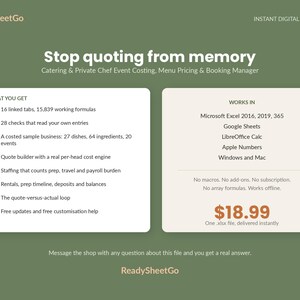
WHAT IS INSIDE - 16 LINKED TABS, 15,839 WORKING FORMULAS, 28 DATA CHECKS
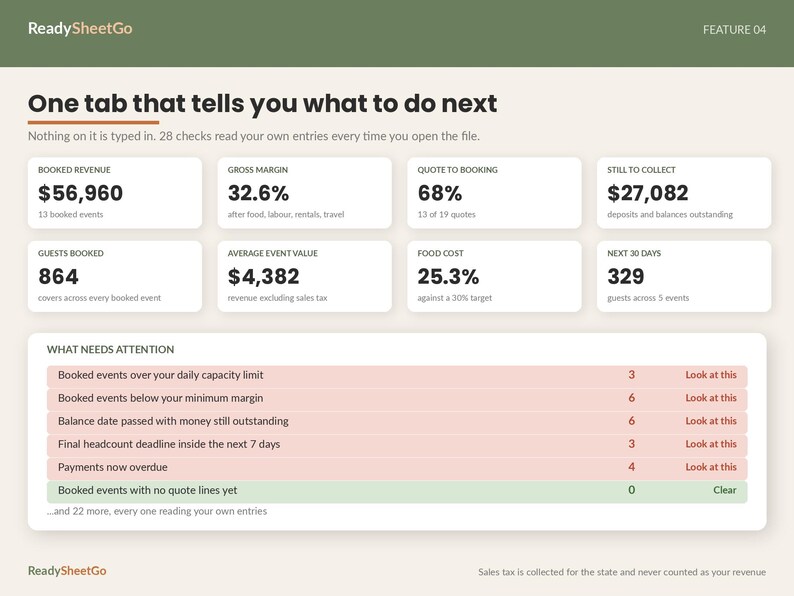
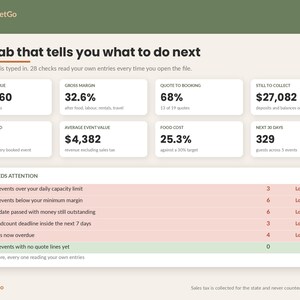
Dashboard - booked revenue, gross margin, food cost percentage, labour percentage, quote to booking rate, deposits banked, money still to collect, guests and events in the next thirty days, and then 28 checks that read your own entries and tell you what needs doing. Nothing on this tab is typed in
Events - one row per enquiry. Type the ID, the client, the date, the guest count, the service style and the status. Everything else calculates: food revenue, food cost, labour, rentals, travel, subtotal, service charge, sales tax, client total, revenue excluding tax, total cost, gross profit, margin, cost per head, price per head, deposit due, money received, still outstanding, balance due date, final headcount deadline
Quote Lines - the quote itself. Pick a Dish ID and the menu price and the true cost per portion arrive on their own. Leave the Dish ID blank for a one-off line and fill the two custom columns
Menu Items - dish, course, portions per batch, batch cost, cost per portion, your own waste override, true cost, menu price, margin per portion, food cost percentage, dietary tags, allergens, prep station
Recipe Lines - one row per ingredient in a dish, with the quantity for a full batch, priced straight from the Ingredients tab
Ingredients - your buying list. Pack cost and pack size in, cost per unit out, with the supplier and the allergen against every line
Clients - events, booked revenue, average booked value and what each one still owes you
Staffing - role, headcount, on-site hours, prep and travel hours, hourly rate, payroll burden, total labour cost, and guests per staff member so you can sanity check the ratio before the day
Rentals and Equipment - what you need against what you already own. You only pay for the shortfall, and you decide per line what gets recharged and at what markup. Delivery dates, return-by dates, damage deposits, and a flag on anything still out past its return date
Prep Timeline - task, station, assignee, how many days before the event, and it works the do-by date out for you. Change the event date and every task moves with it. Anything late is raised as OVERDUE
Payments - deposits, progress payments, balances and refunds. The amount due fills itself in from the event. It tells you what is Paid, Part paid, Due or OVERDUE, and how many days late
Actuals vs Quote - the loop. Quoted against actual on food, labour, rentals and travel and other direct costs, the variance on each, and the margin you really made. It will not report a total until you have filled in all four, because a row with three of the four would tell you that you beat the quote
Settings, Lists, Start Here and Disclaimer - twelve numbers that drive the workbook, your dropdowns, a four-step setup and plain language about what this file is and is not
THE THING NO OTHER CATERING SHEET DOES
Catering software runs a hundred dollars a month and is built for a twenty-person operation. Every catering spreadsheet on the market is a quote form. A quote form tells you what you charged. It does not tell you what it cost.
This one closes the loop. After the event you put the real food, labour, rental and travel figures in, and the quoted and actual sides compare exactly the same four costs, so the variance is real and not an artefact. Then there is a column headed What Happened, for one sentence in your own words.
That sentence is worth more than the spreadsheet. It is why the next wedding is priced properly.
BUILT FOR
Solo caterers and private chefs. Personal chefs cooking in clients' homes. Home-based and cottage-food catering businesses. Drop-off and corporate lunch caterers. Anyone doing two to twenty events a month who is currently quoting from memory and finding out afterwards.
Pairs with our Home Bakery Pricing Calculator and our Farmers Market and Craft Fair Vendor Tracker if you sell across more than one channel.
HOW IT WORKS
1. Open Settings and set your target food cost, waste, payroll burden, service charge, local sales tax, deposit percentage, travel rate, minimum margin and how many events you can physically cover in a day
2. Load your ingredients, your recipes and your menu prices. The costing is automatic from there
3. Add a client and an event, pick the dishes and the portions, plan the staffing and the rentals
4. Open the Dashboard whenever you sit down to work
There is not a single tax figure, mileage rate or government constant anywhere in this workbook that can go out of date. Every rate on the Settings tab is a decision about your own business.
WHAT YOU GET IN THE SAMPLE FILE
A costed catering business you can pull apart: 20 events across the full pipeline from enquiry to paid, 6 clients, 27 costed dishes, 64 ingredients, 128 recipe lines, 125 quote lines and 70 staffing rows. Every date in it is relative, so the file reads sensibly on whatever day you open it. Delete it all and start with your own, or keep it alongside while you learn the shape of the thing.
COMPATIBILITY
Microsoft Excel 2016, 2019 and 365, Windows and Mac
Google Sheets - File, Import, Upload, Replace spreadsheet
LibreOffice Calc and Apple Numbers
No macros. No add-ons. No array formulas. No subscription. Works offline. The file is yours forever.
PLEASE READ BEFORE BUYING
This is a costing and booking workbook. It is a planning tool, not accounting software, not a contract and not tax advice.
The sales tax rate on the Settings tab is one number you set yourself. Real catering tax is not one number - prepared food, alcohol, delivery and service charges are often taxed differently, and the rules change by state and county. Treat the tax line as an estimate for quoting and check the real position before you invoice.
The service charge is treated as your revenue, which is what it usually is in law. Several states require you to say so plainly on the quote and the invoice so a client does not read it as gratuity for the staff. Say what it is, in writing, every time.
The payroll burden percentage is your own estimate of employer taxes, workers compensation and insurance. It is not a calculation of what you owe. Overtime, tipped wage rules, travel time and employee versus contractor status are set by law, not by this file.
The dietary tags and allergen notes are a place for you to record what you know. This workbook cannot verify any of them, does not read your recipes for allergens, and knows nothing about cross-contact in your kitchen. Allergen information given to a guest is your responsibility.
Every check in the file compares your entries against each other. A clear check means your entries are internally consistent. It does not mean they are correct. A dish costed from a stale pack price will produce a confident, well formatted and entirely wrong margin.
Gross profit here is revenue less food, labour with burden, rentals, travel and other direct costs. It is before rent, vehicle, insurance, marketing, your own draw and tax.
Every client, event, supplier and price in the sample file was invented to show you the shape of a working workbook.
WHAT YOU GET
One .xlsx file, delivered instantly on purchase. Free updates. Free customisation help - message the shop with any question about this file and you will get a real answer.
This is a digital download. Nothing is posted.
📗 HOW TO OPEN IN GOOGLE SHEETS (free & easy):
This is one file that works in BOTH Excel and Google Sheets — there's no separate file to find, you just import the download once:
1. Go to sheets.google.com and open a blank spreadsheet
2. Click File ▸ Import ▸ Upload
3. Drag in the .xlsx file you downloaded from this order
4. Choose "Replace spreadsheet" and click Import data
All tabs load as a full Google Sheet saved in your Drive — edit it on any device. (Prefer Excel? Just double-click the file to open.)
———————————————
VIDEO TUTORIAL INCLUDED
This template comes with a step-by-step video walkthrough to help you get set up in minutes. Your tutorial link is included with the instant download.
Instant Download
Your files will be available to download once payment is confirmed. Here's how.
Instant download items don’t accept returns, exchanges or cancellations. Please contact the seller about any problems with your order.
Etsy Purchase Protection
Shop confidently on Etsy knowing if something goes wrong with an order, we've got your back for all eligible purchases —
see program terms

Be the first to review this item


Speedy replies Has a history of replying to messages quickly.
Rave reviews Average review rating is 4.8 or higher.
More from this shop
Visit shop-
Digital download
Q4 Planner Spreadsheet Template Excel Google Sheets | Black Friday Small Business Sales, Inventory, Promo Margin and Ad ROAS Tracker
$17.99
-
Digital download
Credit Card Payoff Calculator Spreadsheet 2027 | Debt Snowball Avalanche Tracker, Student Loan Payoff Planner | Excel Google Sheets
$7.99
-
Digital download
Wheel Strategy Tracker Spreadsheet Template Excel Google Sheets, Cash Secured Put & Covered Call Premium Income Log, Options Seller Journal
$17.99
-
Digital download
Swing Trading Journal Spreadsheet Template Excel Google Sheets, Multi-Day Stock Position Size Check, Hold Time and R Multiple Analysis
$17.99
-
Digital download
Restaurant Food Cost Calculator Excel, Recipe Costing, Inventory Tracker, Menu Engineering, Profit Spreadsheet
$14.00
-

Digital download
Recipe Cost Profit Calculator, Baking Ingredient Spreadsheet Home Baker Cake Costing Template Bakery Food Costs Excel Baking Pricing Tool
Sale Price $7.97
Original Price $15.95
-
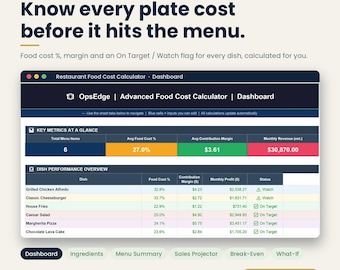
Digital download
Restaurant Food Cost Calculator Spreadsheet, Recipe Cost Card, Menu Costing | Excel Google Sheets
Sale Price $16.50
Original Price $22.00
-
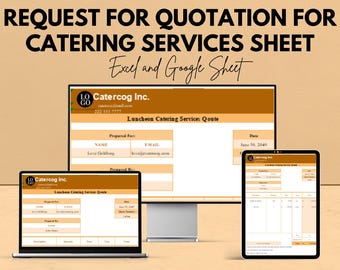
Digital download
Catering Services Quotation Template | Request for Quote | Google Sheets & Excel | Event Catering RFQ Form | Editable Catering Pricing Sheet
Sale Price $5.74
Original Price $11.48
-

Digital download
Recipe Cost Calculator Food Cost Spreadsheet Bakery Cafe Pricing Tool Profit Margin Tracker Google Sheets Template For Small Business
Sale Price $7.97
Original Price $15.95
-

Digital download
Advanced Food Cost Calculator | Restaurant Cafe Catering Spreadsheet — Excel and Google Sheets Digital Download for F&B Businesses
$11.36
-

Digital download
Catering Sheet Template | Excel and Google Sheet | Event Planning & Catering Budgeting
Sale Price $5.74
Original Price $11.48
-

Digital download
Pro Recipe Cost Calculator | Food Business Cost Control Tool | Ingredient Management | Editable Excel Template (Instant Download)
Sale Price $5.59
Original Price $12.40
-

Digital download
Restaurant Recipe Cost Calculator Spreadsheet | Excel Food Cost & Menu Pricing Template
Sale Price $5.59
Original Price $12.40
-

Digital download
Catering Business Bundle: Recipe Cost Calculator, Meal planning, Recipe Database, Client Order Tracking for Google Sheets Excel Ipad Numbers
$11.95
-

Digital download
Bakery Business Manager Excel Spreadsheet, Recipe Cost Calculator, Ingredient Inventory, Allergen Tracker, Invoice & Price List for Bakers
Sale Price $9.97
Original Price $19.95
-

Digital download
Recipe Cost Calculator for Restaurant & Food | Main and Sub Recipes Costing, Profit Margin | Easy Spreadsheet Template Excel Google Sheets
$14.99
Shoppers with similar taste loved these
-

Digital download
Editable Cottage Food Label, Printable Food Label, DIY Bakery Ingredient Label, Canva Template, Home Bakery Packaging Sticker | Bakery
$3.49
-

Digital download
Editable Flavor Label Template, Scent Name Product Labels, Custom Food Flavour Labels, Chic Circle Cake Stickers
Sale Price $4.88
Original Price $6.51
-
Digital download
Custom Lollipop Labels: Editable Jar Seal Sticker Template (Canva, Digital Download 1.5" x 4")
Sale Price $2.00
Original Price $4.00
-
Digital download
Editable Retro Scan to Pay QR Sign, DIY neutral Printable Payment Accepted Payments Sign, Market Payment Sign Canva Template, Among Misti
$6.99
-
Digital download
Mini Cake Tin Label, Editable Bakery Strip Label Template, Printable Cake Packaging (Editable Canva Template)
Sale Price $2.98
Original Price $4.59
-

Digital download
Cottage Law Food Label Template, Editable Round Label, Customizable Sticker, Canva Label, Ingredient Label, Instant Download Cottage Law
Sale Price $5.17
Original Price $6.90
-

Multi QR code Business Social Media Sign: Heart Shaped Payment & Social Media Sign T3
Sale Price $7.00
Original Price $14.00
-

Digital download
Tiny Skiers Tracing Template
$2.99
-

Digital download
Editable Canva Payment Sign | Small Business Display Template | Thank You We Accept Multiple Payment Methods Printable
$4.50
-

Digital download
Cottage Food Label | Cottage Baking Label | Printable Food Label | Home Baked Goods Label | Home Bakery Stickers | Ingredient Label Template
Sale Price $1.97
Original Price $3.58
-
Editable Scan to Pay Retractable Sign, Editable Canva Template, QR Code Signs, CashApp PayPal Sign for Small Business, Venmo Payment
Sale Price $3.75
Original Price $5.00
-

Custom 4 QR Code Business Sign: Social Media & Payment
$51.81


