


Reseller Spreadsheet, Google Sheets & Excel
Item highlights
Seller's description
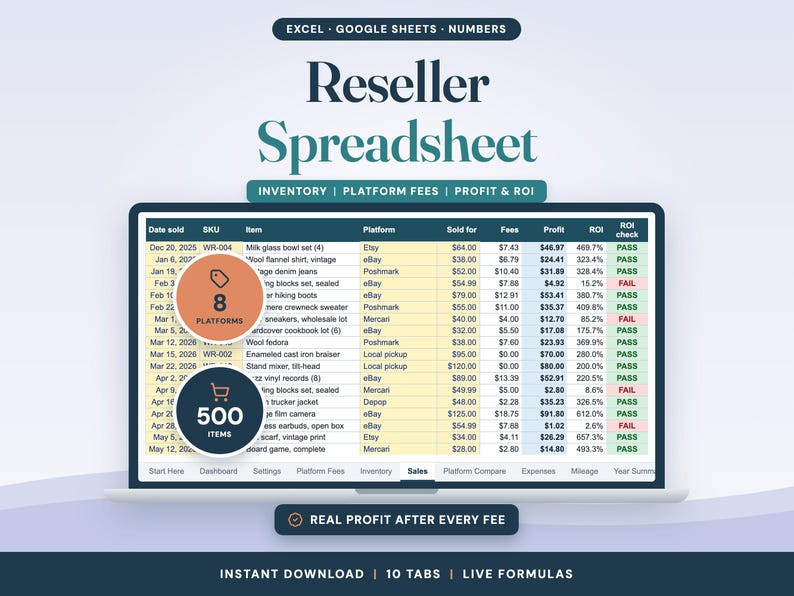
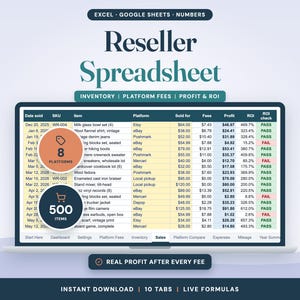
Know what you really make on every flip. This reseller spreadsheet tracks your inventory with its cost basis, works out each platform's fees on every sale, and shows your profit, ROI, sell-through and days to sell.
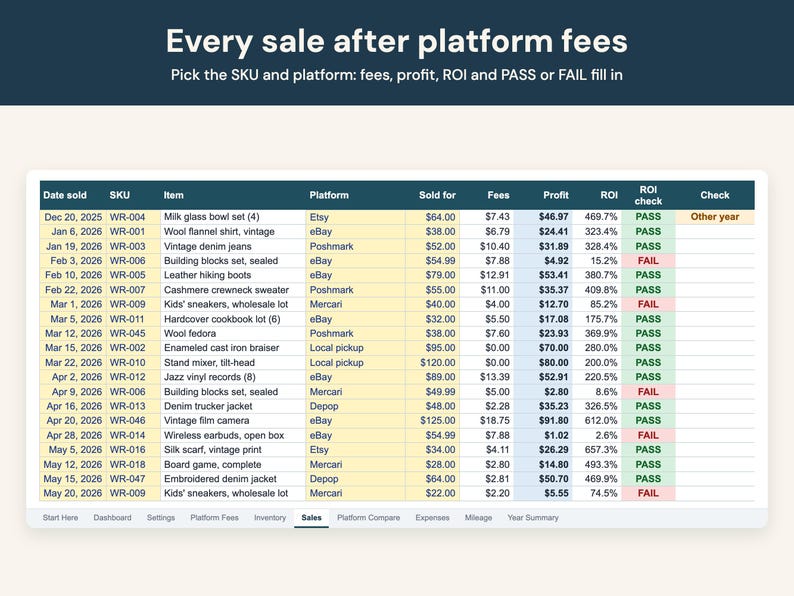
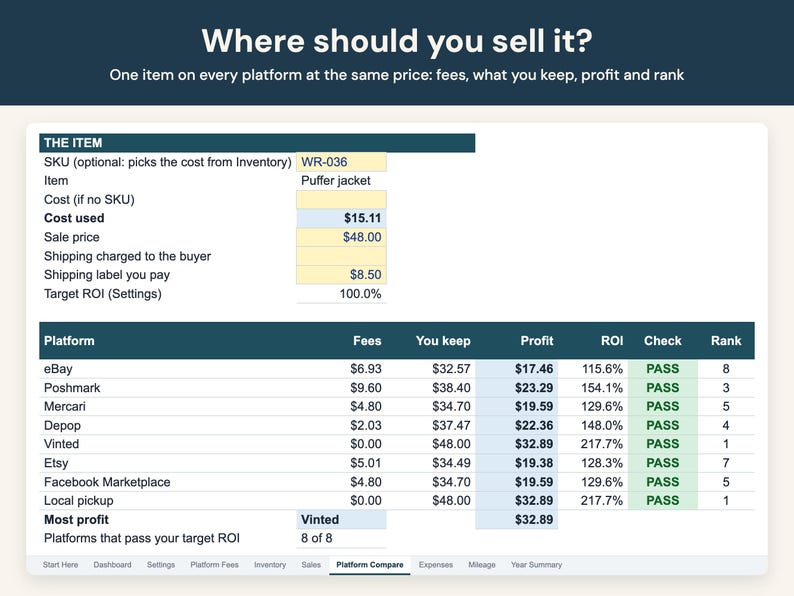
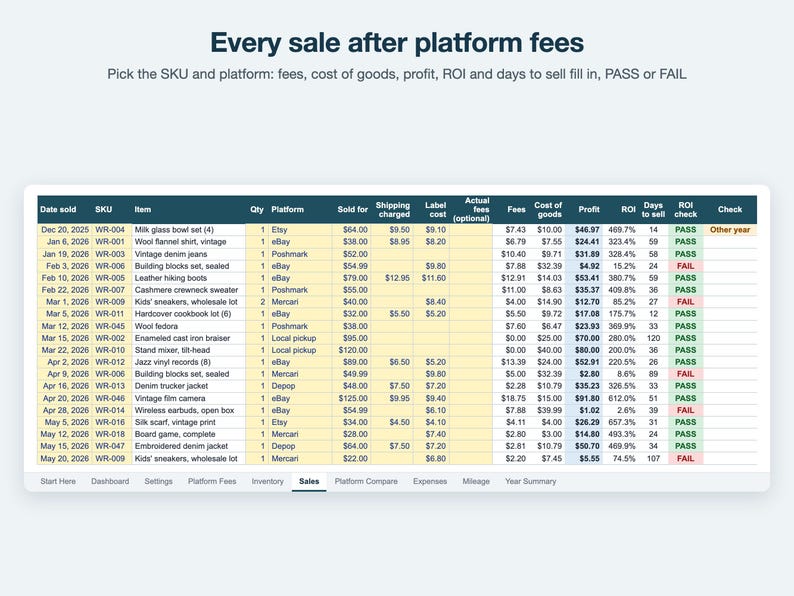
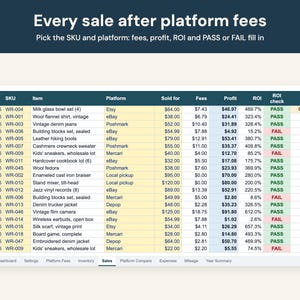
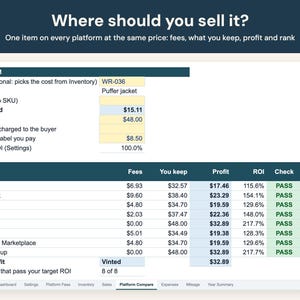
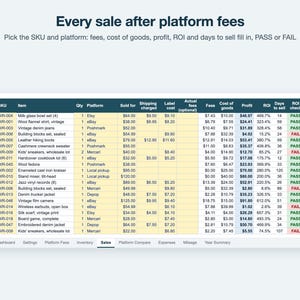
Log what you buy (thrift stores, garage and estate sales, retail arbitrage, wholesale lots) with what you paid plus tax and shipping. When it sells, pick the SKU and the platform: the fee comes from that platform's rule, or type the actual fee from the order page. Profit and ROI fill in and turn green (PASS) or red (FAIL) against your target. Before you list, Platform Compare runs one item through every platform at the same price and ranks what you'd keep.
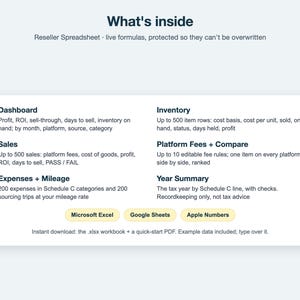
WHAT'S INSIDE (one .xlsx workbook, 10 tabs)
• Start Here: how to use it, color key, notes
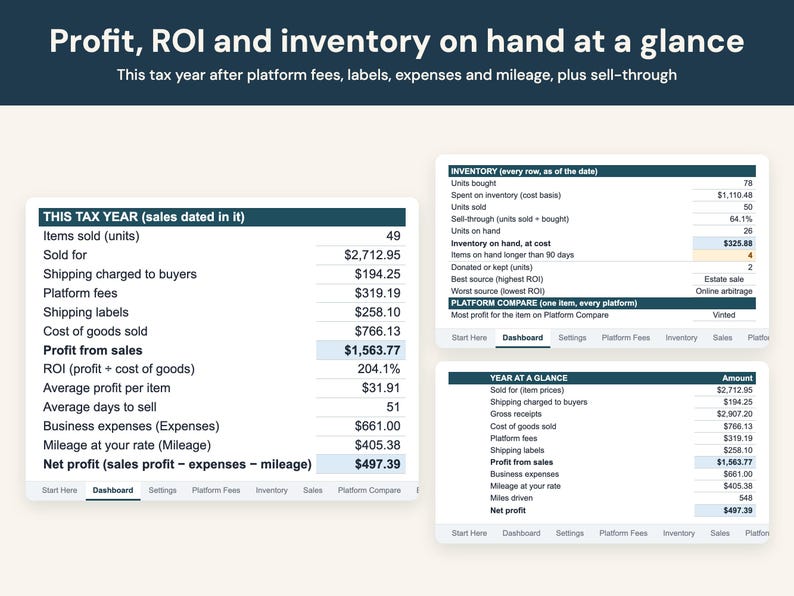
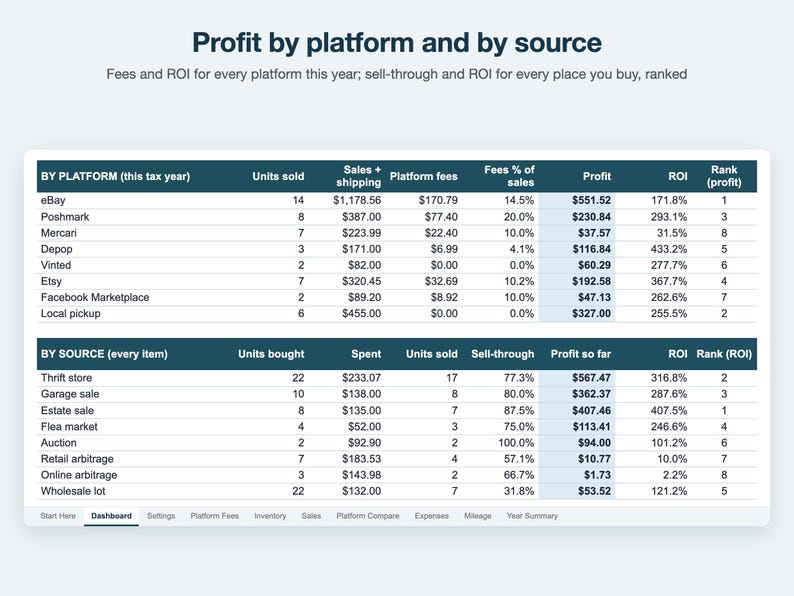
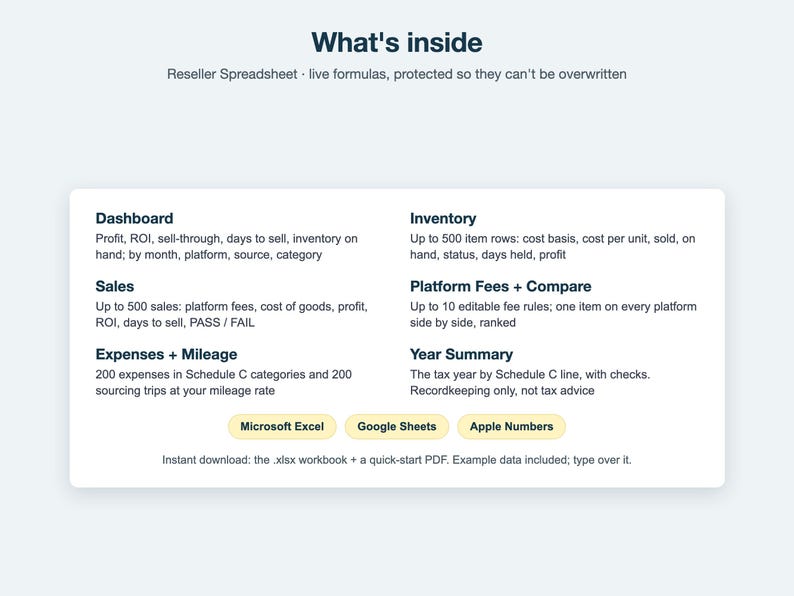
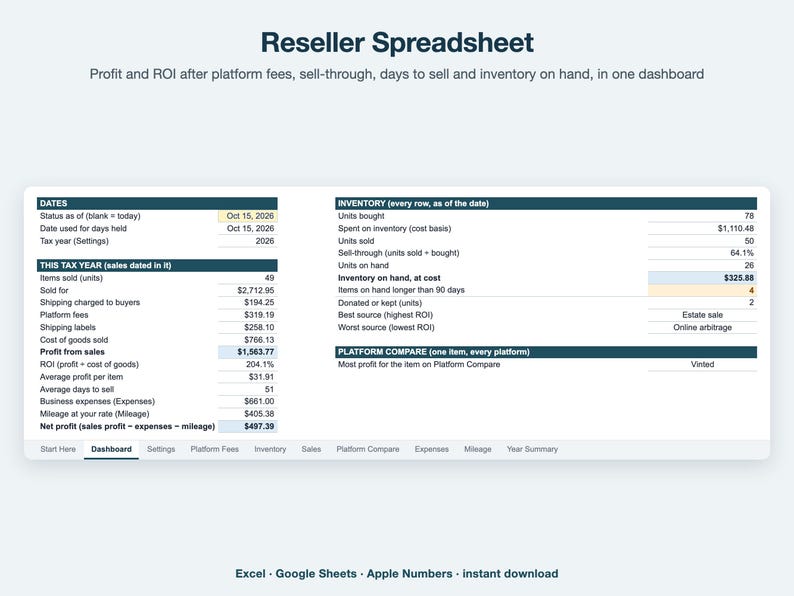
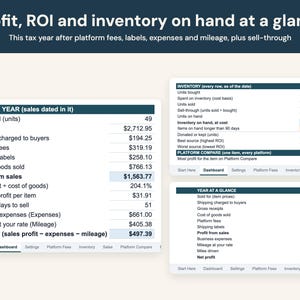
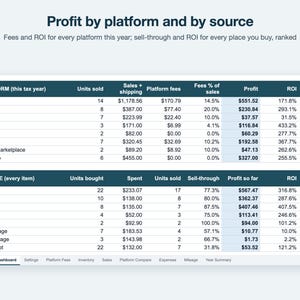
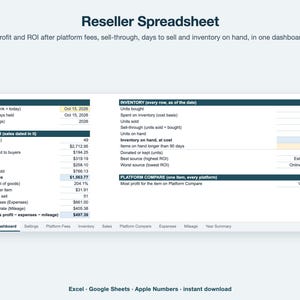
• Dashboard: this tax year's sales, fees, labels, cost of goods, profit, ROI, average profit per item and days to sell, expenses, mileage and net profit; units bought, sell-through, inventory on hand at cost, stale items, best and worst source; profit by month, by platform, by source and by category
• Settings: business name, tax year, target ROI, when an item counts as stale, mileage rate (with a mid-year rate change), your sources and categories
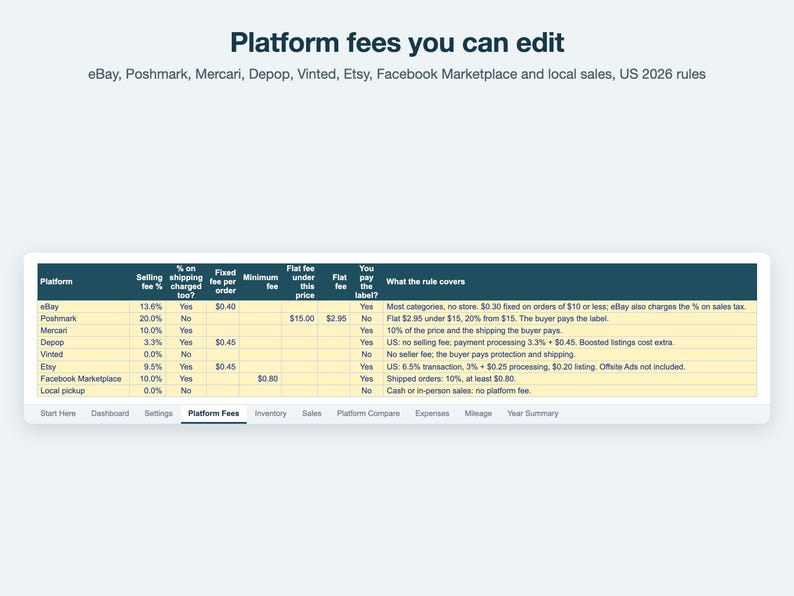
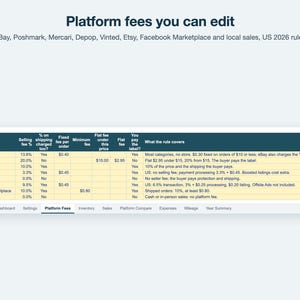
• Platform Fees: fee rules for eBay, Poshmark, Mercari, Depop, Vinted, Etsy, Facebook Marketplace (shipped) and local sales, filled in with each platform's published US rates for 2026 and editable: selling fee %, whether it's charged on shipping, fixed fee per order, minimum fee and a flat fee under a price (up to 10 platforms)
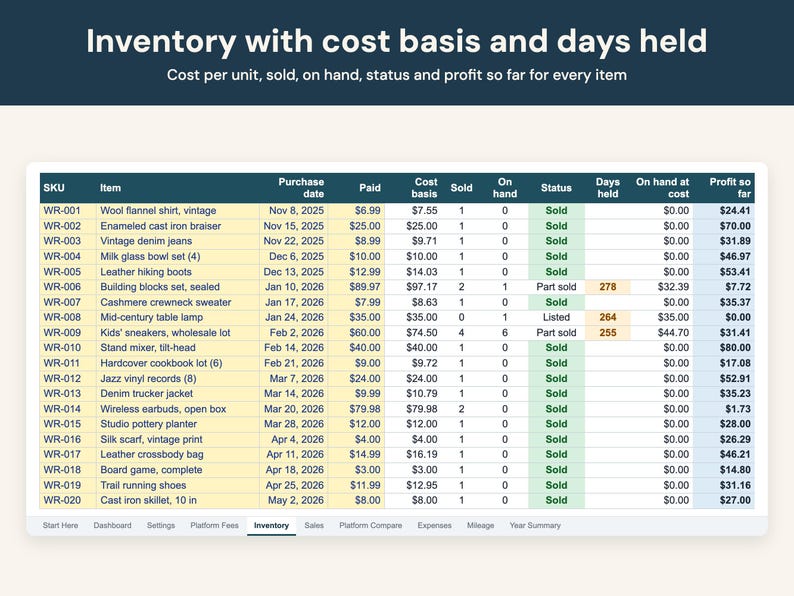
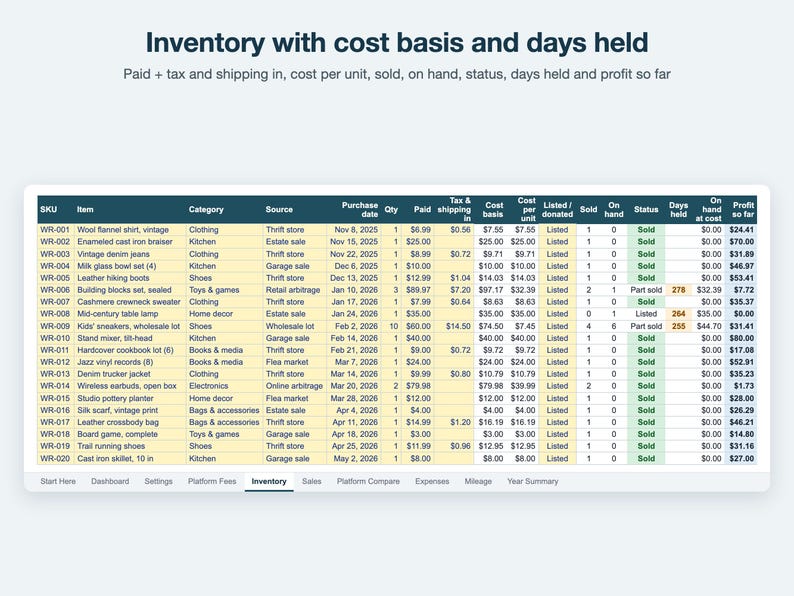
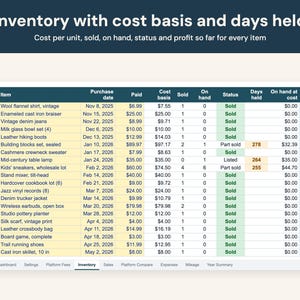
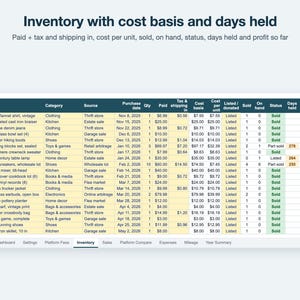
• Inventory: up to 500 item rows. SKU, item, category, source, purchase date, quantity, paid, tax and shipping in; cost basis, cost per unit, units sold and on hand, status (Sold, Part sold, Listed, Not listed, Donated, Kept), days held (amber once stale) and profit so far
• Sales: up to 500 sales. Date, SKU, quantity, platform, sold for, shipping charged, label cost, actual fees if you have them; fees, cost of goods, profit, ROI, days to sell, PASS / FAIL and a check column that flags anything missing
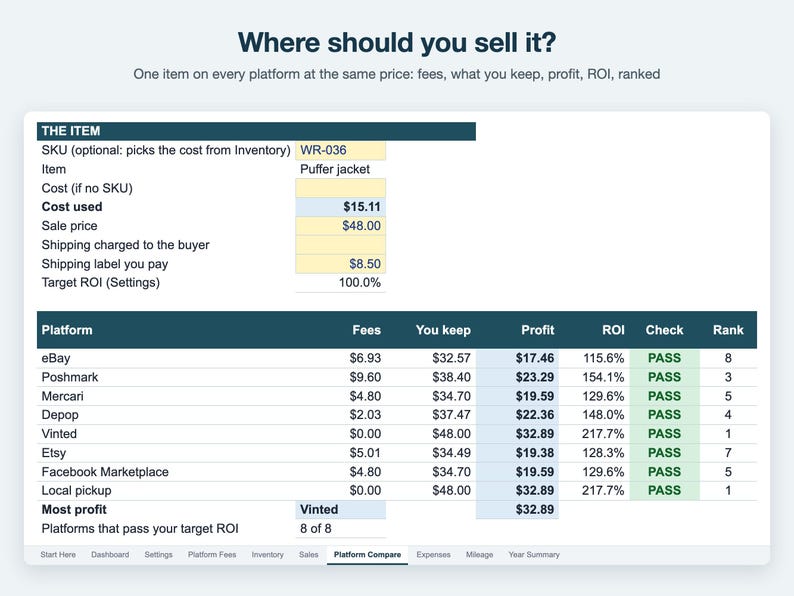
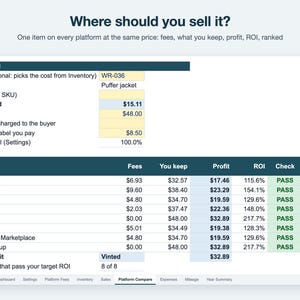
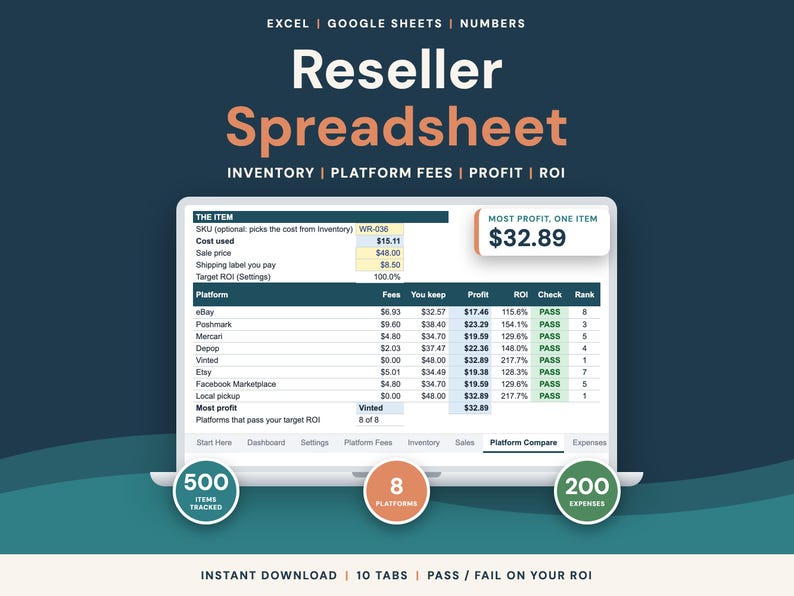
• Platform Compare: one item, one price, every platform: fees, what you keep, profit, ROI, PASS / FAIL and rank
• Expenses: up to 200 business expenses in categories named after the Schedule C lines (supplies, software, storage...)
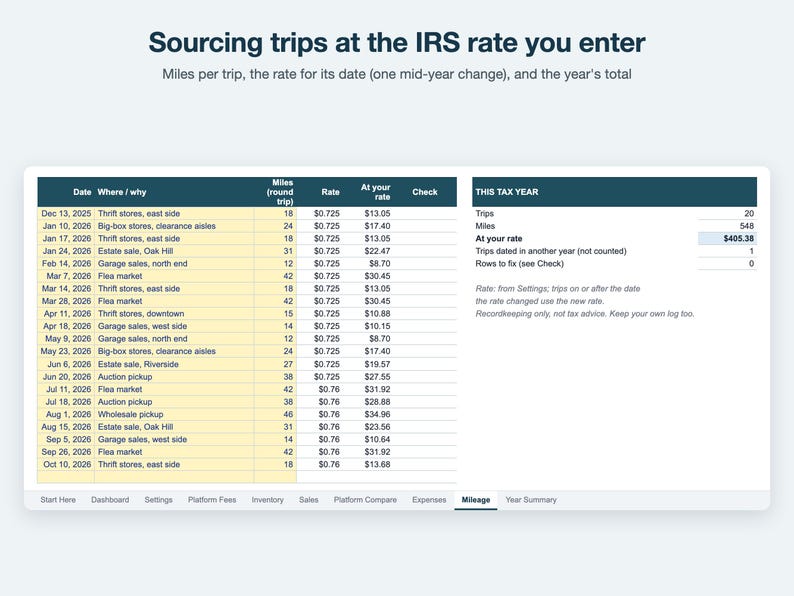
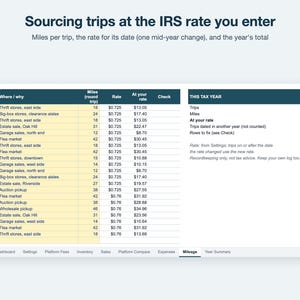
• Mileage: up to 200 sourcing trips, each at the rate for its date
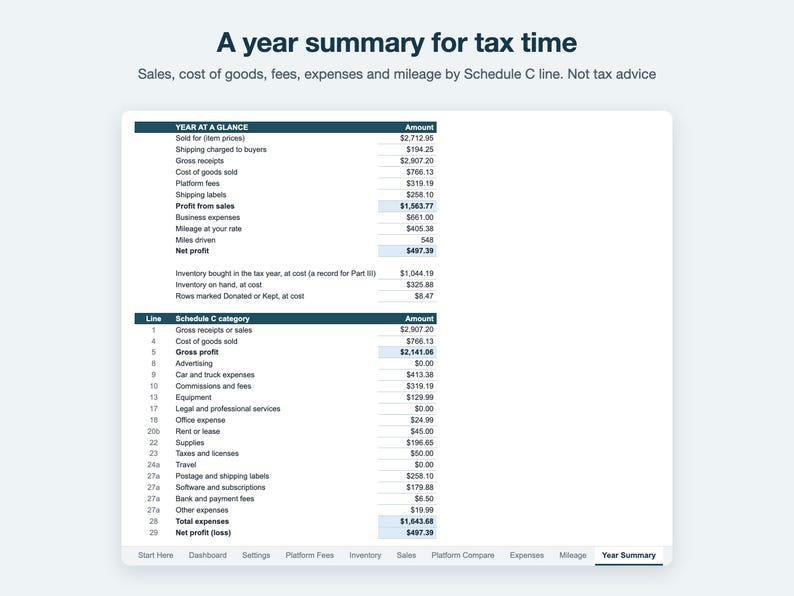
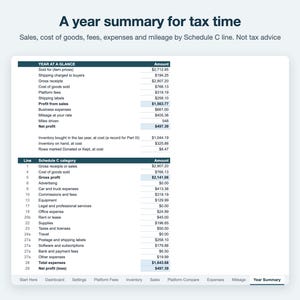
• Year Summary: the tax year at a glance and by Schedule C line, with platform fees, labels and mileage sorted in, plus checks
Plus a 2-page quick-start PDF.
WHO IT'S FOR
Resellers and flippers who buy secondhand, clearance or wholesale and sell on one or more marketplaces, from a side hustle to a full-time resale business, and want their real profit after fees, labels and cost of goods without accounting software.
HOW IT WORKS
• Yellow cells are your inputs. Everything else is a live formula.
• ROI = profit ÷ cost of goods. Set your target (100% = double your money) and every sale is marked PASS or FAIL.
• A lot of identical items is one row with a quantity; sell them one at a time or several in one sale.
• Inventory carries over from year to year: money totals count the tax year you choose, inventory and sell-through count every row.
• "Status as of" is blank, so days held count to today.
• Example data for a made-up reseller is filled in so you can see how it works. Type over it.
OPENS IN
• Microsoft Excel 2010 or newer, Windows or Mac, including Microsoft 365 and Excel for the web: open the .xlsx.
• Google Sheets: File → Import → Upload the .xlsx (free Google account).
• Apple Numbers 13 or newer: File → Open the .xlsx. In Numbers, dropdowns may become plain cells: type names exactly as on their lists.
• LibreOffice Calc: open the .xlsx.
• No macros and no newest-only functions. Tested: LibreOffice recalculates every formula and must match the expected results.
• In Excel, formula cells are locked (no password) so you can't type over them by accident. Google Sheets and Numbers drop that lock on import, so type only in the yellow cells there.
• Made for a computer screen; phone spreadsheet apps aren't tested.
Not affiliated with Microsoft, Google or Apple.
WHAT IT ISN'T
• Recordkeeping only, not tax advice. The categories use the Schedule C line names so your totals are easy to hand over; what's deductible, and how, is between you and your tax preparer.
• No connection to any marketplace or bank and no CSV import: you type your items and sales.
• Fee rules are estimates from each platform's published US rates for 2026. Promoted or boosted listings, sales tax and category exceptions aren't in them, and platforms change fees: check your platform's current fees, or type the actual fee on a sale.
• No barcode scanning, crosslisting or sales tax tracking.
• Amounts show in dollars; change the currency format in your spreadsheet app (the quick-start PDF says how).
• Not affiliated with eBay, Poshmark, Mercari, Depop, Vinted, Etsy or Meta (Facebook).
QUICK FAQ
• Can I use it on an iPad or tablet? Set it up on a computer, where it's tested. The iPad apps for Excel, Google Sheets and Numbers can open an .xlsx, but they aren't tested, so a dropdown or color may not work the same there.
• How many items? Up to 500 items, 500 sales, 200 expenses, 200 trips and 10 platform fee rules.
• Can I reuse it next year? Yes, in the same file: change the tax year on Settings and the money totals count that year's rows, while inventory and sell-through carry over (500 items and 500 sales in all).
• Can I rename the categories? Your sources and item categories are yours (they fill the dropdowns), and every platform fee rule is editable. Expenses use the Schedule C line names, which stay fixed.
ALSO IN THIS SHOP
• Sell your own handmade products on Etsy? Etsy Seller Bookkeeping Spreadsheet: every Etsy fee on its own line, cost of goods per order and profit by product and month.
https://www.etsy.com/listing/4589081888/etsy-seller-spreadsheet-etsy-bookkeeping
• Pricing 3D prints? 3D Printing Pricing Calculator: filament, print time and Etsy fees, solved backwards to the price that hits your margin.
https://www.etsy.com/listing/4589227759/3d-printing-pricing-calculator
INSTANT DOWNLOAD
This is a digital file; nothing will be shipped. After purchase, download it from your Etsy Purchases page; you can download it again any time. Because it's a digital download, Etsy doesn't allow returns or exchanges. If the file won't open or something looks wrong, message me and I'll help or fix it.
For personal use. Please don't resell or share the file.
Designed by me with the help of AI tools.
If something goes wrong with an order, we've got your back for all eligible purchases. View program terms
NowPrice:$5.99
Original Price: $7.99
25% off
Sale ends in 6 days
You can only make an offer when buying a single item
Delivery
Instant download
Your files will be available to download once payment is confirmed. Here's how.
Instant download items don't accept returns, exchanges or cancellations. Please contact the seller about any problems with your order.
Seller's description
Specifications
Know what you really make on every flip. This reseller spreadsheet tracks your inventory with its cost basis, works out each platform's fees on every sale, and shows your profit, ROI, sell-through and days to sell.
Log what you buy (thrift stores, garage and estate sales, retail arbitrage, wholesale lots) with what you paid plus tax and shipping. When it sells, pick the SKU and the platform: the fee comes from that platform's rule, or type the actual fee from the order page. Profit and ROI fill in and turn green (PASS) or red (FAIL) against your target. Before you list, Platform Compare runs one item through every platform at the same price and ranks what you'd keep.
WHAT'S INSIDE (one .xlsx workbook, 10 tabs)
• Start Here: how to use it, color key, notes
• Dashboard: this tax year's sales, fees, labels, cost of goods, profit, ROI, average profit per item and days to sell, expenses, mileage and net profit; units bought, sell-through, inventory on hand at cost, stale items, best and worst source; profit by month, by platform, by source and by category
• Settings: business name, tax year, target ROI, when an item counts as stale, mileage rate (with a mid-year rate change), your sources and categories
• Platform Fees: fee rules for eBay, Poshmark, Mercari, Depop, Vinted, Etsy, Facebook Marketplace (shipped) and local sales, filled in with each platform's published US rates for 2026 and editable: selling fee %, whether it's charged on shipping, fixed fee per order, minimum fee and a flat fee under a price (up to 10 platforms)
• Inventory: up to 500 item rows. SKU, item, category, source, purchase date, quantity, paid, tax and shipping in; cost basis, cost per unit, units sold and on hand, status (Sold, Part sold, Listed, Not listed, Donated, Kept), days held (amber once stale) and profit so far
• Sales: up to 500 sales. Date, SKU, quantity, platform, sold for, shipping charged, label cost, actual fees if you have them; fees, cost of goods, profit, ROI, days to sell, PASS / FAIL and a check column that flags anything missing
• Platform Compare: one item, one price, every platform: fees, what you keep, profit, ROI, PASS / FAIL and rank
• Expenses: up to 200 business expenses in categories named after the Schedule C lines (supplies, software, storage...)
• Mileage: up to 200 sourcing trips, each at the rate for its date
• Year Summary: the tax year at a glance and by Schedule C line, with platform fees, labels and mileage sorted in, plus checks
Plus a 2-page quick-start PDF.
WHO IT'S FOR
Resellers and flippers who buy secondhand, clearance or wholesale and sell on one or more marketplaces, from a side hustle to a full-time resale business, and want their real profit after fees, labels and cost of goods without accounting software.
HOW IT WORKS
• Yellow cells are your inputs. Everything else is a live formula.
• ROI = profit ÷ cost of goods. Set your target (100% = double your money) and every sale is marked PASS or FAIL.
• A lot of identical items is one row with a quantity; sell them one at a time or several in one sale.
• Inventory carries over from year to year: money totals count the tax year you choose, inventory and sell-through count every row.
• "Status as of" is blank, so days held count to today.
• Example data for a made-up reseller is filled in so you can see how it works. Type over it.
OPENS IN
• Microsoft Excel 2010 or newer, Windows or Mac, including Microsoft 365 and Excel for the web: open the .xlsx.
• Google Sheets: File → Import → Upload the .xlsx (free Google account).
• Apple Numbers 13 or newer: File → Open the .xlsx. In Numbers, dropdowns may become plain cells: type names exactly as on their lists.
• LibreOffice Calc: open the .xlsx.
• No macros and no newest-only functions. Tested: LibreOffice recalculates every formula and must match the expected results.
• In Excel, formula cells are locked (no password) so you can't type over them by accident. Google Sheets and Numbers drop that lock on import, so type only in the yellow cells there.
• Made for a computer screen; phone spreadsheet apps aren't tested.
Not affiliated with Microsoft, Google or Apple.
WHAT IT ISN'T
• Recordkeeping only, not tax advice. The categories use the Schedule C line names so your totals are easy to hand over; what's deductible, and how, is between you and your tax preparer.
• No connection to any marketplace or bank and no CSV import: you type your items and sales.
• Fee rules are estimates from each platform's published US rates for 2026. Promoted or boosted listings, sales tax and category exceptions aren't in them, and platforms change fees: check your platform's current fees, or type the actual fee on a sale.
• No barcode scanning, crosslisting or sales tax tracking.
• Amounts show in dollars; change the currency format in your spreadsheet app (the quick-start PDF says how).
• Not affiliated with eBay, Poshmark, Mercari, Depop, Vinted, Etsy or Meta (Facebook).
QUICK FAQ
• Can I use it on an iPad or tablet? Set it up on a computer, where it's tested. The iPad apps for Excel, Google Sheets and Numbers can open an .xlsx, but they aren't tested, so a dropdown or color may not work the same there.
• How many items? Up to 500 items, 500 sales, 200 expenses, 200 trips and 10 platform fee rules.
• Can I reuse it next year? Yes, in the same file: change the tax year on Settings and the money totals count that year's rows, while inventory and sell-through carry over (500 items and 500 sales in all).
• Can I rename the categories? Your sources and item categories are yours (they fill the dropdowns), and every platform fee rule is editable. Expenses use the Schedule C line names, which stay fixed.
ALSO IN THIS SHOP
• Sell your own handmade products on Etsy? Etsy Seller Bookkeeping Spreadsheet: every Etsy fee on its own line, cost of goods per order and profit by product and month.
https://www.etsy.com/listing/4589081888/etsy-seller-spreadsheet-etsy-bookkeeping
• Pricing 3D prints? 3D Printing Pricing Calculator: filament, print time and Etsy fees, solved backwards to the price that hits your margin.
https://www.etsy.com/listing/4589227759/3d-printing-pricing-calculator
INSTANT DOWNLOAD
This is a digital file; nothing will be shipped. After purchase, download it from your Etsy Purchases page; you can download it again any time. Because it's a digital download, Etsy doesn't allow returns or exchanges. If the file won't open or something looks wrong, message me and I'll help or fix it.
For personal use. Please don't resell or share the file.
Designed by me with the help of AI tools.
-
Item typeDigital download
-
Digital file type(s)1 PDF, 1 other file
If something goes wrong with an order, we've got your back on all eligible purchases. View program terms
Meet your seller
More from this shop
-
Digital download
Recipe Cost & Bakery Pricing Calculator
Sale Price $5.24
Original Price $6.99
-
Digital download
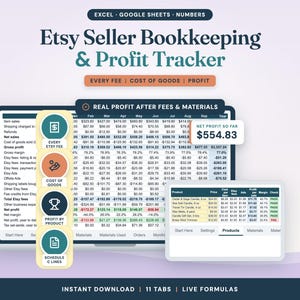
Etsy Seller Spreadsheet & Profit Tracker
Sale Price $5.99
Original Price $7.99
-
Digital download
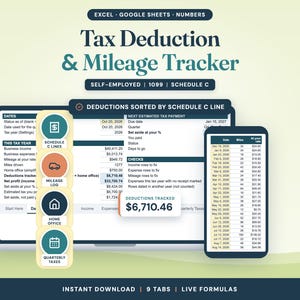
Tax Deduction & Mileage Tracker, Google Sheets
Sale Price $4.87
Original Price $6.49
-
Digital download
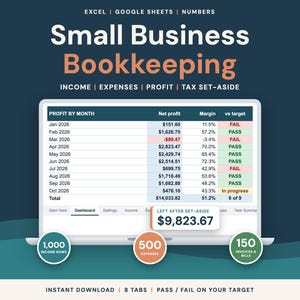
Small Business Bookkeeping, Google Sheets
Sale Price $5.99
Original Price $7.99
-
Digital download
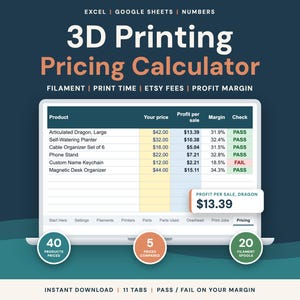
3D Printing Pricing Calculator
Sale Price $5.99
Original Price $7.99
-
Digital download
House Hunting Comparison Spreadsheet
Sale Price $3.74
Original Price $4.99
-
Digital download
Reseller Spreadsheet Inventory, Sales, and Profit Tracker (Google Sheets and Excel)
$9.99
-
Digital download
Reseller Inventory Tracker: Profit & SKU Dashboard (Google Sheets Template)
$8.50
-

Digital download
Reseller Inventory & Profit Tracker Spreadsheet for Online Sellers (Google Sheets and Excel)
$9.99
-

Digital download
Reseller Inventory Profit Tracking Spreadsheet for Excel & Google Sheets , EBay Seller Inventory Spreadsheet , Resale Profit and Inventory
$9.99
-

Digital download
reseller spreadsheet google sheet - reseller spreadsheet excel - reseller spreadsheet - reseller tracker - reseller sales tracker -
Sale Price $3.24
Original Price $6.49
-

Digital download
Reseller Inventory & Bookkeeping Tracker | eBay, Etsy, Poshmark Seller Spreadsheet | Profit and ROI Dashboard | Google Sheets Template
$9.95
-

Digital download
Reseller Inventory & Sales Tracker, Google Sheets (Digital Download)
$9.87
-
Digital download
Inventory Tracker | Inventory Spreadsheet | Etsy Inventory Spreadsheet | Reseller Spreadsheet, Inventory Management | Small Business Excel
$9.97
-

Digital download
Reseller Spreadsheet, Reselling Business Dashboard, Inventory Management Tracker, Reseller Bookkeeping Excel & Google Sheets
Sale Price $11.43
Original Price $17.58
-

Digital download
Reselling Dashboard Spreadsheet | Sourcing Calculator Inventory Sales Tracker | Poshmark Ebay Mercari Depop | EDITABLE Excel & Google Sheets
$15.00
-

Digital download
Inventory Tracker, Inventory Spreadsheet, Etsy Inventory Spreadsheet, Reseller Spreadsheet, Inventory Management, Small Business Spreadsheet
$9.97
-
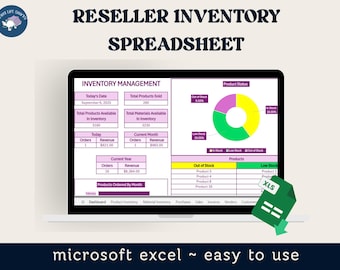
Digital download
Etsy Inventory Tracker | Inventory Spreadsheet | Etsy Inventory Spreadsheet | Reseller Spreadsheet | Inventory Management | Excel Inventory
$7.87
Shoppers with similar taste loved these
-

Digital download
Warehouse Inventory List Sheet | Excel and Google Sheets | Track Stock In/Out | Barcode & Category Based | Inventory Management Template
Sale Price $5.74
Original Price $11.47
-

Digital download
Inventory Manager, Selling System with Barcode Reading: Excel Template for Small Business
$29.98
-

Digital download
Unique Barcode Scan Inventory Management System - No Typing - Google Spreadsheet, Serial Numbers, MAC Addresses, Template, Easy
$8.99
-
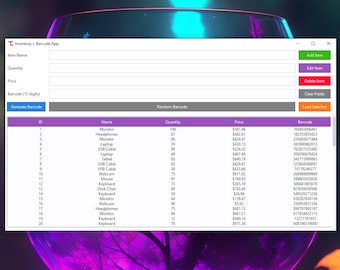
Digital download
Inventory & Barcode Manager App | Small Business Inventory Tracker | Digital Tool for Shops
$10.00
-

Digital download
Excel Inventory Management: QR & Barcode Generator, Sales Tracker (Windows)
Sale Price $30.00
Original Price $40.00
-

Digital download
Checkmate POS Inventory Software: Barcode Printing, Sales Tracker (Excel)
Sale Price $18.75
Original Price $25.00
-
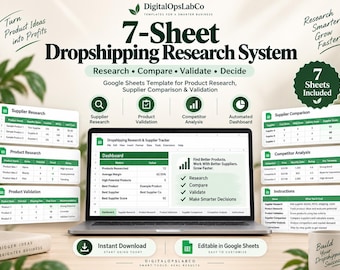
Digital download
Dropshipping Product Research Spreadsheet | Supplier Scorecard & Profit Calculator | Google Sheets Template
$10.39
-

Digital download
Pricing Calculator Spreadsheet | Small Business Template | Product Pricing Calculator | Pricing Worksheet | Price Guide | Profit Calculator
Sale Price $1.00
Original Price $2.50
-

Digital download
Savings Challenge Tracker Bundle: Printable Budget Planner (Digital Download)
Sale Price $2.00
Original Price $4.00
-
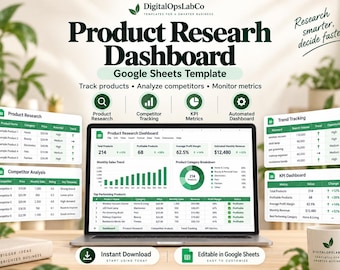
Digital download
Dropshipping Product Research Dashboard | Google Sheets Product Tracker, Competitor Analysis and KPI Template
$9.34
-
Digital download
Notion Template Permanent Jewelry Business Inventory Tracker Notion Dashboard Permanent Jewelry Expenses Tracker Small Business CRM
$22.04
-
Digital download
Supplier Evaluation Tracker Google Sheets Template | Vendor Scorecard | Supplier Performance Dashboard | Procurement Spreadsheet
$6.19


