

Teen Money Planner Excel Spreadsheet, Allowance and First Paycheck Budget, Savings Goal Tracker, IOUs and Credit Card Lesson, Google Sheets
Item highlights
Seller's description
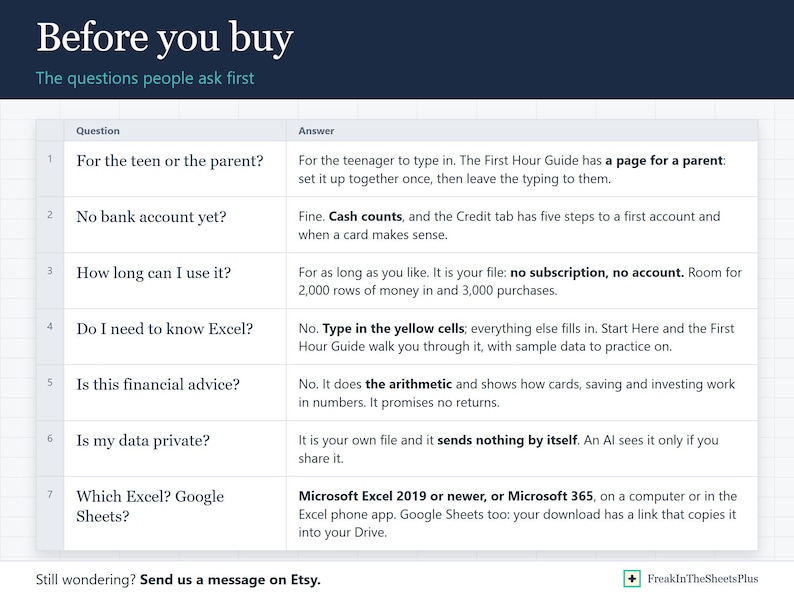
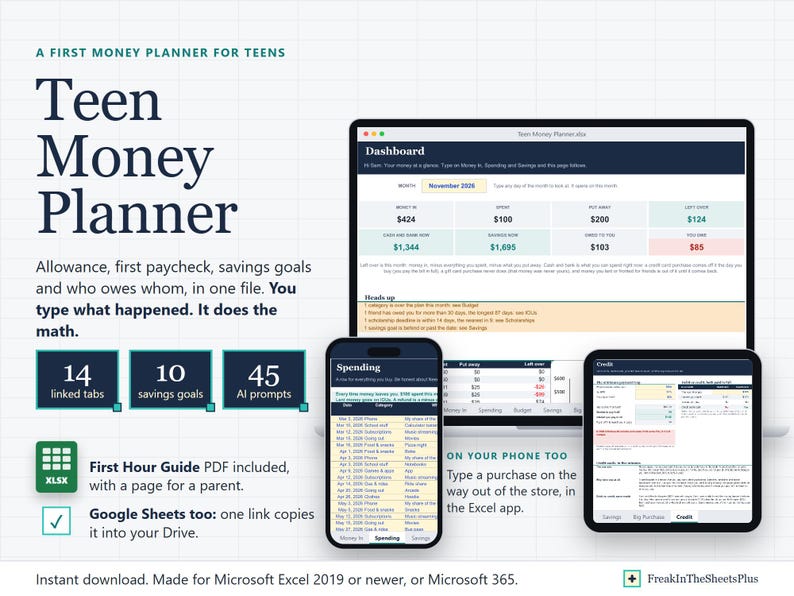
Teen Money Planner is a first money planner for a teenager, in Excel. It does the math, so the habit is the only hard part. Buying it for your teenager? The First Hour Guide has a page for a parent.
Type what comes in (allowance, a paycheck, a gift, chores, something you sold) and what goes out, with Need or Want on every purchase. It works out what you have, what is left this month, how far away the thing you are saving for is, and who still owes whom.
WHAT IT DOES FOR YOU
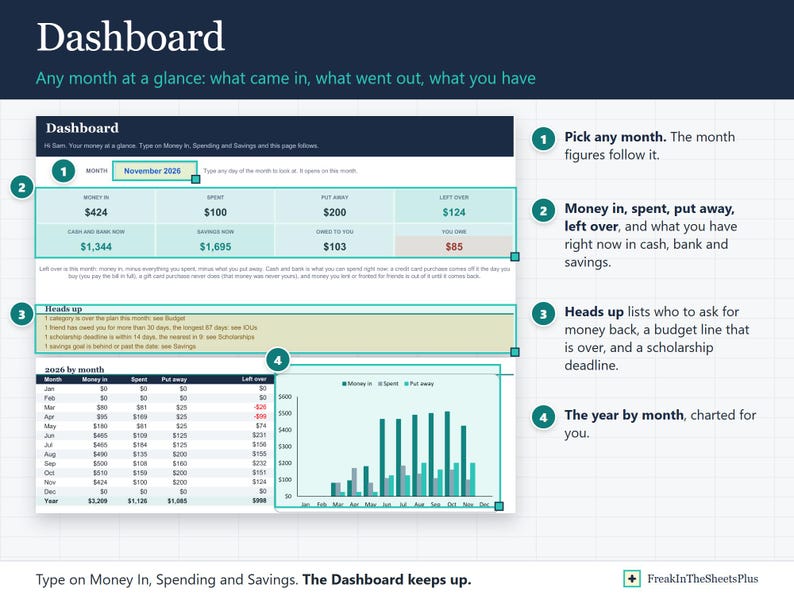
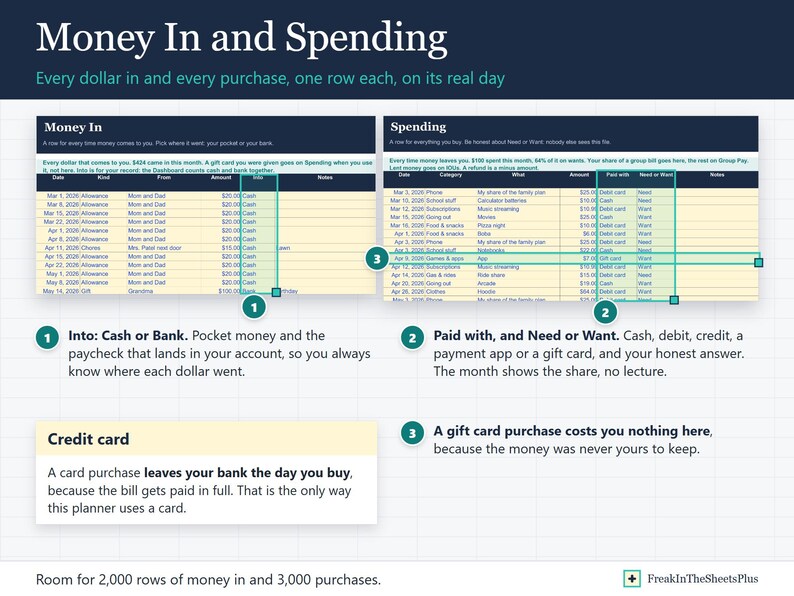
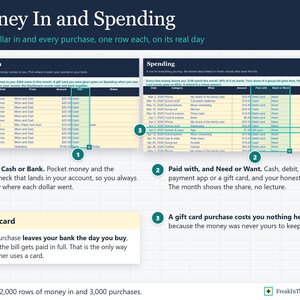
- Knows what you have right now. Cash and bank, and savings, from the day you start plus every row you type. A gift card purchase costs you nothing here. A credit card purchase leaves your bank the day you buy, because the bill gets paid in full. Money you lent or fronted for friends stays out of it until it comes back.
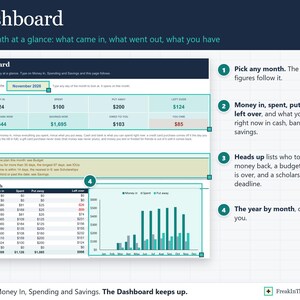
- Shows Need or Want as a number, no lecture. The Dashboard and Budget show what share of the month went to wants.
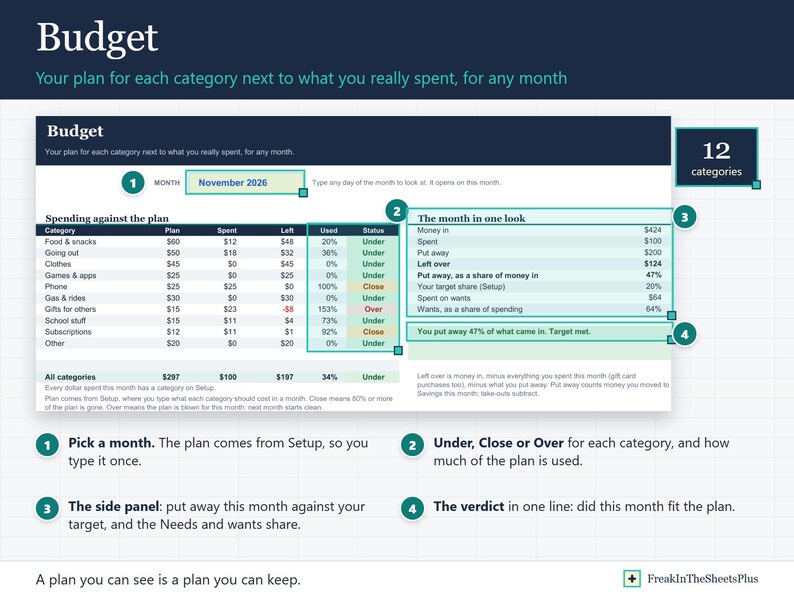
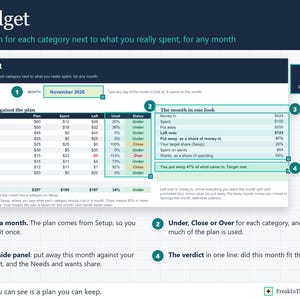
- Budget for any month: your plan for each category next to what you really spent, Under, Close or Over, and whether you hit your put-away target.
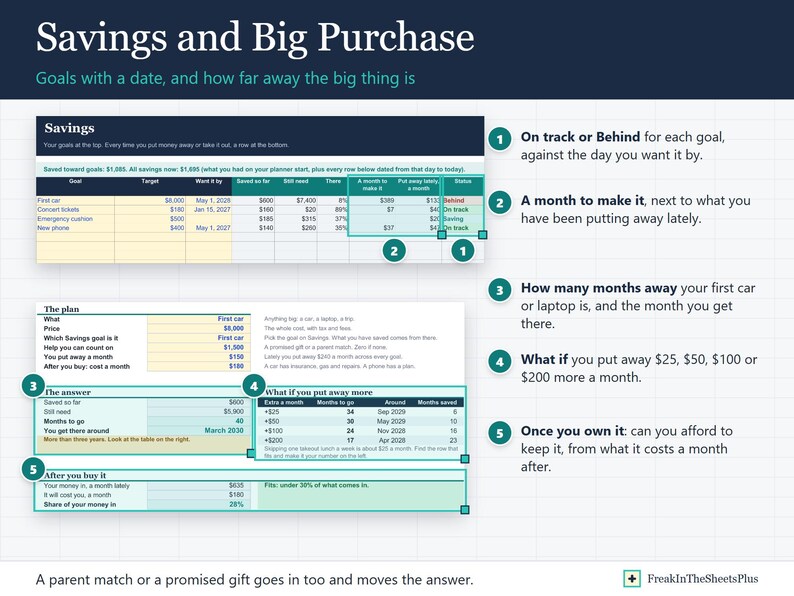
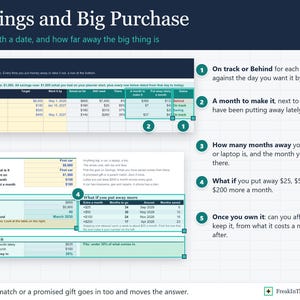
- Savings goals with a date: how much a month it takes to make it, what you have been putting away lately, and On track or Behind.
- Big Purchase: how many months away a first car or a laptop is, what putting away $25, $50, $100 or $200 more a month would do, and whether you can afford to keep it once you own it.
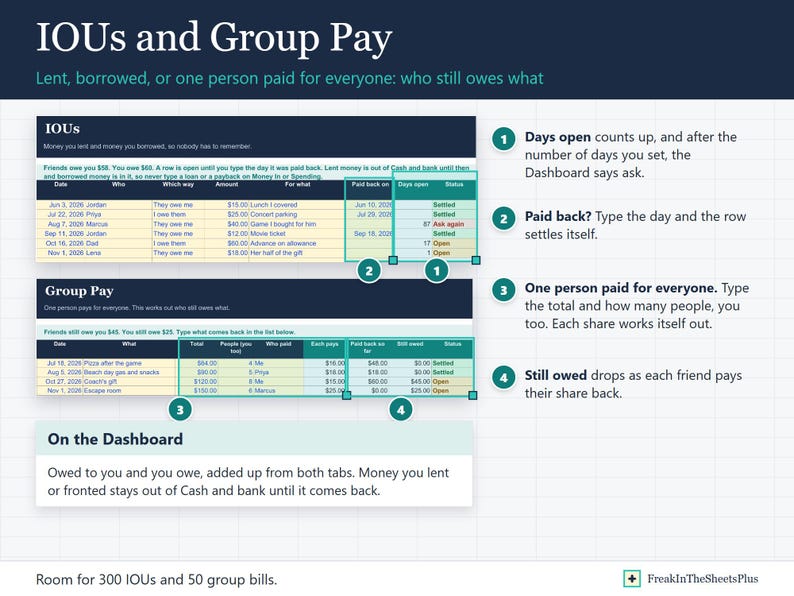
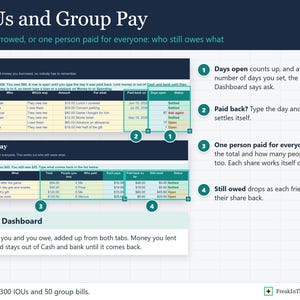
- IOUs and Group Pay: money lent and borrowed, and the bill one person paid for everyone, until every share is back. The Dashboard reminds you to ask after the number of days you set.
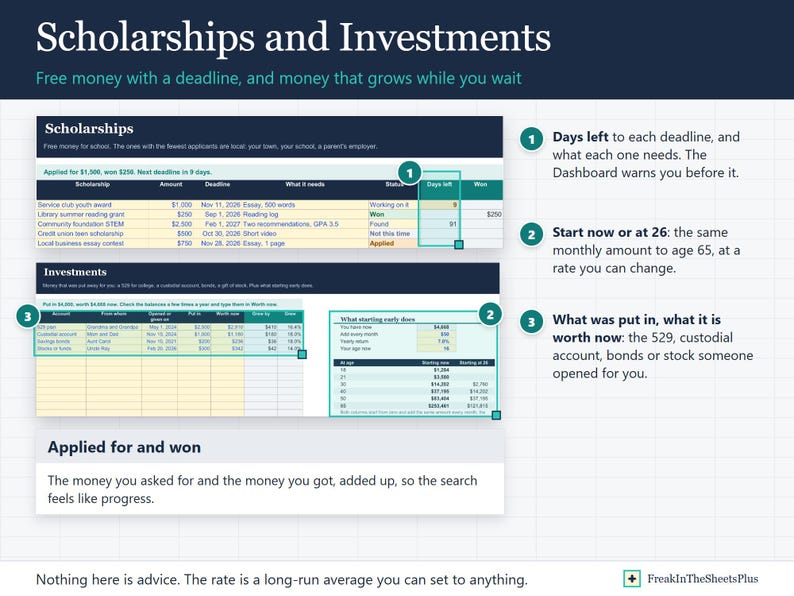
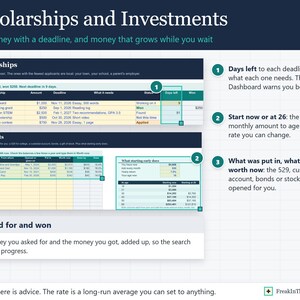
- Scholarships with deadlines that warn you, and the money you applied for and won.
- Investments: the 529, custodial account, bonds or stock someone opened for you, and a table that shows what starting at your age does by 65 against starting at 26.
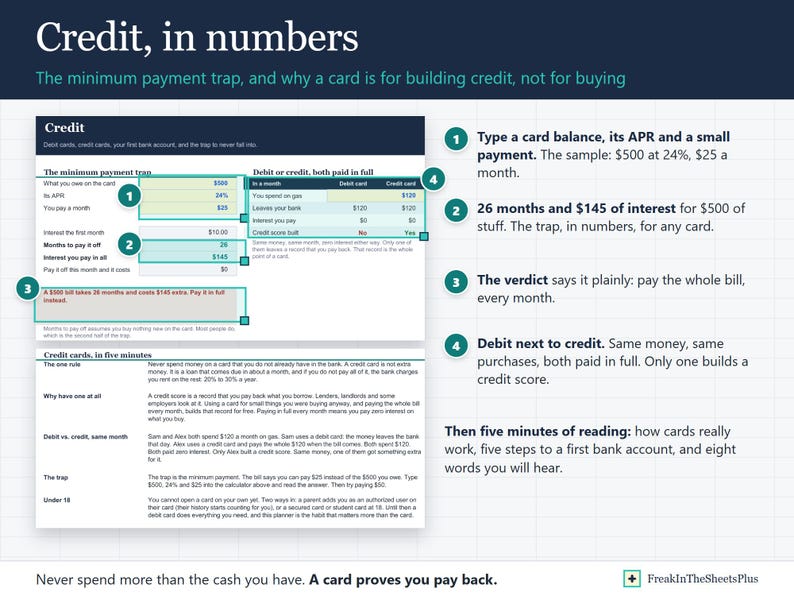
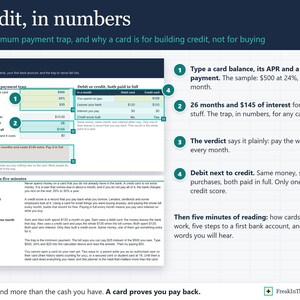
- Credit, in numbers: type a card balance, its APR and a small payment, and read how many months it takes and what it costs. Then five minutes on how cards really work, how to open a first bank account, and the words you will hear.
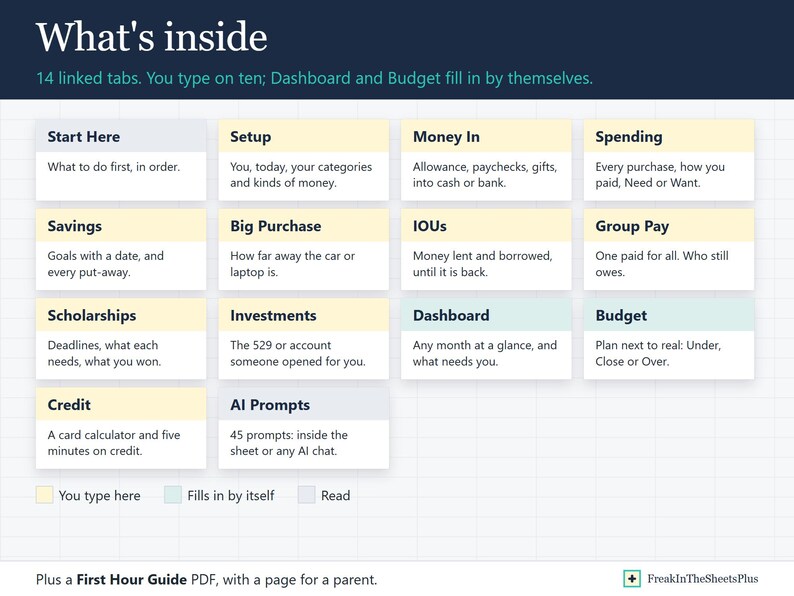
WHAT IS INSIDE (14 TABS)
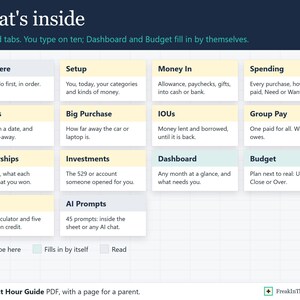
Start Here, Dashboard, Money In, Spending, Budget, Savings, Big Purchase, IOUs, Group Pay, Scholarships, Investments, Credit, Setup, AI Prompts.
Room for 2,000 rows of money in, 3,000 of spending, 10 savings goals, 300 IOUs, 50 group bills and 100 scholarships.
45 COPY-PASTE AI PROMPTS, TWO WAYS
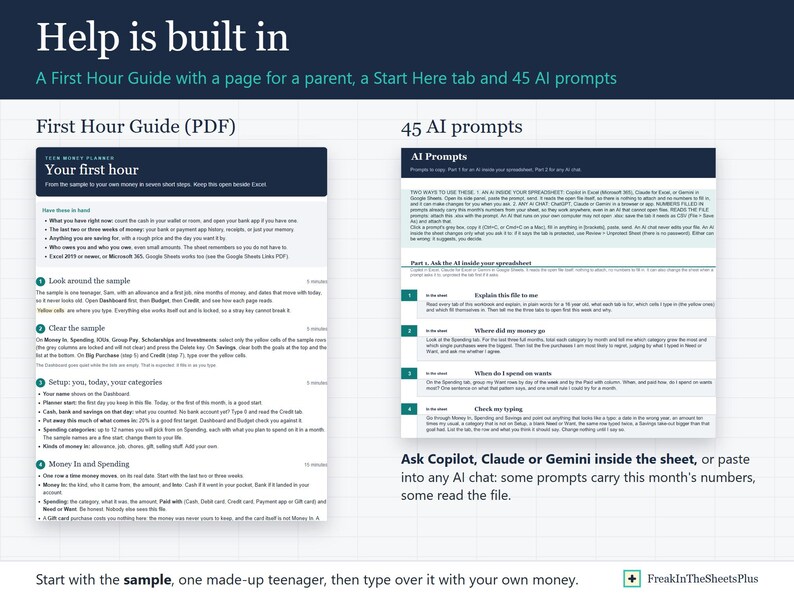
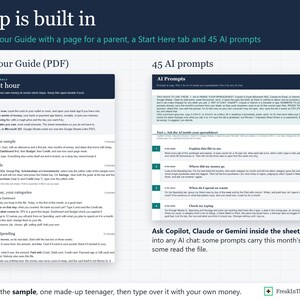
Ask an AI inside your spreadsheet (Copilot in Excel, Claude for Excel, Gemini in Google Sheets): it reads the open file, so 20 prompts have it explain the file, find where the money went, check your typing, build a budget plan from what you really spend, draft the texts that get you paid back, settle a group bill, plan your scholarship weeks, split a paycheck, reconcile with your real bank balance, run a weekly check-in, and improve the file for you: a Want vs Need chart, a Worth it? column, highlights on the purchases to look at, a Monthly Review sheet.
Or any AI chat (ChatGPT, Claude or Gemini): 8 prompts already carry this month's numbers from your sheet, so they work in any AI, and 17 read the attached file: check the planner for mistakes, sort a bank export into rows, find scholarships you can win, plan a first paycheck, talk to your parents about money, pressure test a big purchase, a year in ten lines, earn more, a gift money plan, a first bank account, an end-of-month routine, a quiz on your own money, and more.
The AI tools are not included: each comes with its own plan, and Copilot in Excel needs Microsoft 365.
WHAT YOU GET
- Teen Money Planner.xlsx
- First Hour Guide (PDF): from the sample to your own money in seven steps, plus a page for a parent
- Google Sheets Links (PDF): one click copies the planner into your Google Drive
This is an instant digital download. Nothing is shipped.
WORKS IN
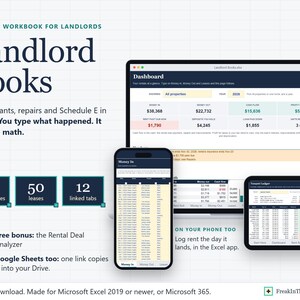
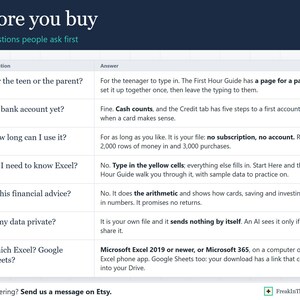
Microsoft Excel 2019 or newer, or Microsoft 365, on a computer or in the Excel phone app.
Google Sheets too: the links PDF copies the planner into your Google Drive.
GOOD TO KNOW
- Sample data (one made-up teenager, nine months of money) shows how it works, and its dates and totals move with the day you open it. Type over it, or clear it and start fresh.
- The formulas are locked so they cannot break. The yellow cells are the ones you type in.
- Google Sheets does not lock the formulas, so in Sheets type only in the yellow cells.
- This planner does arithmetic. It is not financial advice and it promises no returns.
- For your own use, or a gift for one teenager. Please do not resell or share the files.
If something goes wrong with an order, we've got your back for all eligible purchases. View program terms
NowPrice:$12.99
Original Price: $25.98
50% off
Sale ends in 14:05:58
You can only make an offer when buying a single item
Delivery
Instant download
Your files will be available to download once payment is confirmed. Here's how.
Instant download items don't accept returns, exchanges or cancellations. Please contact the seller about any problems with your order.
Seller's description
Specifications
Teen Money Planner is a first money planner for a teenager, in Excel. It does the math, so the habit is the only hard part. Buying it for your teenager? The First Hour Guide has a page for a parent.
Type what comes in (allowance, a paycheck, a gift, chores, something you sold) and what goes out, with Need or Want on every purchase. It works out what you have, what is left this month, how far away the thing you are saving for is, and who still owes whom.
WHAT IT DOES FOR YOU
- Knows what you have right now. Cash and bank, and savings, from the day you start plus every row you type. A gift card purchase costs you nothing here. A credit card purchase leaves your bank the day you buy, because the bill gets paid in full. Money you lent or fronted for friends stays out of it until it comes back.
- Shows Need or Want as a number, no lecture. The Dashboard and Budget show what share of the month went to wants.
- Budget for any month: your plan for each category next to what you really spent, Under, Close or Over, and whether you hit your put-away target.
- Savings goals with a date: how much a month it takes to make it, what you have been putting away lately, and On track or Behind.
- Big Purchase: how many months away a first car or a laptop is, what putting away $25, $50, $100 or $200 more a month would do, and whether you can afford to keep it once you own it.
- IOUs and Group Pay: money lent and borrowed, and the bill one person paid for everyone, until every share is back. The Dashboard reminds you to ask after the number of days you set.
- Scholarships with deadlines that warn you, and the money you applied for and won.
- Investments: the 529, custodial account, bonds or stock someone opened for you, and a table that shows what starting at your age does by 65 against starting at 26.
- Credit, in numbers: type a card balance, its APR and a small payment, and read how many months it takes and what it costs. Then five minutes on how cards really work, how to open a first bank account, and the words you will hear.
WHAT IS INSIDE (14 TABS)
Start Here, Dashboard, Money In, Spending, Budget, Savings, Big Purchase, IOUs, Group Pay, Scholarships, Investments, Credit, Setup, AI Prompts.
Room for 2,000 rows of money in, 3,000 of spending, 10 savings goals, 300 IOUs, 50 group bills and 100 scholarships.
45 COPY-PASTE AI PROMPTS, TWO WAYS
Ask an AI inside your spreadsheet (Copilot in Excel, Claude for Excel, Gemini in Google Sheets): it reads the open file, so 20 prompts have it explain the file, find where the money went, check your typing, build a budget plan from what you really spend, draft the texts that get you paid back, settle a group bill, plan your scholarship weeks, split a paycheck, reconcile with your real bank balance, run a weekly check-in, and improve the file for you: a Want vs Need chart, a Worth it? column, highlights on the purchases to look at, a Monthly Review sheet.
Or any AI chat (ChatGPT, Claude or Gemini): 8 prompts already carry this month's numbers from your sheet, so they work in any AI, and 17 read the attached file: check the planner for mistakes, sort a bank export into rows, find scholarships you can win, plan a first paycheck, talk to your parents about money, pressure test a big purchase, a year in ten lines, earn more, a gift money plan, a first bank account, an end-of-month routine, a quiz on your own money, and more.
The AI tools are not included: each comes with its own plan, and Copilot in Excel needs Microsoft 365.
WHAT YOU GET
- Teen Money Planner.xlsx
- First Hour Guide (PDF): from the sample to your own money in seven steps, plus a page for a parent
- Google Sheets Links (PDF): one click copies the planner into your Google Drive
This is an instant digital download. Nothing is shipped.
WORKS IN
Microsoft Excel 2019 or newer, or Microsoft 365, on a computer or in the Excel phone app.
Google Sheets too: the links PDF copies the planner into your Google Drive.
GOOD TO KNOW
- Sample data (one made-up teenager, nine months of money) shows how it works, and its dates and totals move with the day you open it. Type over it, or clear it and start fresh.
- The formulas are locked so they cannot break. The yellow cells are the ones you type in.
- Google Sheets does not lock the formulas, so in Sheets type only in the yellow cells.
- This planner does arithmetic. It is not financial advice and it promises no returns.
- For your own use, or a gift for one teenager. Please do not resell or share the files.
-
Item typeDigital download
-
Digital file type(s)2 PDF, 1 other file
If something goes wrong with an order, we've got your back on all eligible purchases. View program terms
Meet your seller