


Cash Flow Spreadsheet, 12 Month Forecast vs Actual, Balance Warning, Excel
Item highlights
Seller's description
This one looks ahead instead of back. Type what you expect to come in and go out for 12 months, then type what really happened as each month ends.
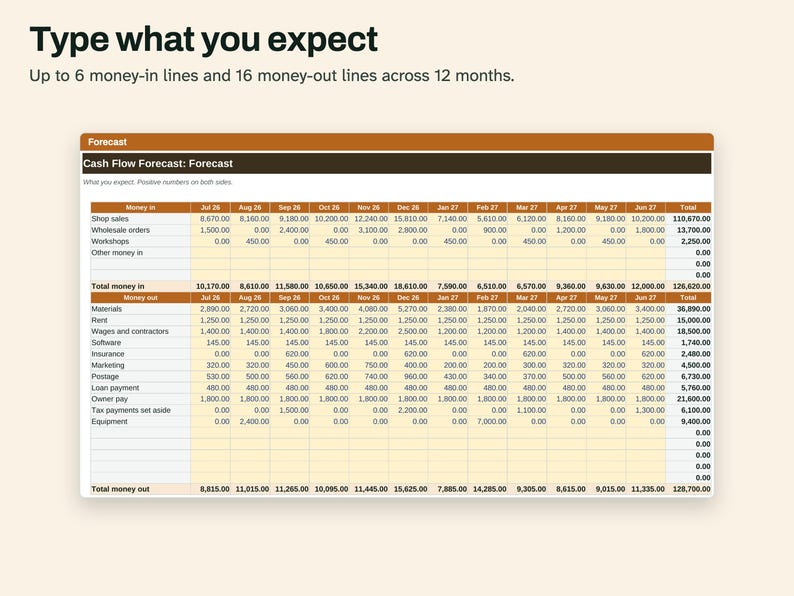
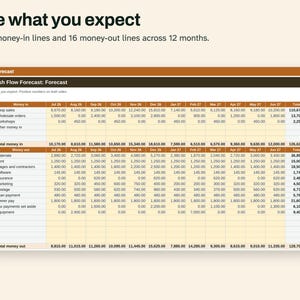
Forecast tab: up to 6 money-in lines and 16 money-out lines across 12 months.
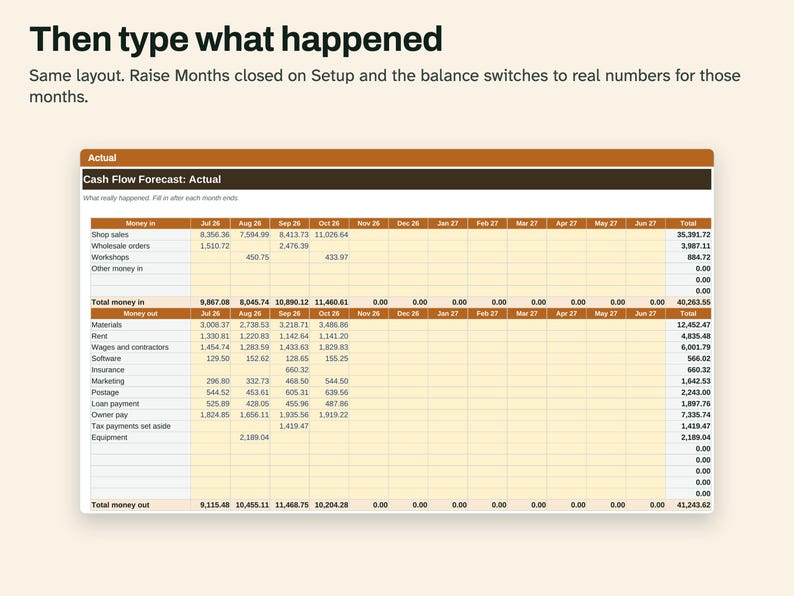
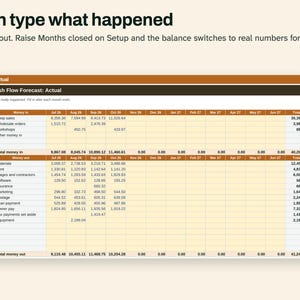
Actual tab: the same layout, filled in after each month ends.
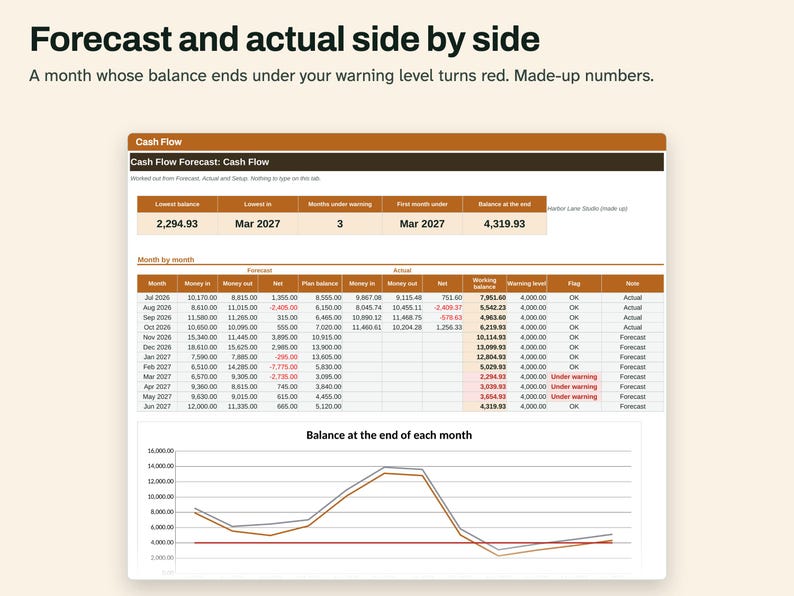
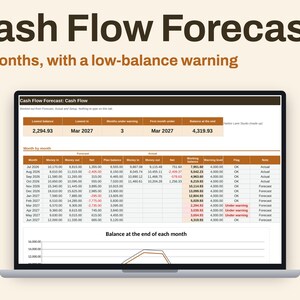
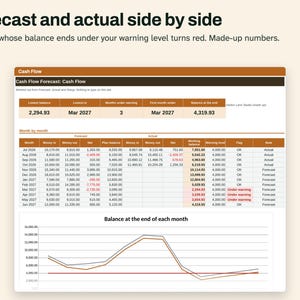
Cash Flow tab: for each month, forecast money in, money out and net, then actuals, a plan balance and a working balance. Working balance uses actuals for closed months and your forecast after that. A month that ends under your warning level turns red and reads Under warning. Cards at the top show the lowest balance, its month, the number of months under, the first month under, and the balance at the end. A line chart shows working balance, plan balance and the warning level.
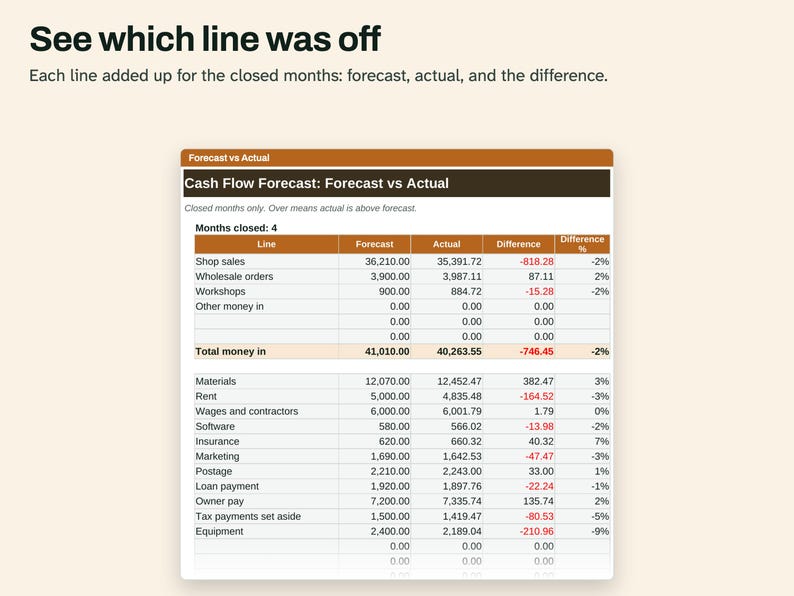
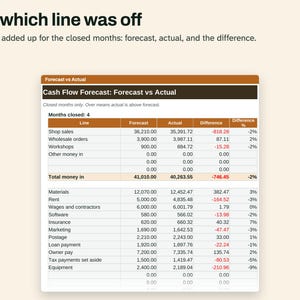
Forecast vs Actual tab: each line added up for the closed months, with the difference in money and percent.
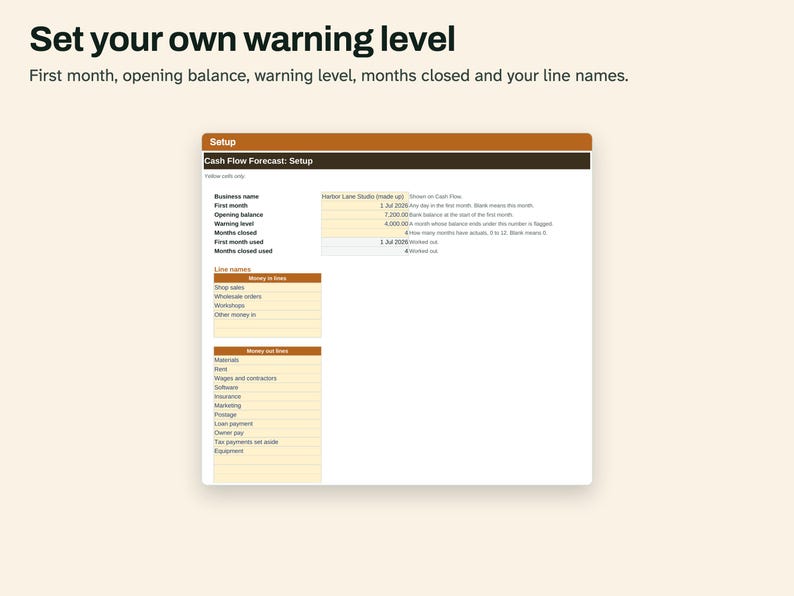
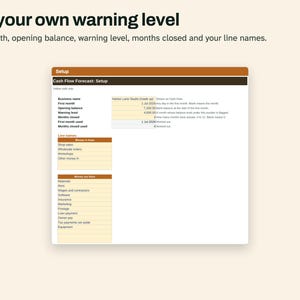
Setup tab: first month (any month), opening balance, warning level, months closed and your line names.
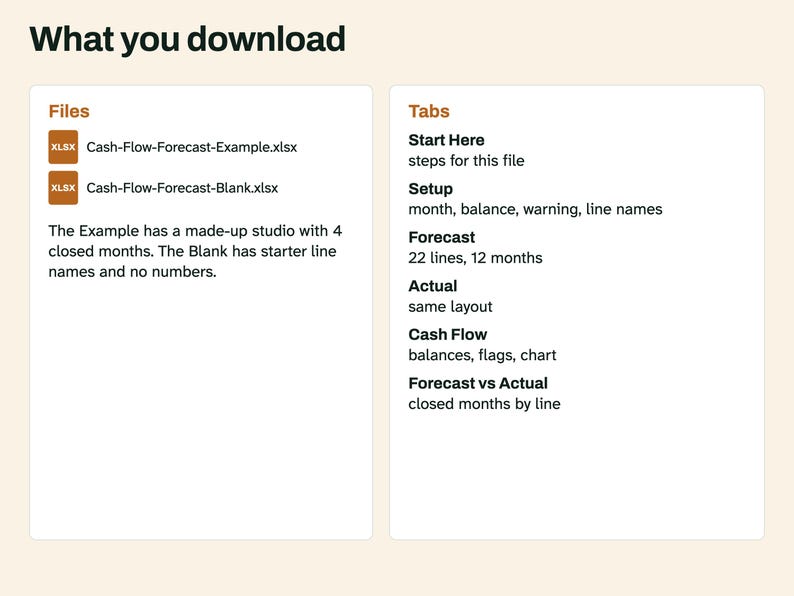
The Example file is a made-up studio with 4 months closed. The Blank file has starter line names and no numbers.
WHAT'S INCLUDED
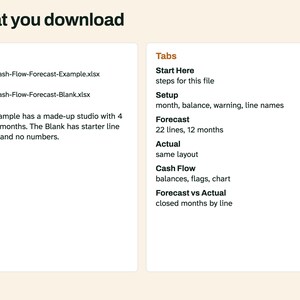
- Cash-Flow-Forecast-Example.xlsx, filled in with made-up numbers
- Cash-Flow-Forecast-Blank.xlsx, starter line names and no numbers
Tabs in each: Start Here, Setup, Forecast, Actual, Cash Flow, Forecast vs Actual. Digital download. Nothing is shipped.
COMPATIBILITY
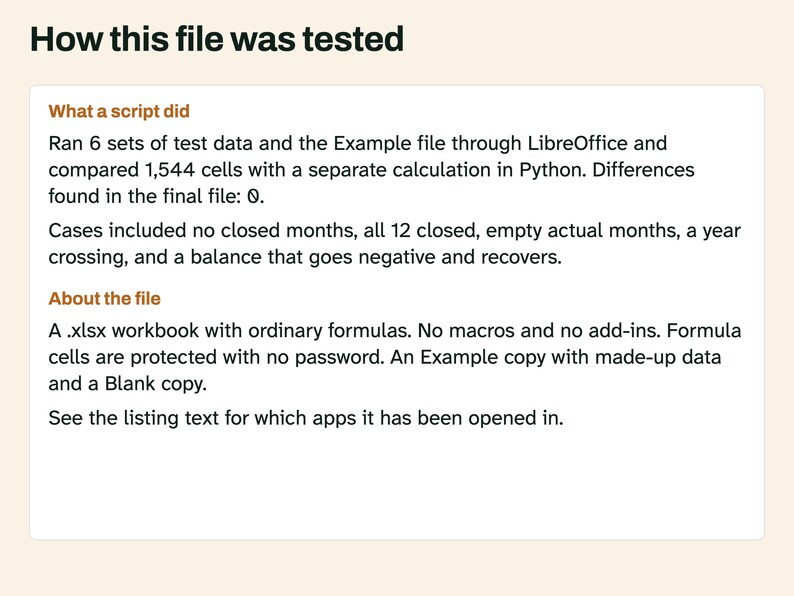
An .xlsx workbook with ordinary formulas. No macros and no add-ins. A script recalculated it in LibreOffice 26.8 and compared the results with a separate Python calculation. Another script confirmed it uses no LAMBDA, LET, XLOOKUP or spill formulas. A script also opened this file in Microsoft Excel for Mac 16.114.3 and ran a full recalculation: every cell matched the values stored in the file, with no error cells. That test did not type new data into Excel or look at the screen. Excel for Windows and Google Sheets have not been tried, and the menu steps below have not been tried in Excel or Google Sheets.
QUESTIONS AND HOW-TO
How is this different from a bookkeeping ledger? A ledger records payments after they happen. This file has one number per line per month, and most of them are your own guesses about months to come.
Do I need to enter every payment? No. You type a monthly total for each line.
What happens after 12 months? Save a new copy, set the new first month and use the last closing balance as the opening balance.
Does it predict my sales? No. It adds up what you type.
Using this file in Excel
Open the .xlsx file. If a yellow bar says Protected View, click Enable Editing.
Type only in the colored input cells. The other cells hold formulas and are locked so they don't get overwritten by accident.
The Example file has made-up entries so you can see how it fills in. Start your own work in the Blank file.
Before you type anything, use File > Save As and give the Blank file a new name. That keeps a clean copy for next time.
To change a locked cell, go to Review > Unprotect Sheet. There is no password. If you edit a formula, the totals may stop being right.
Copying this file to Google Sheets
Open Google Sheets in a browser and start a blank spreadsheet.
Go to File > Import, choose the Upload tab and select the .xlsx file.
Under Import location choose Replace spreadsheet, then click Import data.
Your copy now lives in your own Google Drive. Name it with File > Rename.
Sheets may not keep the locks from the Excel file, so type only in the colored input cells.
HOW AI WAS USED
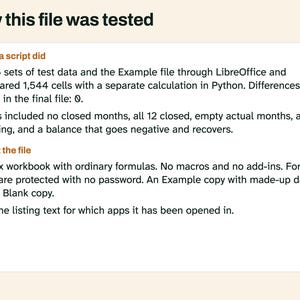
AI helped write the listing text, the how-to text and the code that builds this file. Scripts tested: every monthly total and balance, the warning flags, the cards and the Forecast vs Actual tab, on 6 sets of test data including no closed months, all 12 closed, empty actual months, a year crossing, a balance that goes negative and recovers and every cell filled. No person is claimed to have checked it unless stated here.
PLEASE NOTE
A forecast is your own guess. This file adds up what you type and gives no financial advice. License: for your personal use only. No resale or sharing of this file.
If something goes wrong with an order, we've got your back for all eligible purchases. View program terms
NowPrice:$4.49
Original Price: $5.99
25% off
Sale ends on November 16
You can only make an offer when buying a single item
Delivery
Instant download
Your files will be available to download once payment is confirmed. Here's how.
Instant download items don't accept returns, exchanges or cancellations. Please contact the seller about any problems with your order.
Seller's description
Specifications
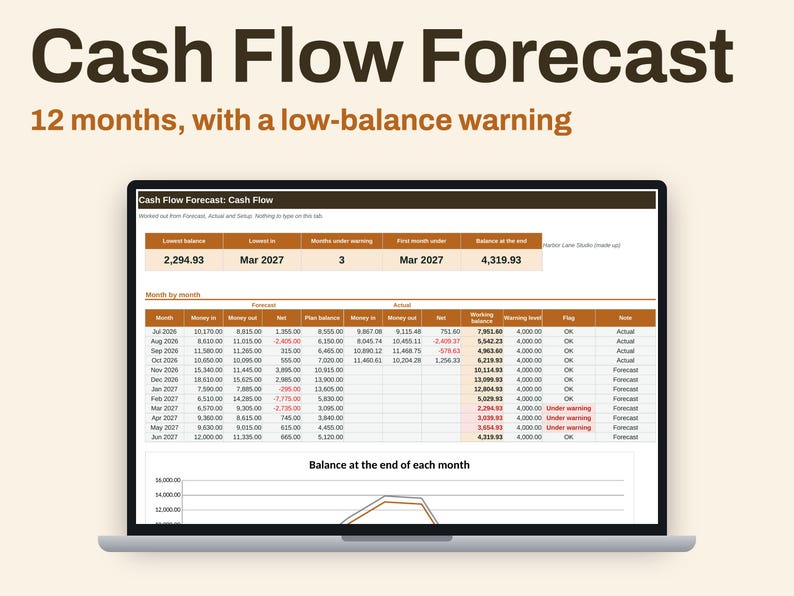
This one looks ahead instead of back. Type what you expect to come in and go out for 12 months, then type what really happened as each month ends.
Forecast tab: up to 6 money-in lines and 16 money-out lines across 12 months.
Actual tab: the same layout, filled in after each month ends.
Cash Flow tab: for each month, forecast money in, money out and net, then actuals, a plan balance and a working balance. Working balance uses actuals for closed months and your forecast after that. A month that ends under your warning level turns red and reads Under warning. Cards at the top show the lowest balance, its month, the number of months under, the first month under, and the balance at the end. A line chart shows working balance, plan balance and the warning level.
Forecast vs Actual tab: each line added up for the closed months, with the difference in money and percent.
Setup tab: first month (any month), opening balance, warning level, months closed and your line names.
The Example file is a made-up studio with 4 months closed. The Blank file has starter line names and no numbers.
WHAT'S INCLUDED
- Cash-Flow-Forecast-Example.xlsx, filled in with made-up numbers
- Cash-Flow-Forecast-Blank.xlsx, starter line names and no numbers
Tabs in each: Start Here, Setup, Forecast, Actual, Cash Flow, Forecast vs Actual. Digital download. Nothing is shipped.
COMPATIBILITY
An .xlsx workbook with ordinary formulas. No macros and no add-ins. A script recalculated it in LibreOffice 26.8 and compared the results with a separate Python calculation. Another script confirmed it uses no LAMBDA, LET, XLOOKUP or spill formulas. A script also opened this file in Microsoft Excel for Mac 16.114.3 and ran a full recalculation: every cell matched the values stored in the file, with no error cells. That test did not type new data into Excel or look at the screen. Excel for Windows and Google Sheets have not been tried, and the menu steps below have not been tried in Excel or Google Sheets.
QUESTIONS AND HOW-TO
How is this different from a bookkeeping ledger? A ledger records payments after they happen. This file has one number per line per month, and most of them are your own guesses about months to come.
Do I need to enter every payment? No. You type a monthly total for each line.
What happens after 12 months? Save a new copy, set the new first month and use the last closing balance as the opening balance.
Does it predict my sales? No. It adds up what you type.
Using this file in Excel
Open the .xlsx file. If a yellow bar says Protected View, click Enable Editing.
Type only in the colored input cells. The other cells hold formulas and are locked so they don't get overwritten by accident.
The Example file has made-up entries so you can see how it fills in. Start your own work in the Blank file.
Before you type anything, use File > Save As and give the Blank file a new name. That keeps a clean copy for next time.
To change a locked cell, go to Review > Unprotect Sheet. There is no password. If you edit a formula, the totals may stop being right.
Copying this file to Google Sheets
Open Google Sheets in a browser and start a blank spreadsheet.
Go to File > Import, choose the Upload tab and select the .xlsx file.
Under Import location choose Replace spreadsheet, then click Import data.
Your copy now lives in your own Google Drive. Name it with File > Rename.
Sheets may not keep the locks from the Excel file, so type only in the colored input cells.
HOW AI WAS USED
AI helped write the listing text, the how-to text and the code that builds this file. Scripts tested: every monthly total and balance, the warning flags, the cards and the Forecast vs Actual tab, on 6 sets of test data including no closed months, all 12 closed, empty actual months, a year crossing, a balance that goes negative and recovers and every cell filled. No person is claimed to have checked it unless stated here.
PLEASE NOTE
A forecast is your own guess. This file adds up what you type and gives no financial advice. License: for your personal use only. No resale or sharing of this file.
-
Item typeDigital download
-
Digital file type(s)2 Files
If something goes wrong with an order, we've got your back on all eligible purchases. View program terms
Meet your seller
More from this shop
-
Digital download
Silent E Worksheets Printable, Long Vowel Words and Vowel Teams, Phonics Practice With Keys
Sale Price $2.99
Original Price $3.99
-
Digital download
2027 Digital Work Planner, Linked Meeting Notes, Project Pages and Weekly Agenda for iPad
Sale Price $2.99
Original Price $3.99
-
Digital download
Wedding Planning Bundle, Budget by Guest Count, Guest List and Dated Checklist, Excel
Sale Price $7.49
Original Price $9.99
-
Digital download
Resume and Cover Letter Set for Word, Matching Headers, References Page
Sale Price $4.49
Original Price $5.99
-
Digital download
Product Pricing Calculator Spreadsheet, Materials, Labor Time and Margin for Makers, Excel
Sale Price $4.49
Original Price $5.99
-
Digital download
Consonant Blends Worksheets Printable, L R S and Final Blends, Decodable Words and Keys
Sale Price $2.99
Original Price $3.99