

Announcement
Last updated on Oct 2, 2025

Reviews
5.0
(24)
Average item review
We calculate this number using a recency-weighted average of all ratings, with a rating's value decreasing by half each year to best reflect the current experience.
Loading
-

-
-
Sandra on Jun 6, 2024
5 out of 5 starsI am now on track with Bible Study and Prayer. This clicks all the boxes if you want to study the Bible and do planning in one place, Forms are so on point. Thank God for your hard work. You have made me a better Bible student. This is a must have. I will be buying 2025 edition. I love it. Again thank you .
-
Christine on Mar 14, 2024
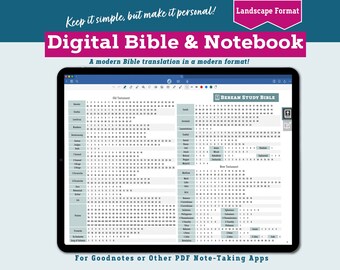
5 out of 5 starsI absolutely adore this Bible. I’d been searching for a digital Bible in a translation I liked that had plenty of space for notes and had links that allow me to easily navigate between books. This Bible does all that and more. There are links to full pages to take notes, as well as generous margins. I was previously unfamiliar with this translation, but it is excellent — easy to understand, seems (to my admittedly untrained eye) accurate at least compared to other translations I’ve used, and yet still captures the literary beauty of the Bible. This is exactly the product I wanted. I couldn’t be happier, and I spend a couple hours a day using it!
-

-
-
Catie on Jan 5, 2024
5 out of 5 starsThis planner is amazing! Theologically sound devotions, quotes, and Exercises. Beautiful imagery and color scheme. Easy to navigate.
-

Etsy buyer on Jan 3, 2024
5 out of 5 starsThis was a digital download. The user guide is very helpful in helping you understand how to navigate the planner.
-
Jen on Dec 31, 2023
5 out of 5 starsAs described. Includes good instructions for each tab which I found helpful to know all the different things it offered. Would like easier navigation to each month like a month tab but the file is exactly as described and pictures show.
-

About KeyCommandMedia
Sales
154
On Etsy since 2021
Shop members
-

CraigC
Owner, Designer
Hi, I'm Craig, the designer of the Christian Focus Planner. Our first edition released in 2022 and I've continued to update it annually since then. You can learn more about me at keycommandmedia.com, or craigcurrymusic.com
Shop policies
Last updated on Apr 14, 2023
Digital downloads
Instant downloads
Your files will be available to download once payment is confirmed. Here's how.
Payment options
Secure options
Accepts Etsy Gift Cards and Etsy Credits
Etsy keeps your payment information secure. Etsy shops never receive your credit card information.
Returns & exchanges
See item details for return and exchange eligibility.
Cancellations
Cancellations: accepted
Request a cancellation: within 2 days of purchase
Privacy policy
More information
Last updated on
Dec 17, 2025
Frequently asked questions
Is there a portrait (vertical) version of the planner?
Not at this time. The planner is designed for landscape position, but also works well in the portrait position.
Is there a Sunday start version of the planner?
Not at this time.
Can I print out the planner?
Not really. The planner is designed for digital use (and besides that, it's more than 3700 pages!)
Can I use this planner across my devices?
Possibly. This is in large part dependent on the PDF markup/note-taking app you use with your planner. Goodnotes (the app we recommend for use with this planner) can save/backup files via iCloud. You can load your marked-up planner on a desktop/laptop, iPad, and iPhone if you have Goodnotes on each of those devices. We recommend using the planner primarily on an iPad/tablet to take advantage of the handwriting/drawing features.
What's the difference between the Christian Digital PLANNER and the Spiritual Life JOURNAL?
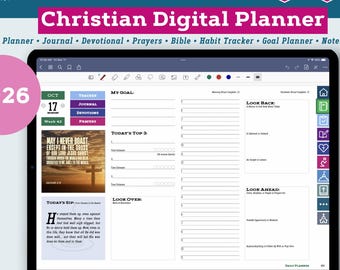
All the Christian content in both products is exactly the same. But the Christian Digital Planner has "everything"—including extensive digital planning features like linked, dated calendars, monthly, weekly and daily planning views, an extensive goal-planning and monitoring section, and a daily Habit Tracker. These sections are not included in the Spiritual Life Journal.
Does the Planner or Journal work with other PDF note-taking/annotation apps besides GoodNotes?
Yes, it should. However, I designed and tested the products using GoodNotes and I believe it gives you the best overall experience with the planner. The planner dimensions fit well, the colors match the default GoodNotes color tools, and the pages load and respond quickly in GoodNotes. These are the main reasons I recommend GoodNotes.
Can I import stickers or other page layouts?
Yes, you should be able to. This is more about which PDF app you're using than the Planner or Journal itself. You might look for specific examples/videos online of how to do this using your PDF annotation app of choice.
Can I split-screen the Planner or Journal so I can have another app open too?
Most likely. It depends on the capabilities of the apps you wish to use. I know GoodNotes allows for split-screen, I assume most PDF note apps do also. Personally, I've taken notes on my Bible reading by having the planner open in GoodNotes on one side and a Bible commentary open on a different app on the other side. Other examples would be having planner's Berean Study Bible open next to a second translation on another app using a split-screen to make a "parallel" version, or splitting the screen while you take sermon notes.