NeuralSheet

United States

0
Sales
No reviews yet
5 months
on Etsy
No reviews yet
0
sales
5 months
on Etsy
0
Sales
No reviews yet
5 months
on Etsy
No reviews yet
0
sales
5 months
on Etsy
0 Admirers

Etsy automatically translates most text on the site to your preferred language.

See in original language


Etsy automatically translates most text on the site to your preferred language.

See in original language

Yusuf Mirza Pıçakcı

Contact shop owner

Yusuf Mirza Pıçakcı

About NeuralSheet

Google Sheets templates that think for you

Sales 0
On Etsy since 2026

Google Sheets templates that think for you

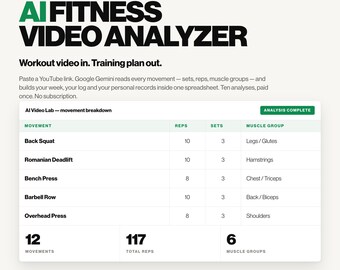
We build Google Sheets templates that watch your videos and analyze them with AI — so you don't have to.

Shop policies

Last updated on Sep 7, 2026

Digital downloads

Instant downloads
Your files will be available to download once payment is confirmed. Here's how.

Payment options

Secure options
Paypal Visa Mastercard Discover Apple Pay Klarna Giftcard
Accepts Etsy Gift Cards and Etsy Credits
Etsy keeps your payment information secure. Etsy shops never receive your credit card information.

Returns & exchanges

See item details for return and exchange eligibility.

Cancellations

Cancellations: not accepted

Please contact the seller if you have any problems with your order.

Privacy policy

More information

Last updated on Sep 7, 2026

Frequently asked questions

Do I need Google Sheets, or does this work in Microsoft Excel?

This is a Google Sheets template and the AI features need Google Sheets. The tool is built on Google Apps Script, which lives inside Sheets and has no equivalent in Excel — so in Excel the AI cannot run.

You need a free Google account, nothing more. There's no Google Workspace subscription, no paid plan and no software to install. Your download is a link: open it, click "Make a copy", and the whole tool is already inside your copy. Setup takes about three minutes, once.

What videos work, and how long can they be?

Any public YouTube link, including Shorts. Up to 30 minutes is analyzed — paste something longer and the sheet tells you it analyzed the first 30 minutes. Shorter videos give sharper results.

Two things to know. The video has to be public: private, unlisted and members-only videos can't be read. And a small number of public videos are refused by YouTube itself and can't be analyzed by anyone, on any account — if you hit one, the sheet says so and no analysis is spent. Just try another link.

What happens when I open the sheet the first time?

Google asks you to approve the tool. Because you copied the sheet rather than installing an app from the Google Workspace Marketplace, that screen lists your own email address as the developer and notes the script hasn't been through Google's Marketplace review. That's the normal path for a copied Sheets template, it's two clicks, and the illustrated Setup Guide in your download walks you through it screen by screen.

The approval covers three narrow things: working inside that one spreadsheet, connecting to our analysis server, and showing the menu and dialogs. Gmail, Drive, your other spreadsheets — not on the list, and the script can't reach them. Every line of it is readable from your own copy.

Do I pay again to redo a program?

No. An analysis is spent only when the AI reads a new video. Rebuilding the program from a video you already analyzed is free and unlimited, and your last 25 programs are saved in the HISTORY tab — reload any of them back into your plan whenever you like, at no cost. You never pay twice for a program you already have.

Do I need a Gemini API key or a Google AI account?

No. The AI runs on our servers, not on your account. You never create a Google Cloud project, never paste an API key, and never see a usage bill. You paste a YouTube link, click Analyze, and the results come back into your sheet. Your purchase includes a set number of analyses — the listing you bought says how many — and they never expire.