

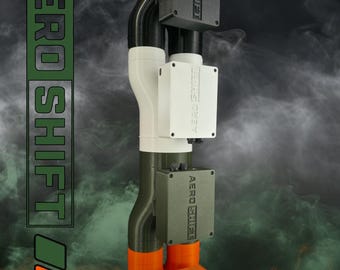

Aeroshift
AeroShift started out as a personal project with the goal of creating a powerful and intelligent wind simulator that would give the sensation of speed and cornering. Adding immersion to our sim rigs is all about getting us a little closer to the feeling of the real thing. After countless hours of design and testing, I think AeroShift has achieved that.
The Hardware Side
AeroShift utilizes a strong central air source as opposed to multiple smaller PC fan-driven air sources. Neither approach is inherently better than the other, but I believed going with a single powerful source was the best way forward for AeroShift. Having one airflow source means you do not need to wait for separate left/right fans to spool up or down to feel the sensation of cornering. AeroShift's power unit redirects the airflow instantly.
The power unit diverts the air left, right, or center in real time based on your car's in-game telemetry. The airflow is then routed through two separate, high-quality flexible hoses and exits through the custom 2-1/2" AeroShift nozzles.
The Software Side
The AeroShift software was quite the undertaking, but I could not be happier with the final product.
AeroShift works with SimHub to interact with your racing simulator. Your simulator delivers live telemetry to SimHub, which translates that data into commands for AeroShift. SimHub controls airflow speed, while AeroShift's onboard software independently handles left/right airflow direction.
Airflow speed and response curves are highly customizable through SimHub, allowing you to fine-tune how the system responds to your vehicle's speed. AeroShift's own software handles the directional airflow, while the standalone AeroShift Windows app provides additional configuration options, testing, and firmware management.
On top of that, I spent a significant amount of time tailoring the blower control software to deliver strong airflow while minimizing unnecessary noise from the motor.
The Windows App
The standalone AeroShift Windows app allows you to do a few things:
Firmware Updates
Firmware updates are entirely user-initiated. AeroShift will never interrupt your racing with an automatic update. There are additional features I would like to introduce in the future, so following AeroShift on Instagram (@aeroshiftsim) is recommended to stay informed.
Constant Airflow Mode
If you want to use AeroShift as a fan outside of your racing simulator, you can turn the blower on directly from the app and adjust the speed slider to your desired output.
Left/Right Toggle
Depending on the final installed orientation of AeroShift, you can invert left and right to match your desired feedback in-game. This gives you the flexibility to install the AeroShift power unit in whichever orientation works best for your rig.
Direction Testing
The app also allows you to test the left and right airflow directions independently. This makes it easy to verify everything is working correctly during installation without having to launch your racing simulator.
---
AeroShift came from a love of racing simulation and a desire to improve immersion. I really hope you love AeroShift as much as I do.
Thanks for reading, and "Feel the Corner!"
— Jake
---
More Information & Downloads
For more information about AeroShift, including setup instructions, software downloads, firmware updates, and compatibility information, please visit our official website:
https://aeroshiftsim.com
You'll find everything you need to get your AeroShift up and running, along with additional product information and future updates.