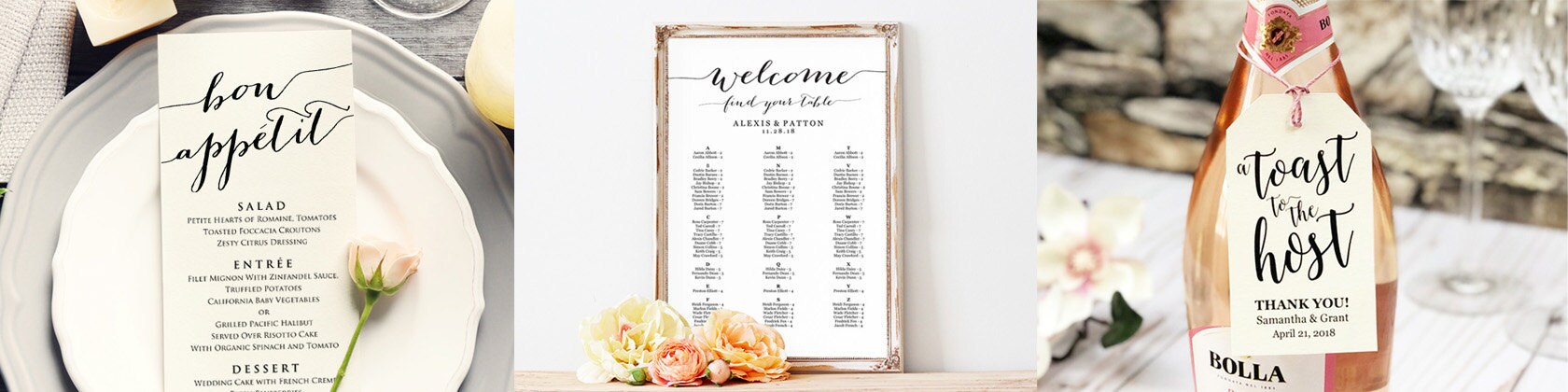







Edit & print your own personalized templates for your special events!
CrossvineDesigns is taking a short break
Loading
Reviews
4.7
(2758)
Average item review
We calculate this number using a recency-weighted average of all ratings, with a rating's value decreasing by half each year to best reflect the current experience.
Loading
-

-
Rachel on Aug 9, 2025
5 out of 5 starsTrying to edit the PDF was a little tough but it worked perfectly.
-
-

-

Karenna on Jun 2, 2025
5 out of 5 starsEasy to download and cut! I like that the hole punch for the top is already there for you.
-
-

-

Etsy buyer on Jan 6, 2025
5 out of 5 starsThese are so easy to download and, with a little ribbon, they add the perfect finishing touch to a bottle of wine!
-

-
About CrossvineDesigns
Sales
31,780
On Etsy since 2014
Etsy automatically translates most text on the site to your preferred language.
See in original language
Shop about video description
Shop members
-

Heather
Owner, Designer
Shop policies
Last updated on Jan 5, 2019
Shipping
See item details for estimated arrival times.
Customs and import taxes
For US deliveries, Etsy policy requires that import duties and fees are included in the checkout price. Non-US buyers may need to pay these fees upon delivery. You can message me to confirm how these fees will be paid for your order. I'm not responsible for any customs-related delays.
Digital downloads
Instant downloads
Your files will be available to download once payment is confirmed. Here's how.
Made-to-order downloads
I’ll create your items after purchase and you’ll receive an email when the files are ready to download. The time I need to complete these items can vary. Contact me if you have questions.
Payment options
Secure options
Accepts Etsy Gift Cards and Etsy Credits
Etsy keeps your payment information secure. Etsy shops never receive your credit card information.
Returns & exchanges
See item details for return and exchange eligibility.
Cancellations
Cancellations: not accepted
Please contact the seller if you have any problems with your order.
More information
Last updated on
May 11, 2022
Frequently asked questions
How do I download my template?
After purchasing a digital file, you’ll see a View your files link which goes to the Downloads page. Here, you can download all the files associated with your order. Or, login to your Etsy account and click "YOU" in the upper right corner of the screen. Next, select "Purchases & Reviews" to view the list of purchases you have made.
Downloads are available once your payment is confirmed. If you paid with PayPal or a credit card on Etsy, confirmation might take a few minutes.
♥ For more information about Etsy's download system, please visit: www.etsy.com/help/article/3949
What do I need to know before I purchase this template?
• You edit the highlighted areas in the template yourself & print
• Edit the templates with Adobe Acrobat Reader
• Print the templates at home or with a local copy shop
• Print as many templates as needed!
• No font downloads necessary
♥ If you have additional questions, please watch our YouTube video tutorials http://bit.ly/2rKmwSF or visit our website at www.crossvinedesigns.com
How do I edit my file?
1. Save the template to a PC or MAC computer
2. Open the template in Adobe Acrobat Reader - http://get.adobe.com/reader
3. Select the highlighted areas and type in your own wording
- To edit the font, style, size or color:
--- Mac users, press [Command-E]
--- PC users, press [Ctrl-E]
4. To duplicate pages, 'Save As' each page separately
5. Save, print, cut and/or fold along crop marks
♥ If you have additional questions, please watch our YouTube video tutorials http://bit.ly/2rKmwSF or visit our website at www.crossvinedesigns.com
Do I need any special fonts?
No font downloads are necessary. The fonts we use are part of our unique designs and as a result, their names are not shared. Use the fonts that are already installed on your computer or download free fonts from sites such as: www.fontspace.com & www.fontsquirrel.com
♥ If you have additional questions, please watch our YouTube video tutorials http://bit.ly/2rKmwSF or visit our website at www.crossvinedesigns.com
Where do I print my template?
1. Home / Office Laser (best) or Inkjet Printer
2. Fedex Kinkos, Staples, Office Depot
3. Professional Offset Printer
Print the template as many times as you want!
♥ If you have additional questions, please watch our YouTube video tutorials http://bit.ly/2rKmwSF or visit our website at www.crossvinedesigns.com
Why is a small 'plus' sign appearing on my template and/or prints?
♥ Depending on your Adobe settings, a small "plus sign" may appear after filling out an area on the template. This 'plus sign' is called the Text Overflow Indicator. Follow these steps to remove this indicator from your template.
- Open Acrobat (or Reader).
- Click menu "Edit ---> Preferences"
- Under Categories, select Forms.
- Uncheck "Show text field overflow indicator".
- Close the program.
- When you reopen the document, the + sign will not appear, and it will not be printed.
Custom and personalized orders
♥ We do not accept custom orders at this time.
Why is the font size and/or style changing when I click in the template?
The file has not been saved to a computer and you are trying to edit from a browser window. Please download/save the file to a computer first and then open the file from Adobe Reader.
♥ If you have additional questions, please watch our YouTube video tutorials http://bit.ly/2rKmwSF or visit our website at www.crossvinedesigns.com
Why aren't the editable areas displaying when I upload to websites or try to print?
The template may not display properly when the PDF template is uploaded to some websites. The PDF will need to be converted to a JPG file using the free converter Small PDF. Please follow these steps to convert PDF to a JPG and if you need any help please contact us at any time!
1. Save the finished PDF template to a PC or MAC computer
2. Open the website https://SmallPdf.com/pdf-to-jpg and drag your file to the area labeled "Drop PDF Here"
3. Select "Convert Entire Pages" and then click "Choose Option"
4. After the file is converted, the new JPG will display in the bottom left of the page. Hover over this thumbnail and click "Download"
5. The new JPG file will be downloaded to a location on your computer
How do I convert the PDF to a JPG file for use on websites such as VistaPrint, Walgreens, Staples, etc...?
The PDF will need to be converted to a JPG file using the free converter Small PDF. Please follow these steps to convert PDF to a JPG and if you need any help please contact us at any time!
1. Save the finished PDF template to a PC or MAC computer
2. Open the website https://SmallPdf.com/pdf-to-jpg and drag your file to the area labeled "Drop PDF Here"
3. Select "Convert Entire Pages" and then click "Choose Option"
4. After the file is converted, the new JPG will display in the bottom left of the page. Hover over this thumbnail and click "Download"
5. The new JPG file will be downloaded to a location on your computer
Looking for more? Find it on Etsy