

Flowstack Studio began with a simple need: creating a clearer way to organize small business.
The original system was first developed from personal working experience — organizing projects, ideas, and daily responsibilities that had become scattered across multiple tools and workflows. The goal was to build a workspace that felt minimalistic, focused, and free from clutter or distractive noise.
As the workflow evolved and proved effective in everyday use, it grew into Flowstack Studio — a collection of thoughtfully designed systems created for creators, photographers, and small business owners seeking clarity without complexity.
Flowstack Studio focuses on workflows that are minimalistic and practical — helping entrepreneurs stay organized, maintain focus, and move through their work with confidence.
The mission is simple: help entrepreneurs build flow, not overwhelm.
Featured items
All items
Reviews
-

Amanda on May 11, 2026
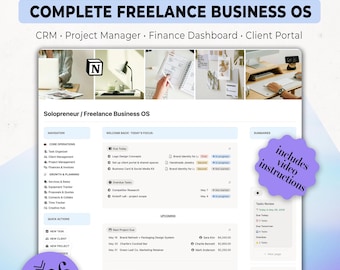
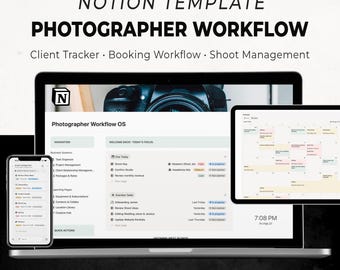
5 out of 5 starsThis workflow is exactly what I needed and exceeded my expectations. It was simple to set up and came with instructions plus a helpful video tutorial. It includes exactly what’s listed in the description. I love being able to connect clients with invoices, packages, and track where they’re at in the process — lead, booked, shooting, editing, etc. Adding tasks for each client is also incredibly helpful. The homepage is amazing because it shows overdue invoices, tasks, galleries, my daily to-do list, monthly income, upcoming shoots, and work progress. I also love how customizable everything is, especially being able to create personalized client portals, customize invoices, and add links, documents, contracts, gallery due dates, and payment deadlines all in one place. Bonus points: it works well on both my laptop and phone!
-

Anna on Apr 1, 2026
5 out of 5 starsBeen using this template for a couple of weeks. Simple, efficient, deals with all business routines.
About FlowstackStudio
Shop policies
Accepted payment methods
Returns & exchanges
More information
Frequently asked questions
How do I access my digital product after purchase?
After purchase, you’ll receive a PDF file with a link. Log in to your account through a web browser. Open the file and click the button to access your template, then duplicate it into your workspace.
Do I need Notion account to use templates?
Yes, a free Notion account is required to use templates.
Can I use this on my phone or tablet?
Yes, but it is best experienced on desktop. Some features may be limited on mobile or tablet devices.
Can I customize the template?
Absolutely. You can fully customize it to fit your workflow, branding, and needs.
Can I share or resell this template?
No. This template is for personal use only and may not be shared, reproduced, or resold.
Do you offer refunds?
Due to the digital nature of this product, refunds are not accepted. However, if you have any issues, please reach out and I’ll do my best to help.