



Welcome to Gold Grid Studio
Reviews
5.0
(3)
Average item review
We calculate this number using a recency-weighted average of all ratings, with a rating's value decreasing by half each year to best reflect the current experience.
Loading
-

Kay on Feb 21, 2026
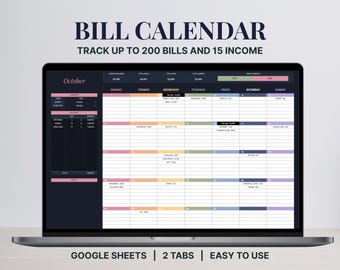
5 out of 5 starsI love that this Bill Calendar has room enough for 50 items for each category - plenty of room for all your bills and reminders. Aside from your monthly bills, you can also record those bills with irregular due dates, like annual or bi-weekly periods. The layout of the calendar is very clean and easy to use.
-

-

Tina on Feb 23, 2026
5 out of 5 starsClear, easy to understand, compact, yet everything is there. Excellent service.
About GoldGridStudio
Sales
14
On Etsy since 2025
Shop members
-

Eva Cho
Owner
Shop policies
Last updated on Sep 18, 2025
Digital downloads
Instant downloads
Your files will be available to download once payment is confirmed. Here's how.
Payment options
Secure options
Accepts Etsy Gift Cards and Etsy Credits
Etsy keeps your payment information secure. Etsy shops never receive your credit card information.
Returns & exchanges
See item details for return and exchange eligibility.
Cancellations
Cancellations: not accepted
Please contact the seller if you have any problems with your order.
More information
Last updated on
Dec 17, 2025
Frequently asked questions
Can I return or exchange my purchase?
Because our products are digital, we cannot offer returns or refunds. Once a purchase has been downloaded, you will always have access to it.
If you made a purchase by mistake, please do not download the file. We can check on our dashboard whether a file has been downloaded. Orders can only be canceled if none of the files in your purchase have been accessed.
Where can I find my digital file?
After checkout, you can access your file in two ways:
1. Email link from Etsy – Etsy will send a download link to the email address listed at checkout. If you don’t see it, please check that your order details include the correct email address.
2. Your Etsy account – Go to the Purchases & Reviews section of your account to download your files at any time.
How does a spreadsheet template work?
A spreadsheet template is a pre-formatted file that helps you get started with budgeting or planning right away. Simply download the template and start using it instantly in Google Sheets.
All of our templates are fully editable and customizable—change the text, titles, sections, colors, and fonts to suit your needs. By default, certain cells are protected to prevent accidental changes to formulas, but you can easily unprotect the sheet if you wish to adjust them.
I can’t access my spreadsheet or it opens in “View Only” mode—what should I do?
Occasionally, Google Sheets may open in view-only mode or have minor issues. Try the following:
1. In the top menu, click File → Make a copy to create your own editable version.
2. Open the spreadsheet from a desktop or laptop.
3. Ensure you have enough storage space in Google Drive.
4. Try using a different browser.
5. Verify that you are logged into your Google account.
If you’ve tried these steps and still experience issues, please reach out to us via Etsy messages—we’ll be happy to assist.