


Built for both of you, with everyone in mind.
All items
Announcement
Last updated on Nov 13, 2026
About TwofoldPlanner
Sales
0
On Etsy since 2026
Shop members
-

Twofold Planner
Owner
Shop policies
Last updated on Nov 13, 2026
Digital downloads
Instant downloads
Your files will be available to download once payment is confirmed. Here's how.
Payment options
Secure options
Accepts Etsy Gift Cards and Etsy Credits
Etsy keeps your payment information secure. Etsy shops never receive your credit card information.
Returns & exchanges
See item details for return and exchange eligibility.
Cancellations
Cancellations: not accepted
Please contact the seller if you have any problems with your order.
Privacy policy
More information
Last updated on
Nov 16, 2026
Frequently asked questions
What’s the difference between Essentials, Complete, and Complete + Signage?
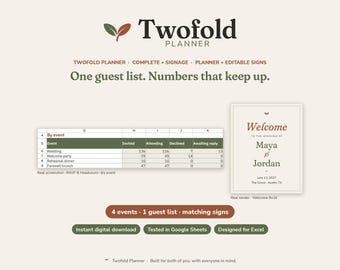
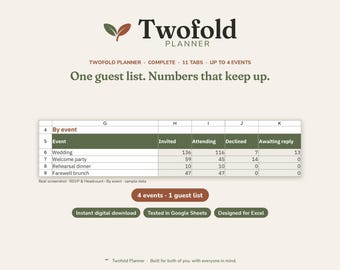
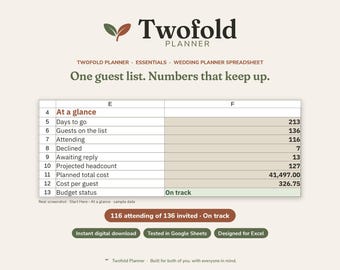
Essentials is the 7-tab planner (Start Here, Guest List, RSVP & Headcount, Meals, Seating, Budget, Checklist), including a 51-task checklist. Complete is 11 tabs, with up to 4 events, plus Guest Import, Vendors, Timeline, and This Week. Complete + Signage includes everything in Complete plus 14 editable PDF signs (welcome, seating chart, table numbers, menus, and more). Every tier includes both Excel and Google Sheets. Digital download only.
Do I get both Excel and Google Sheets?
Yes. Every tier includes both an Excel file (.xlsx) and a Google Sheets version. The Sheets copy is a clickable Make-a-copy link in your setup-guide PDF — click, don’t type.
Which versions of Excel or Google Sheets can I use?
The planners are designed for Excel and tested in Google Sheets. Excel may ask “save changes?” the first time you close the file — that is harmless. Etsy or phone previews may show blank totals until you open the file in Excel or Sheets.
How do I get my files?
These are instant digital downloads. Nothing physical ships. After checkout, download the files from your Etsy account (Purchases / Downloads). Essentials and Complete each include a setup-guide zip and the planner workbook. Complete + Signage also includes Signage.zip. Your PDF explains how to open the Excel file and how to Make-a-copy of the Sheets file.
Can I get a refund?
Because these are digital downloads, returns, exchanges and refunds aren't available once files are delivered. If a file is defective, won't open, or is missing something, message us and we'll fix or replace it for free.
Do I get free updates?
Yes. Your purchase includes free updates to the planner files for one year from the order date. How we deliver updates (Etsy message and/or a revised download) will be noted in your PDF. After one year, updates are not guaranteed.
Can I use this for clients or more than one couple?
The files are licensed for personal use by one couple / one wedding per purchase. You may not resell, redistribute, or reuse the files for clients or other couples. A separate planner or coordinator license may be offered later; until then, client reuse is not allowed.
Can I import RSVPs from Zola or a spreadsheet?
Complete and Complete + Signage include Guest Import, tested with real Zola and The Knot exports. You can also import any CSV that matches our column map (see the PDF). Essentials does not include Guest Import.
How do I edit the signs?
The signs in Complete + Signage are editable PDFs. Edit for free in Google Chrome or Firefox (tested). Adobe Acrobat Reader is also expected to work. We do not promise editing in Mac Preview or by typing on an iPhone or iPad.
Is this only for brides, or will it work for any couple?
It is built for any couple. Partner A and Partner B fields are made for every couple and never written for just the bride or just the groom. The tagline is: Built for both of you, with everyone in mind.