


Floral Pricing Calculator Spreadsheet, Florist Recipe and Stem Cost, Wedding Florist, Excel and Google Sheets
Price:CA$29.33
Here's what's eligible:
- Your order doesn't match the item description or photos
- Your item arrived damaged
- Your item arrived after the estimated arrival window
- Your item didn't arrive or was lost in the mail
You can only make an offer when buying a single item.
Highlights
Florist Pricing Calculator for Excel and Google Sheets: know what to charge for a bridal bouquet, a centerpiece, a boutonniere or a vase arrangement, and what you keep. Type your flowers by the bunch at the price you paid, your foam, tape and ribbon, your minutes to process, design and deliver, and the stems you lose, and the sheet shows your price, your profit and your profit per hour at the top. Then write the wedding quote with a deposit on one page and keep each order's profit by month.
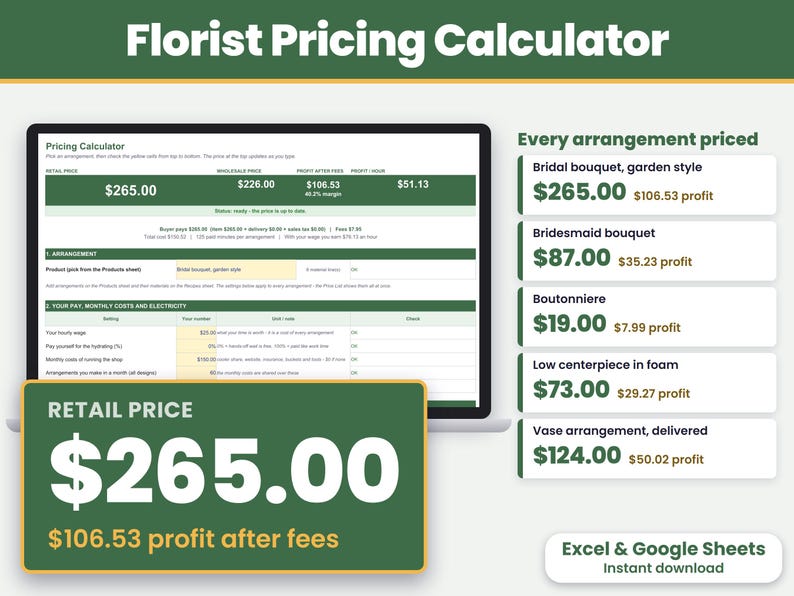
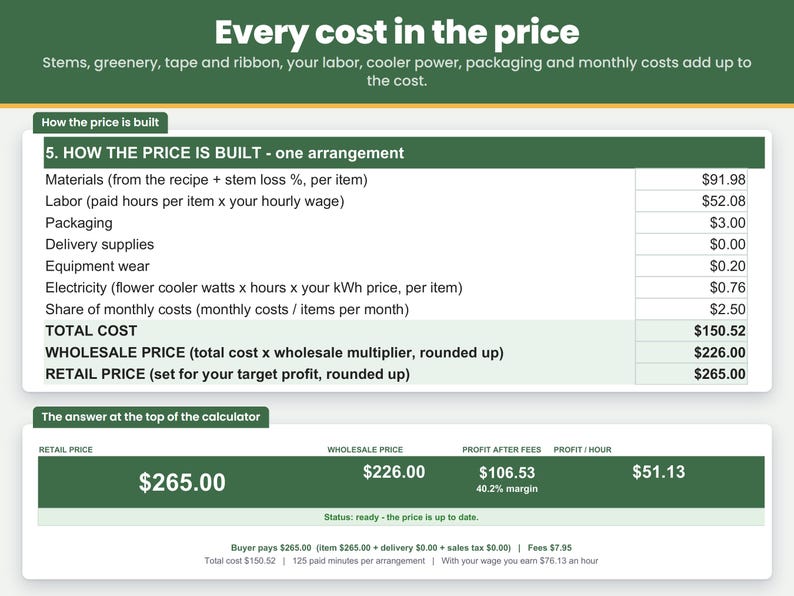
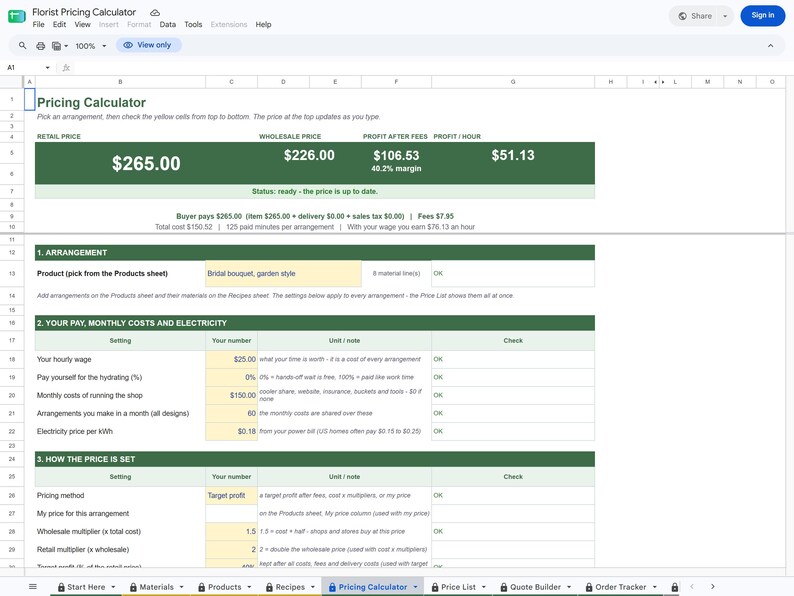
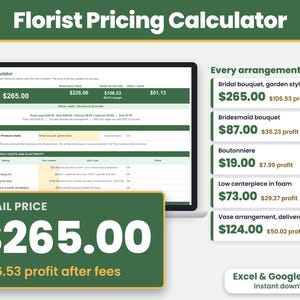
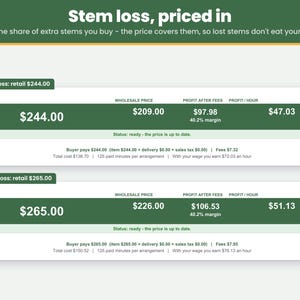
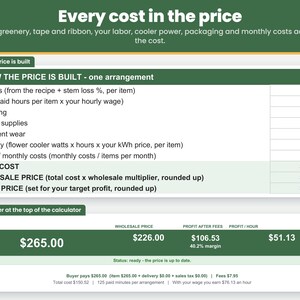
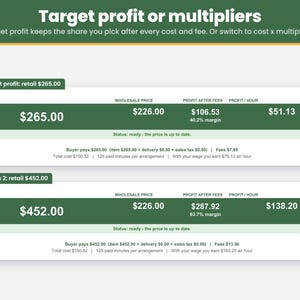
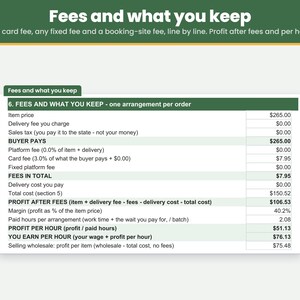
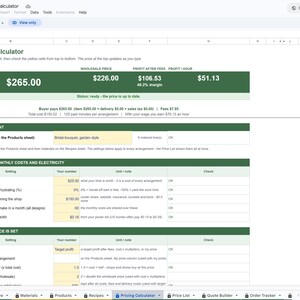
The filled-in example: a garden-style bridal bouquet costs $150.52, including $91.98 of flowers and supplies with 15% stem loss and 125 paid minutes at $25 an hour. It sells for $265.00 and keeps $106.53 after a 3% card fee. Change any number and the price updates as you type.
Made for florists and wedding and event florists in the US, from a home studio or a small shop, who sell to local couples, event planners or on Etsy. Instant download for Excel and Google Sheets on a computer.
WHAT YOU CAN DO
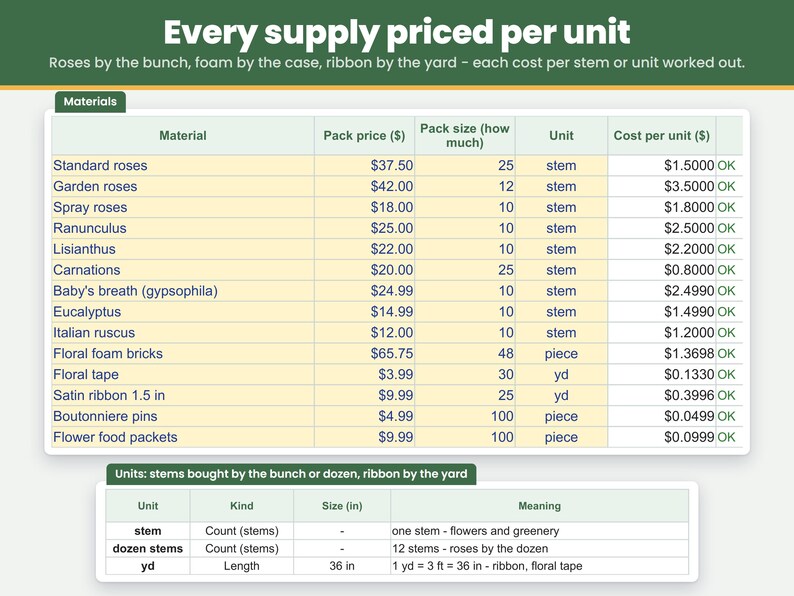
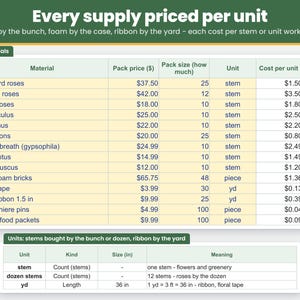
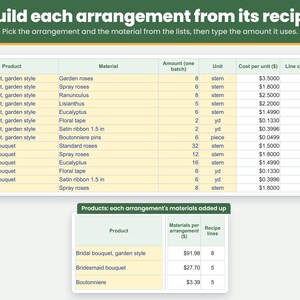
- Price every recipe by the stem: type a bunch once - the price, how many stems and "stem". A bunch of 25 roses for $37.50 becomes $1.50 a stem, 12 garden roses for $42 become $3.50 a stem, and a recipe can count roses by the stem or the dozen.
- Price a whole wedding order: type how many of an arrangement you make in one go (10 centerpieces = 10) and the stems and minutes for all of them. Every cost and the price come out per arrangement.
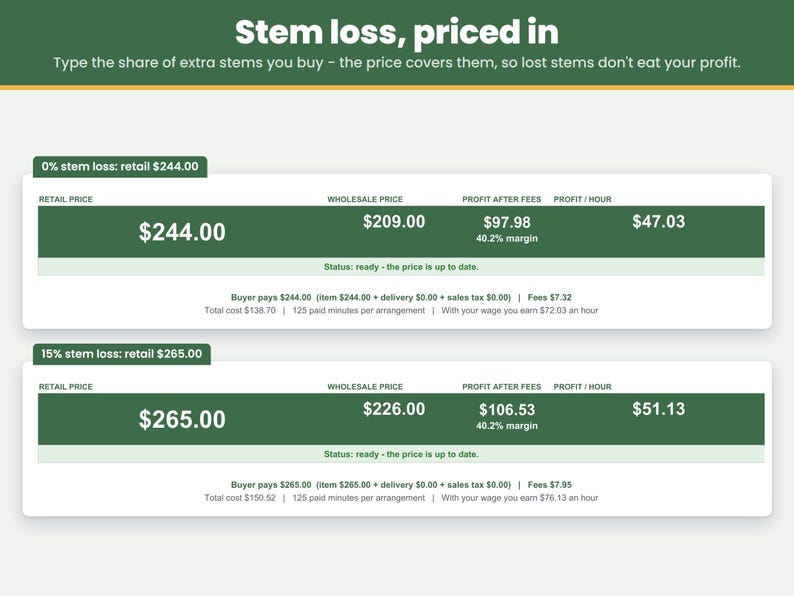
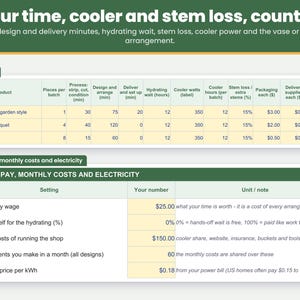
- Price in the stems you lose: type the share of extra flowers you buy to cover broken stems, early blooms and short cuts (15% = 15 extra for every 100). It is added to the materials of the arrangement.
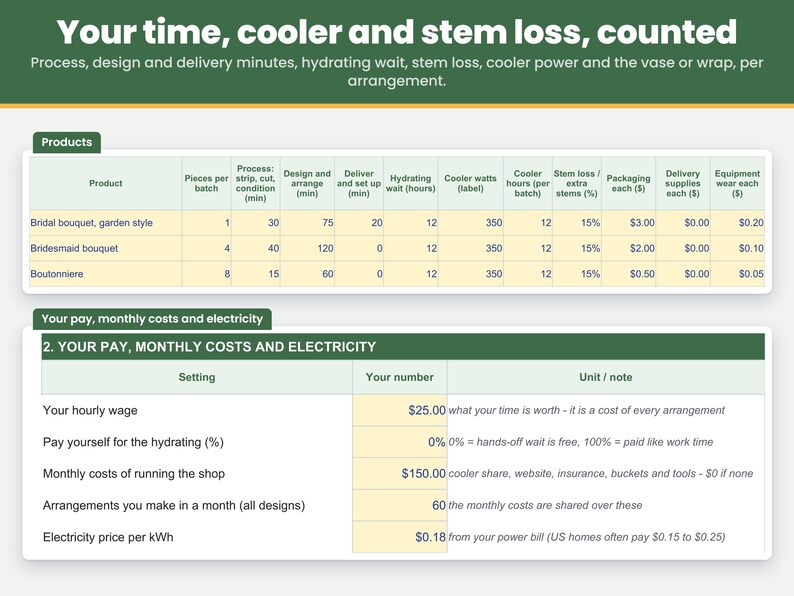
- Time in three steps: process (unpack, strip, cut, fill buckets), design (build, wrap, ribbon) and deliver, in minutes.
- Decide whether hydrating time is paid: flowers drink for hours in the cooler while you do other things. Pay yourself 0% of that wait, 100% or anything between - the price shows the difference straight away.
- Count the cooler's electricity, your equipment wear and packaging, plus a share of your monthly costs (cooler, website, insurance, buckets and tools) spread over the arrangements you make in a month.
- Charge for delivery: type the delivery you charge and what the drive costs you per arrangement. The drive stays your cost, and the profit is worked out after it.
- Pay yourself: your time x your hourly wage is part of the cost, so any profit is on top of your pay.
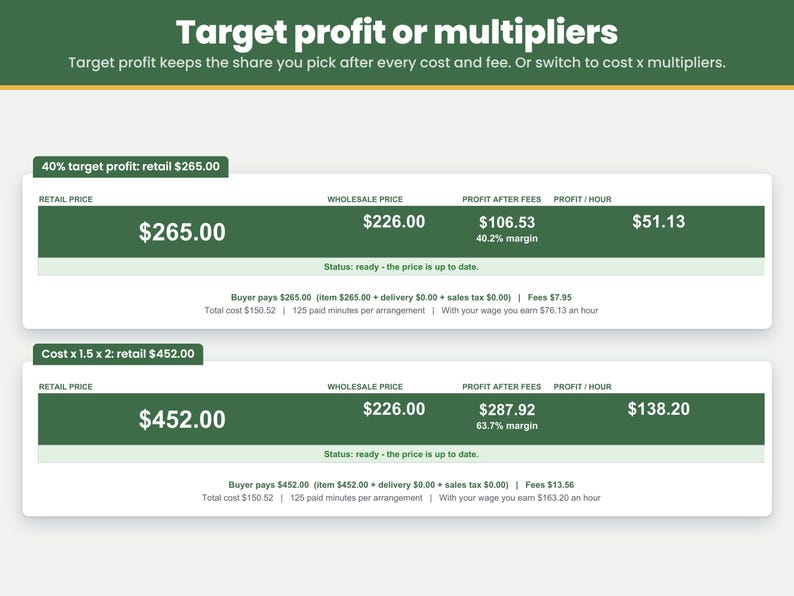
- Price three ways: for a target profit (the share of the price you want to keep, 40% to start), with cost x multipliers (cost x 1.5 = wholesale, wholesale x 2 = retail to start, both yours to change), or check the price you charge now with "My price".
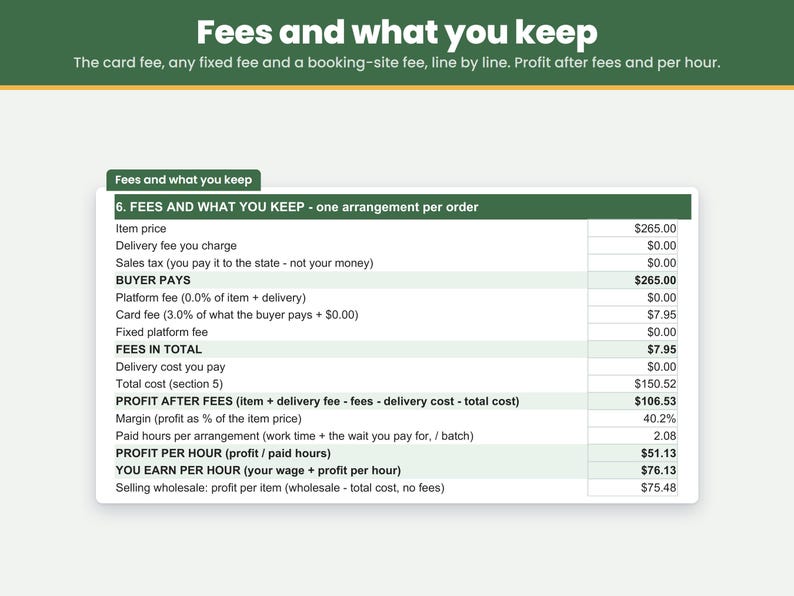
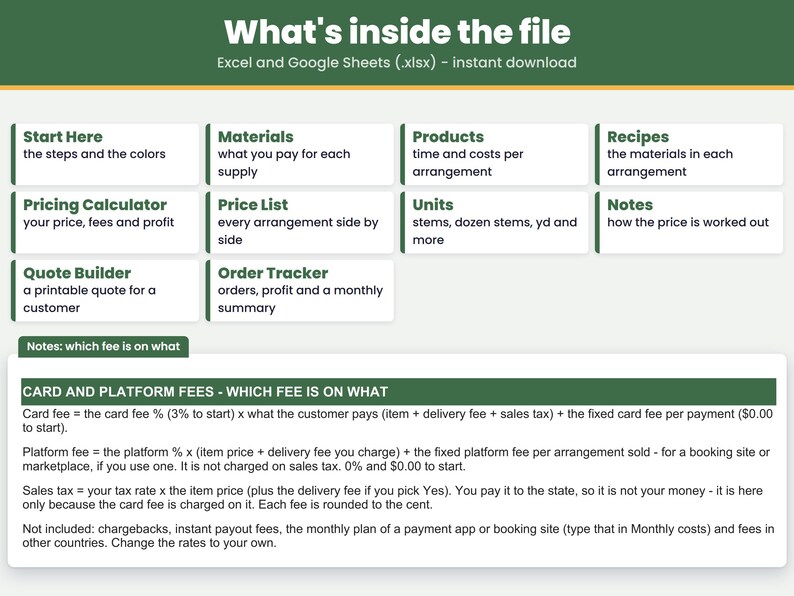
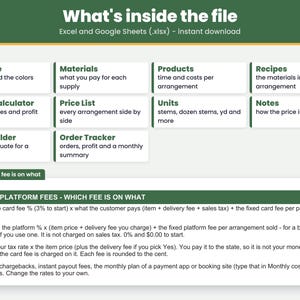
- See your fees line by line: the file starts with a 3% card fee on what the customer pays, about what card readers charge. Selling on Etsy? Type its rates in the same cells: 6.5% as the platform fee, 3% + $0.25 as the card fee and $0.20 as the fixed platform fee. Every rate is yours to change.
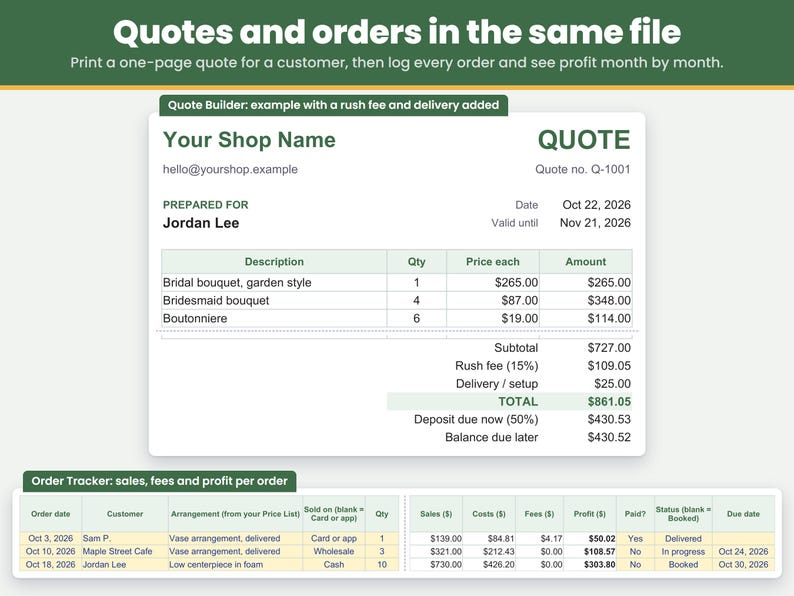
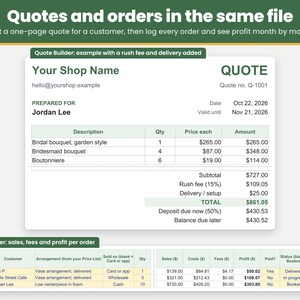
- Write a wedding quote: the Quote Builder takes your arrangements at your prices and adds a rush fee, a delivery and setup fee, a discount and a deposit (50% in the example), with the balance due later, ready to print as a one-page quote.
- Keep track of your orders: the Order Tracker lists each order with what you charged, what it cost, the fees and the profit, with a summary by month.
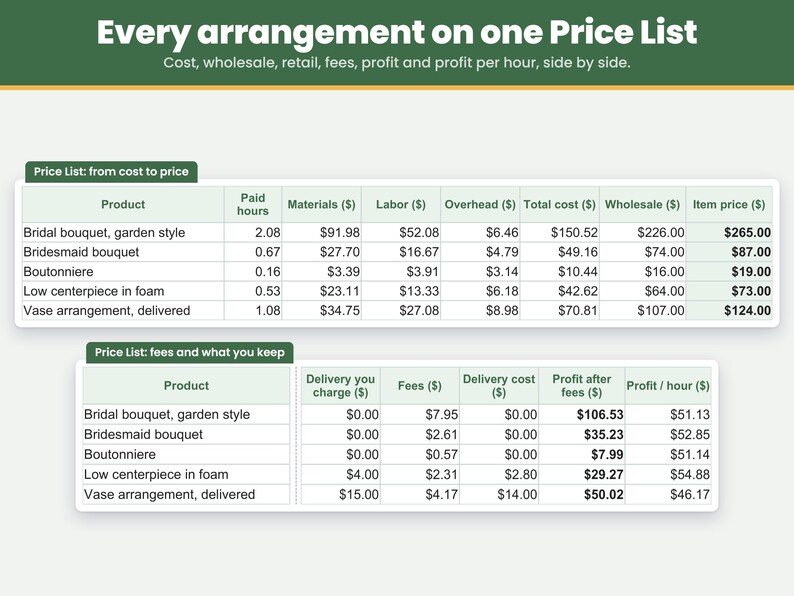
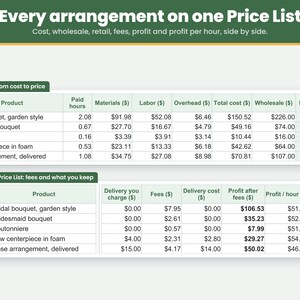
- See every arrangement on one Price List: cost, wholesale, retail, fees, delivery, profit and profit per hour, side by side.
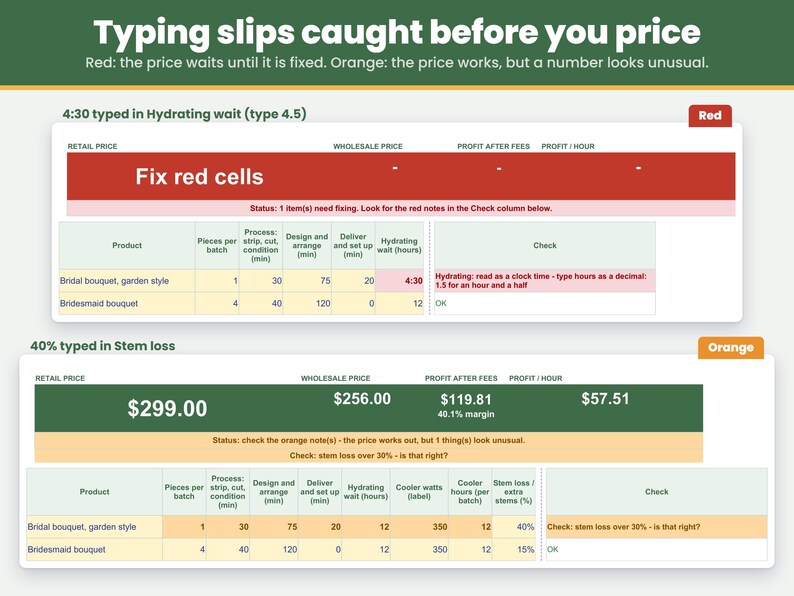
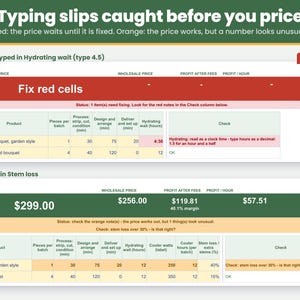
- Catch typing slips before you price: a missing number, text in a number cell, a zero bunch size, a number far too large, an hourly wage under $1 or cooler watts typed in kW (0.35 instead of 350) turns red, and the price stays hidden until it is fixed. A fraction typed as 1/2 or a clock time typed as 4:30 turns red and says what to type instead: a decimal such as 0.5 or 4.5, or whole minutes such as 30. Orange asks you to double-check: cooler watts over 2,000, a hydrating wait over 72 hours, a price over $5,000, one arrangement using more than a whole bunch, and an arrangement that loses money.
- See what each flower costs in one arrangement: the Pricing Calculator lists the biggest lines of the recipe, biggest cost first, with the stems in one arrangement - so a bunch typed as one stem stands out.
WHAT'S INCLUDED
- One spreadsheet file (.xlsx) for Excel, plus a PDF with your link to make your own copy in Google Sheets. Tabs: Start Here, Materials, Products, Recipes, Pricing Calculator, Price List, Quote Builder, Order Tracker, Units, Notes.
- Finished examples already filled in: a garden-style bridal bouquet ($265.00, $106.53 profit), a bridesmaid bouquet made four at a time ($87.00, $35.23 profit), a boutonniere made eight at a time ($19.00, $7.99 profit), a low centerpiece in foam made ten at a time ($73.00 plus $4.00 delivery, $29.27 profit each) and a delivered vase arrangement ($124.00 plus $15.00 delivery, $50.02 profit). Replace the example prices with your own.
- Room for 50 materials, 25 arrangements and 200 recipe lines, with 9 units to pick from (stem, dozen stems, yd, ft, in, m, mm, piece, dozen).
- Yellow cells are the only cells you fill in. In Excel, formula cells are locked to keep them safe from accidental edits; in your Google Sheets copy, typing over a formula shows a warning first.
HOW TO USE IT
1. Materials: type each flower and supply once - the bunch or pack price, how much is in it and the unit.
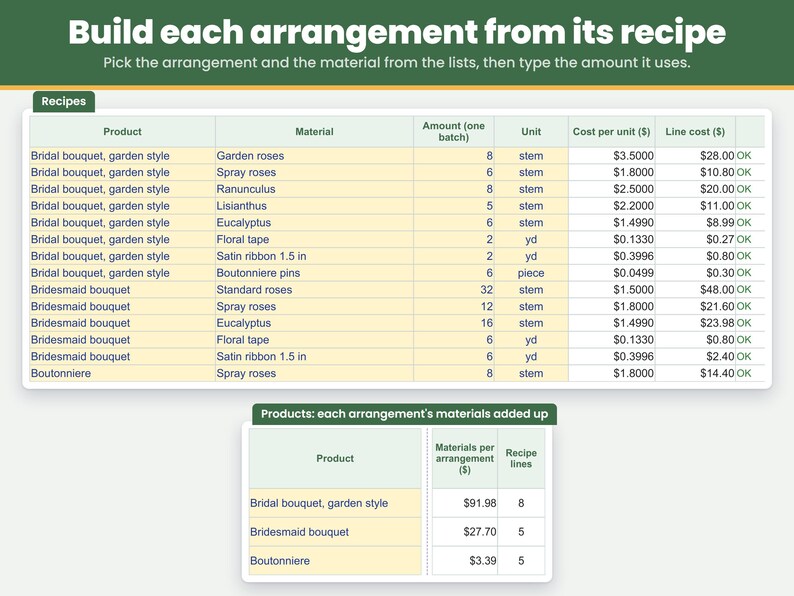
2. Products and Recipes: on Products, one row per arrangement with how many you make in one go, the minutes of each step, the hydrating wait, the cooler watts and hours, the stem loss, packaging, delivery and what the drive costs you. On Recipes, the stems and supplies for the whole batch.
3. Pricing Calculator: pick an arrangement and set your hourly wage, how much of the hydrating wait you are paid for, monthly costs, electricity price, pricing method and fees. The price, wholesale price, profit and profit per hour show at the top.
4. Quote Builder and Order Tracker: pick arrangements from your Price List to quote a wedding or to log an order you made.
FAQ
How much should I charge for a bridal bouquet?
Add up the flowers and supplies with the stems you lose, your time at an hourly wage, the cooler, packaging, a share of your monthly costs and the card fee, then set the price for the profit you want. In the example, a garden-style bridal bouquet costs $150.52 (8 garden roses, 6 spray roses, 8 ranunculus, 5 lisianthus and 6 eucalyptus with 15% stem loss, and 125 paid minutes at $25 an hour) and sells for $265.00, priced for a 40% profit and rounded up to the next dollar: $106.53 kept.
How do I work out the cost per stem from a bunch?
Type the bunch price, the stems in the bunch and "stem" on the Materials sheet. A bunch of 25 roses for $37.50 is $1.50 a stem; a recipe can then count roses by the stem or by the dozen.
How do I price wedding centerpieces?
Make a row for the centerpiece with how many you make for the wedding (10 in the example) and type the stems, foam and minutes for all of them. The example low centerpiece costs $42.62 each and sells for $73.00 each plus $4.00 delivery - $730 for ten - and keeps $29.27 each after the drive and the card fee.
How do I price in stems that break or open too early?
Type the share of extra stems you buy on the Products sheet. The extra flowers are added to the materials of the arrangement, so the price covers them. The example bouquets use 15%.
Should I charge for hydrating time?
That is your choice, and the calculator shows both. Type the hydrating hours on the Products sheet and pick how much of it you pay yourself for on the Pricing Calculator: 0% leaves it out, 100% pays it like work time.
How do I take a deposit for a wedding order?
Use the Quote Builder: pick the arrangements and how many, type the delivery and setup fee, any rush fee or discount and the deposit %. It shows the total, the deposit due now and the balance due later on a one-page quote you can print.
Does the price include card fees?
Yes. The example takes a 3% card fee off what the customer pays - $7.95 on the bridal bouquet. If you take cash, type 0%; if you sell on Etsy, type Etsy's rates. The fee cells are yours to change.
Is the price I charge now high enough?
Type it in the My price column on the Products sheet and pick "My price". You see the profit, the margin and what you earn per hour at that price, and the status line at the top turns orange if the price is below your cost or loses money.
Does it work in Google Sheets?
Yes. Your download includes a PDF with a link: click it and Google Sheets makes your own copy, no upload needed. In Google Sheets, fill only the yellow cells and type decimals such as 0.5, not fractions such as 1/2.
HOW TO DOWNLOAD
After you buy, open etsy.com in a web browser (computer recommended), go to Purchases and reviews, and click Download Files. Digital files cannot be downloaded in the Etsy app.
- Microsoft Excel: open the .xlsx file in Excel on a computer.
- Google Sheets: open the PDF in your download, click Make my copy in Google Sheets, then click Make a copy. The copy is saved in your Google Drive. A free Google account is enough. (You can also upload the .xlsx at drive.google.com: New > File upload, then right-click it > Open with > Google Sheets.)
LIMITATIONS
- Instant digital download. Nothing is shipped. No floral designs or tutorials are included - this is a pricing spreadsheet.
- Needs Microsoft Excel or Google Sheets on a computer.
- Made in Microsoft Excel and checked in Google Sheets.
- Not tested in Excel on the web, Excel for Mac, Numbers or the Google Sheets phone app.
- In Google Sheets, formula cells are not locked as they are in Excel. The copy from your link warns you before you type over a formula; an uploaded .xlsx does not, so fill only the yellow cells.
- The multipliers apply to the whole cost. Separate markups for flowers and for hard goods (such as 3.5x flowers, 2x supplies) are not built in; the target profit method prices the whole recipe.
- The stem loss share is added to the flowers and greenery only. The Recipes sheet leaves it off a material whose name has foam, tape, ribbon, pins, flower food, vase, basket, wire or wrap in it; a supply you name some other way gets the share too, so name it with one of those words or put it under packaging on Products.
- The fee cells are named for local sales (platform or booking fee, card fee, fixed platform fee), and the file starts with only a 3% card fee. Selling on Etsy or a booking site means typing its rates into those cells yourself; the file does not know any site's current rates.
- US dollars. Units convert within the same kind (stems, length, pieces); stems only match stems.
- Prices assume one arrangement per order; with several in one order, the fixed fee and the delivery are shared.
- Room for 50 materials, 25 arrangements and 200 recipe lines.
- It prices, quotes and tracks orders and profit, but it is not a wedding planner, flower order sheet or bookkeeping file.
- The Quote Builder holds up to 10 lines per quote, and the Order Tracker up to 200 orders per file.
- The Quote Builder shows prices before sales tax (its printed note says so); the Pricing Calculator shows what the buyer pays with sales tax.
- Fee rates and the sales tax rate in the file are examples. Check your own card reader, shop and local sales tax rate.
- Example flower and supply prices, stems per recipe, times, cooler watts and hours, stem loss and costs are examples. Flower prices change with the season. Replace them with your own.
- For use in your own business. Please do not resell or share the file.
- Because this is a digital download, returns and exchanges are not accepted.
Something not working, or a question? Message us on Etsy anytime - we're happy to help.
This spreadsheet was designed by CraftCostSheets and built with the help of AI tools, then checked in Microsoft Excel and Google Sheets.
Instant Download
Your files will be available to download once payment is confirmed. Here's how.
Instant download items don’t accept returns, exchanges or cancellations. Please contact the seller about any problems with your order.
Etsy Purchase Protection
Shop confidently on Etsy knowing if something goes wrong with an order, we've got your back for all eligible purchases —
see programme terms

More from this shop
Visit shop-
Digital download
Sticker Pricing Calculator Spreadsheet, Sticker Cost Per Sheet, Sticker Shop Business, Excel and Google Sheets
CA$20.53
-
Digital download
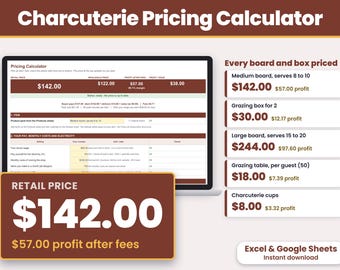
Charcuterie Pricing Calculator Spreadsheet, Grazing Table Price Per Guest, Charcuterie Business, Excel and Google Sheets
CA$23.46
-
Digital download
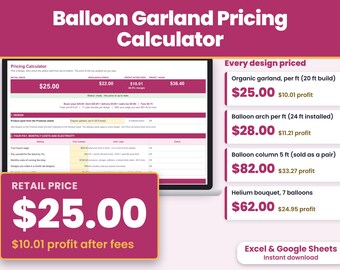
Balloon Garland Pricing Calculator Spreadsheet, Arch Price Per Foot, Balloon Business, Excel and Google Sheets
CA$29.33
-
Digital download
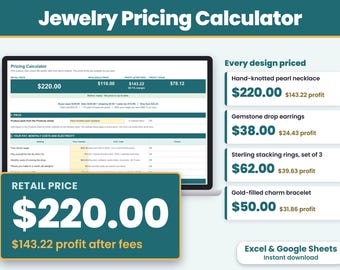
Jewelry Pricing Calculator Spreadsheet, Jewelry Price Sheet, Wholesale Retail Price, Etsy Fees, Excel and Google Sheets
CA$18.33



 Bridesmaid gifts
 Best men gifts
 Wedding gifts
 Engagement gifts